

April 18th, 2024
Developed in collaboration with the Wisconsin Land Information Association
Table of Contents
- Introduction
- Compliance Notes
- RoadCenterLine (Road Centerline) – Summary Table
- 3.1 Identification Elements
- 3.2 Relate Elements
- Not applicable
- 3.3 Address Elements
- 3.3.1 Left Address Number Prefix
- 3.3.2 Left FROM Address
- 3.3.3 Left TO Address
- 3.3.4 Right Address Number Prefix
- 3.3.5 Right FROM Address
- 3.3.6 Right TO Address
- 3.3.7 Street Name Pre Modifier
- 3.3.8 Street Name Pre Directional
- 3.3.9 Street Name Pre Type
- 3.3.10 Street Name Pre Type Separator
- 3.3.11 Street Name
- 3.3.12 Street Name Post Type
- 3.3.13 Street Name Post Directional
- 3.3.14 Street Name Post Modifier
- 3.3.15 Full Street Name
- 3.3.16 Abbreviated Full Street Name
- 3.3.17 Legacy Street Name Pre Directional
- 3.3.18 Legacy Street Name
- 3.3.19 Legacy Street Name Type
- 3.3.20 Legacy Street Name Post Directional
- 3.3.21 Postal Code Left
- 3.3.22 Postal Code Right
- 3.3.23 Postal Community Name Left
- 3.3.24 Postal Community Name Right
- 3.4 Area Elements
- 3.4.1 Country Left
- 3.4.2 Country Right
- 3.4.3 State Left (A1)
- 3.4.4 State Right (A1)
- 3.4.5 County Left (A2)
- 3.4.6 County Right (A2)
- 3.4.7 Incorporated Municipality Left (A3)
- 3.4.8 Incorporated Municipality Right (A3)
- 3.4.9 Unincorporated Community Left (A4)
- 3.4.10 Unincorporated Community Right (A4)
- 3.4.11 Neighborhood Community Left (A5)
- 3.4.12 Neighborhood Community Right (A5)
- 3.4.13 Additional Code Left
- 3.4.14 Additional Code Right
- 3.5 Functional Elements
- 3.6 Management Elements
- 3.7 9-1-1 Elements
- SiteStructureAddressPoint (Site/Structure Address Point) – Summary Table
- 4.1 Identification Elements
- 4.2 Relate Elements
- 4.3 Address Elements
- 4.3.1 Address Number Prefix
- 4.3.2 Address Number
- 4.3.3 Address Number Suffix
- 4.3.4 Complete Landmark Name
- 4.3.5 Mile Post
- 4.3.6 Building
- 4.3.7 Floor
- 4.3.8 Unit Pre Type
- 4.3.9 Unit Value
- 4.3.10 Room
- 4.3.11 Seat
- 4.3.12 Additional Location Information
- 4.3.13 Street Name Pre Modifier
- 4.3.14 Street Name Pre Directional
- 4.3.15 Street Name Pre Type
- 4.3.16 Street Name Pre Type Separator
- 4.3.17 Street Name
- 4.3.18 Street Name Post Type
- 4.3.19 Street Name Post Directional
- 4.3.20 Street Name Post Modifier
- 4.3.21 Full Street Name
- 4.3.22 Abbreviated Full Street Name
- 4.3.23 Legacy Street Name Pre Directional
- 4.3.24 Legacy Street Name
- 4.3.25 Legacy Street Name Type
- 4.3.26 Legacy Street Name Post Directional
- 4.3.27 Postal Code
- 4.3.28 ZIP Plus 4
- 4.3.29 Postal Community Name
- 4.4 Area Elements
- 4.5 Functional Elements
- 4.6 Management Elements
- 4.7 9-1-1 Elements
- PsapPolygon (PSAP Boundary) – Summary Table
- FirePolygon, PolicePolygon, EmsPolygon (Emergency Service Boundary) – Summary Table
- ProvisioningPolygon (Provisioning Boundary) – Summary Table
- 7.1 Identification Elements
- 7.2 Relate Elements
- Not applicable
- 7.3 Address Elements
- Not applicable
- 7.4 Area Elements
- Not applicable
- 7.5 Functional Elements
- Not applicable
- 7.6 Management Elements
- 7.7 9-1-1 Elements
- Schema Crosswalk Tables
- Potential Future Changes in NENA Standards Impacting this Standard
- Considerations for GIS Data Development and Maintenance
- Quality Control of Next Generation 9-1-1 GIS Data
- 11.1 Definitions of Commonly Used Quality Control Terms
- 11.2 General Quality Control
- 11.3 Boundary Quality Control
- 11.4 Site/Structure Address Point Quality Control
- 11.5 Road Centerline Quality Control
- 11.6 Site/Structure Address Point to Road Centerline Quality Control
- 11.7 Synchronization of ALI and MSAG to GIS Data
- 11.8 Quality Control Exceptions
- Parsing Street Names and Addresses into the Wisconsin Standard
- Road Centerline Recommendations and Best Practices for GIS Data Development and Maintenance
- Site/Structure Address Point Recommendations and Best Practices for GIS Data Development and Maintenance
- Items Pending Future Work
- Terminology
- References
- Appendix A | Change Log
- Appendix B | Street Name Aliases
- Street Name Alias Methodology
- StreetNameAliasTable (Street Name Aliases) – Strongly Recommended
- StreetNameAliasTable (Street Name Alias Table) – Data Element Details
- B.1 Identification Elements
- B.2 Relate Elements
- B.3 Address Elements
- B.3.1 Street Name Pre Modifier
- B.3.2 Street Name Pre Directional
- B.3.3 Street Name Pre Type
- B.3.4 Street Name Pre Type Separator
- B.3.5 Street Name
- B.3.6 Street Name Post Type
- B.3.7 Street Name Post Directional
- B.3.8 Street Name Post Modifier
- B.3.9 Full Street Name
- B.3.10 Abbreviated Full Street Name
- B.4 Area Elements
- Not Applicable
- B.5 Functional Elements
- Not Applicable
- B.6 Management Elements
- B.7 9-1-1 Elements
1 Introduction
In 2020, the Wisconsin Department of Military Affairs’ (DMA) Office of Emergency Communications (OEC), in collaboration with the 9-1-1 Subcommittee and the State Interoperability Council, continued efforts to prepare the State of Wisconsin for the implementation of Next Generation 9-1-1 (NG9-1-1). This standard and best practices document is the result of one such effort that focused on GIS data preparation for NG9-1-1. Changes to this Standard occur on a regular basis and a Change Log can be found in Appendix A.
1.1 Background
Accurate and complete GIS data is critical to the operation of an NG9-1-1 system. Locally developed GIS data will be used for routing 9-1-1 calls to the appropriate Public Safety Answering Point (PSAP) and to support the dispatch of emergency services providers. This requires the GIS data to be standardized for use in NG9-1-1.
The majority of authoritative GIS data in Wisconsin is created at the county or local level to meet local government needs, including 9-1-1 purposes. In 2017, the Wisconsin Land Information Association (WLIA) began discussing the need for statewide GIS data standards for data exchange and aggregation purposes. They began developing statewide Street Centerline and Address Point standards the following year, with an eye towards their potential use for NG9-1-1 and supporting a Wisconsin NG9-1-1 GIS data schema. Their work on developing these standards invoked valuable conversations among the Wisconsin geospatial community about NG9-1-1 GIS data needs in Wisconsin.
In 2020, the 9-1-1 Subcommittee updated the 2017 Wisconsin Statewide NG9-1-1 Plan [1], adding GIS as one of their nine primary goals: Implement Geographic Information Systems (GIS) in support of statewide NG9-1-1. The 2019 update of the State Interoperability Council’s Wisconsin Emergency Communication Strategy report [2] also identified GIS in their goals for advancing NG9-1-1: Identify and promote minimum data standards and integrity for 9-1-1 and GIS integration. To successfully implement these goals, the 9-1-1 Subcommittee and the Wisconsin DMA partnered with WLIA’s NG9-1-1 Task Force to develop this standard.
1.2 Purpose of the Wisconsin NG9-1-1 GIS Data Standard
The purpose of the Wisconsin NG9-1-1 GIS Data Standard is to establish a uniform, common data model for the required NG9-1-1 GIS layers in the State of Wisconsin. The National Emergency Number Association (NENA) sets standards for implementing and managing 911 systems, including the data used in public safety systems to support emergency response, particularly as it relates to NG9-1-1. NENA has identified the following GIS data layers as required for NG9-1-1 call routing and dispatching emergency services:
- Road Centerlines
- Site/Structure Address Points
- PSAP Boundaries
- Service Boundaries (law enforcement, fire/rescue, emergency medical services)
- Provisioning Boundaries
Data maintained locally in the Wisconsin Land Information Association (WLIA) Street Centerline Data Standard [3] or the WLIA Address Point Data Standard [4] contains many of the same data fields as this standard. Most fields in the WLIA Standards can be directly crosswalked into the Wisconsin NG9-1-1 GIS Data Standard. See Section 8, Schema Crosswalk Tables, for more detailed information for cross walking WLIA Street Centerline and WLIA Address Point data into this standard.
This document also provides recommendations and best practices for creating and maintaining the Road Centerline and Site/Structure Address Point GIS data layers to meet Wisconsin’s NG9-1-1 GIS data requirements and quality control processes for all of the required NG9-1-1 GIS data layers.
1.3 Applicability
The standard is not intended to replace any data producer’s local schema, internal data capture, or storage specifications. Rather, it is the required GIS data standard for use in NG9-1-1 functional elements and core services such as:
- Location Validation Function (LVF) to determine if a civic location is valid for call routing and dispatch before a 911 call is ever made,
- Emergency Call Routing Function (ECRF) to identify the location of a 911 call and then perform a geographic query to determine the appropriate PSAP to route the call to,
- MSAG Conversion Service (MCS) to create an MSAG record from an NG9-1-1 PIDF-LO record for backwards compatibility or to create a PIDF-LO record from an MSAG record for use in NG9-1-1,
- Geocode Service (GCS) to provide geocoding and reverse-geocoding services,
- Mapping Data Service (MDS) to display a map to the telecommunicator showing the location of an out-of-area call.
GIS data to be used in NG9-1-1 must be in this format. Some data producers may find benefits from storing their data in this structure, such as reducing incompatibilities and inconsistencies when sharing data or eliminating the need for ETL (Extract, Transform, Load) processes when providing data for NG9-1-1 purposes. However, some may choose to continue storing their data in a structure that fits their local needs.
1.4 Sources of this Standard
The Wisconsin NG9-1-1 GIS Data Standard is built upon the NENA Standard for NG9-1-1 GIS Data Model [5] and includes all required GIS data layers and their elements. This standard also incorporates some elements and data domains from the WLIA Street Centerline Data Standard [3] and the WLIA Address Point Data Standard [4]. The WLIA Standards, developed in conjunction with the Wisconsin geospatial community and the WLIA Technical Committee, provided an initial baseline standard for Street Centerline and Address Point GIS data layers that would support a Wisconsin NG9-1-1 GIS data schema.
2 Compliance Notes
The NENA Standard for NG9-1-1 GIS Data Model [5] identifies the GIS data layers necessary for NG9-1-1 and defines their required data schema and associated fields. This Wisconsin NG9-1-1 GIS Data Standard is fully compliant with the NENA Standard and includes the required Road Centerline, Site/Structure Address Point, PSAP Boundary, Emergency Service Boundary, and Provisioning Boundary GIS data layers. All fields listed in the NENA standard for these layers are included in this document as well as a few additional fields specific to the State of Wisconsin’s needs. All fields listed in this standard must be included in the GIS data layers, even if data does not exist for a field or a field is classified as Optional.
2.1 Spatial Reference
Local GIS data shall be maintained in any datum and coordinate system desired. Final GIS data must be transformed into the World Geodetic System of 1984 (WGS 1984) prior to its use in a NGCS and the conversion will be completed through the WI NG911 GIS Data Management process. All GIS data in i3 must be in this WGS84 format to support interoperability between all systems and all sites across the US, as referenced in NENA STA 010
- Geodetic parameters for WGS84 are specified by the European Petroleum Survey Group (EPSG) as follows:
- For 2-dimensional geometries the geodetic parameters are required to follow EPSG::4326
- For 3-dimensional geometries the geodetic parameters are required to follow EPSG::4979
2.2 Title Case
The standard requires that field values use title case format with the exception of the Country and State fields, which must be in uppercase. Legacy Street Name fields should preserve the case of existing data. It is understood that some end users may need the uppercase format for some applications. However, there are several methods that allow end users to convert the data to uppercase for a desired purpose. Having the data in a title case format makes it much easier to automatically convert the data if needed.
2.3 Abbreviations
NENA NG9-1-1 standards require field values to be fully spelled out to remove confusion and ambiguity. This is important when dealing with street names where abbreviations could have multiple interpretations (e.g., “W Charles Tr” could be West Charles Trail, West Charles Trace, William Charles Trail, William Charles Trace, etc.). It is understood that abbreviations can be widely used for a number of applications and some fields may need to be maintained locally in abbreviated form. The use of non-USPS abbreviations are allowed within the Legacy Street Name Type field to match the existing MSAG and ALI values (e.g., AV, TR, LA, etc.). PSAPs should strive to update the MSAG and ALI for USPS standard types as time allows. The goal in the State of Wisconsin is to follow the USPS abbreviations for the Legacy Street Name Pre Directional, Legacy Street Name Type and Legacy Street Name Post Directional; base street name should not be abbreviated. If only abbreviations are maintained locally data must be converted into the fully spelled out values before use in NG9-1-1.
The use of abbreviations in the NG9-1-1 GIS data should not be confused with what telecommunicators see on their screens or what they need to type into their systems. Consult with the NG9-1-1 Core Services Provider regarding the software translation capabilities of the data input interfaces used by the telecommunicators.
2.4 NENA Globally Unique IDs (NGUID)
In this version of the Wisconsin NG9-1-1 GIS Data Standard, the format of the NENA Globally Unique ID (NGUID) has changed. The changes make the form of these IDs match other similar IDs in i3. Like the changes in i3, this change lets a user see what kind of data the ID is from (GIS data), what layer it is from, and which organization created the data. Conversion from the Wisconsin NG9-1-1 GIS Data Standard version 1 format is straightforward: a layer-sensitive string precedes the existing data and the “@” sign is replaced with a colon. The new format allows a host name containing the agency identifier to be used after the final colon, although just the agency identifier is acceptable.
A NGUID is required for all GIS data elements. NGUIDs shall be generated and maintained within a GIS database by concatenating “urn:emergency:uid:gis:[Layer Indicator]:[Local Unique ID]:[Agency Identifier]” where the elements are defined as:
- urn:emergency:uid:gis – standardized unique prefix that defines this class of IDs associated with GIS data.
- Layer Indicator – the shorter name for the GIS data layer the feature is associated with as defined by the GIS Data Layers Registry in NENA-STA-010.3e-2021 [16]. See section 2.4.1 in this document for Layer Indicator values.
- Local Unique ID – a GIS Data Provider generated “locally assigned ID,” which can be numeric and/or text. This local ID MUST be unique within the GIS Data Provider’s dataset for all features associated with a specific Agency Identifier. It is not recommended to use the ObjectID as the Local Unique ID as the ObjectID can be changed by the software.
- Agency Identifier – a fully qualified domain name (FQDN) representing the GIS Data Provider, which is an “Agency.” Agency and Agency Identifier are as defined in NENA-STA-010.3e-2021 [16]. The domain name is obtained from any Domain Name System (DNS) registrar.
Each NGUID must be unique as an aggregated NGUID following the structure described in this section.
The combination of the Local Unique ID with the rest of the values that construct the NGUID, provides a unique NGUID when multiple GIS Data Provider submissions are aggregated. The NGUID should be stable for as long as possible, so that it supports the reporting and resolution of errors from a quality control process, including the discrepancy reporting. The consistency of the ID between submissions also assists with managing downstream data sets.
Example NGUIDs:
urn:emergency:uid:gis:RCL:{AD873541-F41C-409E-A0BE-1B0C583902A4}:co.polk.wi.us
URN – urn:emergency:uid:gis
Layer Indicator – RCL
Local Unique ID – {AD873541-F41C-409E-A0BE- 1B0C583902A4}
Agency Identifier – co.polk.wi.us
urn:emergency:uid:gis:SSAP:100373182:waukeshacounty.gov
URN – urn:emergency:uid:gis
Layer Indicator – SSAP
Local Unique ID – 100373182
Agency Identifier – waukeshacounty.gov
urn:emergency:uid:gis:Ems:55025{AD873541-F41C-409E-A0BE-1B0C583902A4}:countyofdane.com
URN – urn:emergency:uid:gis
Layer Indicator – Ems
Local Unique ID – 55025{AD873541-F41C-409E-A0BE- 1B0C583902A4}
Agency Identifier – countyofdane.com
The Local Unique ID above contains the two-digit state code (55) followed by the three-digit county code (025) prior to the unique number of the feature.
2.4.1 Layer Indicators
Name: RoadCenterLine
Layer Indicator: RCL
Name: SiteStructureAddressPoint
Layer Indicator: SSAP
Name: PsapPolygon
Layer Indicator: Psap
Name: PolicePolygon
Layer Indicator: Pol
Name: FirePolygon
Layer Indicator: Fire
Name: EmsPolygon
Layer Indicator: Ems
Name: ProvisioningPolygon
Layer Indicator: Prov
Name: StreetNameAliasTable
Layer Indicator: StrNA
2.5 Field Type
For simplicity, this standard identifies five field types (Text, Date, Short, Long, Float) that equate to the following NENA-defined field types:
P [Text] – Printable UTF 8 characters that display recognizable glyphs when printed, plus the space character, (U+0020). This explicitly supports accented characters and does not permit other blank characters such as a non breaking space or control characters such as carriage return, line feed, and escape. Indigenous characters are expressly allowed. It is up to the agency to verify with their 9 1 1 system vendor(s) that their systems support characters or pictographic glyphs for all of the indigenous languages within their service area, or for a service area from which they receive diverted or transferred emergency calls.
U [Text] – A Uniform Resource Identifier (URI) as described in Section 16, Terminology, and defined in RFC 3986 [7], and also conforming to any rules specific to the scheme (e.g., sip:, https:, etc.) of the chosen URI. Consult with the NG9-1-1 Core Services Provider for requirements.
D [Date] – Date and time. Information for a record represented as local time with offset from Coordinated Universal Time (UTC) as defined by the W3C “dateTime” datatype described in XML Schema Part 2: Datatypes Second Edition [8]. Since many GIS applications cannot currently utilize this format, local data may store the date and time in the local database date/time format but time must include seconds and may be recorded to 0.1 seconds. Local data stored in a local database date/time format will be converted to the NENA-required format prior to use in NG9-1-1.
N [Short, Long] – Non-negative Integer, consisting of whole numbers only.
F [Float] – Floating (numbers that have a decimal place). There is no defined field length of a floating number; it is system dependent. These shall be double-precision fields.
2.6 Field Width
This is the maximum number of characters a field may contain. Field width represents guidelines for interoperability. Local implementations MAY use smaller maximum widths, but their emergency call processing systems MUST be capable of managing the listed widths when handling out-of-area calls. A GIS system that allows longer widths must be used with great care as those attributes which exceed these widths may be truncated.
2.7 Inclusion
Inclusion refers to the requirement for a field to be populated in a dataset to comply with the standard. Data fields include a specification of when they may appear in a record. The database systems that are used to store a GIS typically can only support a specification of whether a field is required to be present, or it is optional. The “Required” column provides this specification. Three values may occur in this column:
Yes: The data element is required to be present in all records. It will appear as required in the database schema.
Conditional: The data field is conditional. This value alerts the reader that a business rule is specified that controls the presence of a value in the data field. It will not appear as required in the database schema. The prevailing business rule for all conditional attributes is that if an attribute value exists (e.g., if a Street Name Pre Directional such as “West” is part of the valid street name), it MUST be provided. If no value exists for the attribute (e.g., there is no Street Name Pre Directional as part of the valid street name), the data field is left unpopulated. All attributes that are governed by CLDXF PIDF-LO structure MUST follow the business rules identified in the CLDXF Standard NENA-STA-004.2-2024 [17]. If no business rule is identified, the prevailing rule will apply.
No: The data field is optional in a record. It will not appear as required in the database schema.
2.8 Domains
A domain defines the set of all valid values that are allowed in a data field. If the domain defines no values, then any value that matches the field type and description may be populated in the data field. This standard identifies a number of required domain tables (shown in italics in the Summary Tables below), some currently maintained by organizations within Wisconsin and others limited to values identified in external sources such as NENA and USPS.
If a local value exists but is not included in an identified domain, and has a business purpose for NG9-1-1 GIS, submit the value with supporting documentation to the 9-1-1 Subcommittee via email at interop@widma.gov for consideration of inclusion. The 9-1-1 Subcommittee will work with the appropriate organization to add the local values that meet the criteria for inclusion in the domains.
3 RoadCenterLine (Road Centerline) – Summary Table
3.1 Identification Elements
Element Number: 3.1.1
Element Name: NENA Globally Unique ID
Database Field Name: NGUID
Field Type: TEXT
Field Width: 254
Inclusion: Yes
Domain:
Reference Standard: NENA
3.2 Relate Elements
3.3 Address Elements
Element Number: 3.3.1
Element Name: Left Address Number Prefix
Database Field Name: AdNumPre_L
Field Type: TEXT
Field Width: 15
Inclusion: Conditional
Domain:
Reference Standard: NENA, WLIA
Element Number: 3.3.2
Element Name: Left FROM Address
Database Field Name: FromAddr_L
Field Type: LONG
Field Width: 6
Inclusion: Yes
Domain: Whole numbers from 0 to 999999
Reference Standard: NENA, WLIA
Element Number: 3.3.3
Element Name: Left TO Address
Database Field Name: ToAddr_L
Field Type: LONG
Field Width: 6
Inclusion: Yes
Domain: Whole numbers from 0 to 999999
Reference Standard: NENA, WLIA
Element Number: 3.3.4
Element Name: Right Address Number Prefix
Database Field Name: AdNumPre_R
Field Type: TEXT
Field Width: 15
Inclusion: Conditional
Domain:
Reference Standard: NENA, WLIA
Element Number: 3.3.5
Element Name: Right FROM Address
Database Field Name: FromAddr_R
Field Type: LONG
Field Width: 6
Inclusion: Yes
Domain: Whole numbers from 0 to 999999
Reference Standard: NENA, WLIA
Element Number: 3.3.6
Element Name: Right TO Address
Database Field Name: ToAddr_R
Field Type: LONG
Field Width: 6
Inclusion: Yes
Domain: Whole numbers from 0 to 999999
Reference Standard: NENA, WLIA
Element Number: 3.3.7
Element Name: Street Name Pre Modifier
Database Field Name: St_PreMod
Field Type: TEXT
Field Width: 15
Inclusion: Conditional
Domain:
Reference Standard: NENA, WLIA
Element Number: 3.3.8
Element Name: Street Name Pre Directional
Database Field Name: St_PreDir
Field Type: TEXT
Field Width: 10
Inclusion: Conditional
Domain: WLIA DirectionDomain
Reference Standard: NENA, WLIA
Element Number: 3.3.9
Element Name: Street Name Pre Type
Database Field Name: St_PreType
Field Type: TEXT
Field Width: 50
Inclusion: Conditional
Domain: NENA Street Name Pre Types and Street Name Post Types Registry
Reference Standard: NENA, WLIA
Element Number: 3.3.10
Element Name: Street Name Pre Type Separator
Database Field Name: St_PreSep
Field Type: TEXT
Field Width: 20
Inclusion: Conditional
Domain: NENA Street Name Pre Type Separators Registry
Reference Standard: NENA, WLIA
Element Number: 3.3.11
Element Name: Street Name
Database Field Name: St_Name
Field Type: TEXT
Field Width: 254
Inclusion: Yes
Domain:
Reference Standard: NENA, WLIA
Element Number: 3.3.12
Element Name: Street Name Post Type
Database Field Name: St_PosTyp
Field Type: TEXT
Field Width: 50
Inclusion: Conditional
Domain: NENA Street Name Pre Types and Street Name Post Types Registry
Reference Standard: NENA, WLIA
Element Number: 3.3.13
Element Name: Street Name Post Directional
Database Field Name: St_PosDir
Field Type: TEXT
Field Width: 50
Inclusion: Conditional
Domain: WLIA DirectionDomain
Reference Standard: NENA, WLIA
Element Number: 3.3.14
Element Name: Street Name Post Modifier
Database Field Name: St_PosMod
Field Type: TEXT
Field Width: 10
Inclusion: Conditional
Domain:
Reference Standard: NENA, WLIA
Element Number: 3.3.15
Element Name: Full Street Name
Database Field Name: FullStNm
Field Type: TEXT
Field Width: 254
Inclusion: Yes
Domain:
Reference Standard: WLIA
Element Number: 3.3.16
Element Name: Abbreviated Full Street Name
Database Field Name: abFullStNm
Field Type: TEXT
Field Width: 175
Inclusion: No
Domain:
Reference Standard: WLIA
Element Number: 3.3.17
Element Name: Legacy Street Name Pre Directional
Database Field Name: LSt_PreDir
Field Type: TEXT
Field Width: 2
Inclusion: Conditional
Domain: WLIA abvDirectionDomain
Reference Standard: NENA
Element Number: 3.3.18
Element Name: Legacy Street Name
Database Field Name: LSt_Name
Field Type: TEXT
Field Width: 75
Inclusion: Conditional
Domain:
Reference Standard: NENA, WLIA
Element Number: 3.3.19
Element Name: Legacy Street Name Type
Database Field Name: LSt_Type
Field Type: TEXT
Field Width: 4
Inclusion: Conditional
Domain: PSAP MSAG; USPS Publication 28, Appendix C1
Reference Standard: NENA
Element Number: 3.3.20
Element Name: Legacy Street Name Post Directional
Database Field Name: LSt_PosDir
Field Type: TEXT
Field Width: 2
Inclusion: Conditional
Domain: WLIA abvDirectionDomain
Reference Standard: NENA
Element Number: 3.3.21
Element Name: Postal Code Left
Database Field Name: PostCode_L
Field Type: TEXT
Field Width: 7
Inclusion: No
Domain: USPS City State File Product
Reference Standard: USPS, NENA, WLIA
Element Number: 3.3.22
Element Name: Postal Code Right
Database Field Name: PostCode_R
Field Type: TEXT
Field Width: 7
Inclusion: No
Domain: USPS City State File Product
Reference Standard: USPS, NENA, WLIA
Element Number: 3.3.23
Element Name: Postal Community Name Left
Database Field Name: PostComm_L
Field Type: TEXT
Field Width: 40
Inclusion: No
Domain: USPS City State File Product
Reference Standard: USPS, NENA, WLIA
Element Number: 3.3.24
Element Name: Postal Community Name Right
Database Field Name: PostComm_R
Field Type: TEXT
Field Width: 40
Inclusion: No
Domain: USPS City State File Product
Reference Standard: USPS, NENA, WLIA
3.4 Area Elements
Element Number: 3.4.1
Element Name: Country Left
Database Field Name: Country_L
Field Type: TEXT
Field Width: 2
Inclusion: Yes
Domain: ISO 3166-1 alpha-2 codes
Reference Standard: NENA
Element Number: 3.4.2
Element Name: Country Right
Database Field Name: Country_R
Field Type: TEXT
Field Width: 2
Inclusion: Yes
Domain: ISO 3166-1 alpha-2 codes
Reference Standard: NENA
Element Number: 3.4.3
Element Name: State Left (A1)
Database Field Name: State_L
Field Type: TEXT
Field Width: 2
Inclusion: Yes
Domain: WLIA FIPSStateDomain
Reference Standard: US Census, NENA, WLIA
Element Number: 3.4.4
Element Name: State Right (A1)
Database Field Name: State_R
Field Type: TEXT
Field Width: 2
Inclusion: Yes
Domain: WLIA FIPSStateDomain
Reference Standard: US Census, NENA, WLIA
Element Number: 3.4.5
Element Name: County Left (A2)
Database Field Name: County_L
Field Type: TEXT
Field Width: 100
Inclusion: Yes
Domain: NG911CountyDomain
Reference Standard: US Census, NENA, WLIA
Element Number: 3.4.6
Element Name: County Right (A2)
Database Field Name: County_R
Field Type: TEXT
Field Width: 100
Inclusion: Yes
Domain: NG911CountyDomain
Reference Standard: US Census, NENA, WLIA
Element Number: 3.4.7
Element Name: Incorporated Municipality Left (A3)
Database Field Name: IncMuni_L
Field Type: TEXT
Field Width: 100
Inclusion: Yes
Domain: WLIA FIPSMunicipalityDomain
Reference Standard: NENA, WLIA
Element Number: 3.4.8
Element Name: Incorporated Municipality Right (A3)
Database Field Name: IncMuni_R
Field Type: TEXT
Field Width: 100
Inclusion: Yes
Domain: WLIA FIPSMunicipalityDomain
Reference Standard: NENA, WLIA
Element Number: 3.4.9
Element Name: Unincorporated Community Left (A4)
Database Field Name: UnincCom_L
Field Type: TEXT
Field Width: 100
Inclusion: No
Domain:
Reference Standard: NENA
Element Number: 3.4.10
Element Name: Unincorporated Community Right (A4)
Database Field Name: UnincCom_R
Field Type: TEXT
Field Width: 100
Inclusion: No
Domain:
Reference Standard: NENA
Element Number: 3.4.11
Element Name: Neighborhood Community Left (A5)
Database Field Name: NbrhdCom_L
Field Type: TEXT
Field Width: 100
Inclusion: No
Domain:
Reference Standard: NENA
Element Number: 3.4.12
Element Name: Neighborhood Community Right (A5)
Database Field Name: NbrhdCom_R
Field Type: TEXT
Field Width: 100
Inclusion: No
Domain:
Reference Standard: NENA
Element Number: 3.4.13
Element Name: Additional Code Left
Database Field Name: AddCode_L
Field Type: TEXT
Field Width: 6
Inclusion: No
Domain:
Reference Standard: NENA
Element Number: 3.4.14
Element Name: Additional Code Right
Database Field Name: AddCode_R
Field Type: TEXT
Field Width: 6
Inclusion: No
Domain:
Reference Standard: NENA
3.5 Functional Elements
Element Number: 3.5.1
Element Name: One-Way
Database Field Name: OneWay
Field Type: TEXT
Field Width: 2
Inclusion: No
Domain: WLIA OneWayDomain
Reference Standard: NENA, WLIA
Element Number: 3.5.2
Element Name: Speed Limit
Database Field Name: SpeedLimit
Field Type: SHORT
Field Width: 3
Inclusion: No
Domain: WLIA SpeedLimitDomain
Reference Standard: NENA, WLIA
Element Number: 3.5.3
Element Name: Road Class
Database Field Name: RoadClass
Field Type: TEXT
Field Width: 24
Inclusion: No
Domain:
Reference Standard: NENA, WLIA
Element Number: 3.5.4
Element Name: From Elevation
Database Field Name: FrElev
Field Type: SHORT
Field Width:
Inclusion: Yes
Domain: WLIA ElevationDomain
Reference Standard: WLIA
Element Number: 3.5.5
Element Name: To Elevation
Database Field Name: ToElev
Field Type: SHORT
Field Width:
Inclusion: Yes
Domain: WLIA ElevationDomain
Reference Standard: WLIA
3.6 Management Elements
Element Number: 3.6.1
Element Name: Date Updated
Database Field Name: DateUpdate
Field Type: DATE
Field Width:
Inclusion: Yes
Domain:
Reference Standard: NENA
Element Number: 3.6.2
Element Name: Effective Date
Database Field Name: Effective
Field Type: DATE
Field Width:
Inclusion: No
Domain:
Reference Standard: NENA
Element Number: 3.6.3
Element Name: Expiration Date
Database Field Name: Expire
Field Type: DATE
Field Width:
Inclusion: No
Domain:
Reference Standard: NENA
3.7 9-1-1 Elements
Element Number: 3.7.1
Element Name: Discrepancy Agency ID
Database Field Name: DiscrpAgID
Field Type: TEXT
Field Width: 100
Inclusion: Yes
Domain:
Reference Standard: NENA
Element Number: 3.7.2
Element Name: Parity Left
Database Field Name: Parity_L
Field Type: TEXT
Field Width: 1
Inclusion: Yes
Domain: O, E, B, Z
Reference Standard: NENA
Element Number: 3.7.3
Element Name: Parity Right
Database Field Name: Parity_R
Field Type: TEXT
Field Width: 1
Inclusion: Yes
Domain: O, E, B, Z
Reference Standard: NENA
Element Number: 3.7.4
Element Name: ESN Left
Database Field Name: ESN_L
Field Type: TEXT
Field Width: 5
Inclusion: Conditional
Domain: Characters from 000 to 99999
Reference Standard: NENA
Element Number: 3.7.5
Element Name: ESN Right
Database Field Name: ESN_R
Field Type: TEXT
Field Width: 5
Inclusion: Conditional
Domain: Characters from 000 to 99999
Reference Standard: NENA
Element Number: 3.7.6
Element Name: MSAG Community Name Left
Database Field Name: MSAGComm_L
Field Type: TEXT
Field Width: 30
Inclusion: Conditional
Domain:
Reference Standard: NENA
Element Number: 3.7.7
Element Name: MSAG Community Name Right
Database Field Name: MSAGComm_R
Field Type: TEXT
Field Width: 30
Inclusion: Conditional
Domain:
Reference Standard: NENA
Element Number: 3.7.8
Element Name: Validation Left
Database Field Name: Valid_L
Field Type: TEXT
Field Width: 1
Inclusion: No
Domain: WLIA YesNoDomain
Reference Standard: NENA
Element Number: 3.7.9
Element Name: Validation Right
Database Field Name: Valid_R
Field Type: TEXT
Field Width: 1
Inclusion: No
Domain: WLIA YesNoDomain
Reference Standard: NENA
Element Number: 3.7.10
Element Name: Exception
Database Field Name: Exception
Field Type: TEXT
Field Width: 75
Inclusion: Conditional
Domain:
Reference Standard: GMSP, NGCS
RoadCenterLine (Road Centerline) – Data Element Details
3.1 Identification Elements
3.1.1 NENA Globally Unique ID
Database Field Name: NGUID
Data Type: TEXT
Inclusion: Yes
Width: 254
Domain:
Examples:
urn:emergency:uid:gis:RCL:47824393:co.polk.wi.us, urn:emergency:uid:gis:RCL:587392034:waukeshacounty.gov, urn:emergency:uid:gis:RCL:90a942e1bc7f4g1h94c5acaadv24r89h:countyofdane.com
Description:
The NENA Globally Unique ID (Primary Key) for each record in a GIS data layer. Each record in the GIS data layer MUST have a globally unique ID. When coalescing data from other local 9-1-1 Authorities into the ECRF and LVF, this unique ID MUST continue to have only one occurrence. Additional detail on how to construct the NGUID can be found in section 2.4 NENA Globally Unique IDs (NGUID).
3.2 Relate Elements
3.3 Address Elements
3.3.1 Left Address Number Prefix
Database Field Name: AdNumPre_L
Data Type: TEXT
Inclusion: Conditional
Width: 15
Domain:
Examples:
N123, W123, N, W, S123W
Description:
An extension of the Left FROM Address or Left TO Address on the left side of the road segment consisting of the non-integer portion of the identifier for a parcel, house, building or other feature which precedes the address number, as defined by the official Addressing Authority for the given jurisdiction. Used commonly in Wisconsin to include the directional to an address number (e.g., N2554 Johnson Street). Also used in a few counties where grid address numbers exist to include the locally-defined grid cell reference. In Wisconsin, this is typically only the two directionals and the number between them (e.g., W180N8085 Town Hall Road).
3.3.2 Left FROM Address
Database Field Name: FromAddr_L
Data Type: LONG
Inclusion: Yes
Width: 6
Domain: Whole numbers from 0 to 999999
Examples:
123
Description:
The beginning value of the address range on the left side of the road segment at the FROM node (begin point). This value can be higher than the Left TO Address.
East Main Street
Left FROM Address: 2
Left TO Address: 98
Right FROM Address: 1
Right TO Address: 99
West Main Street
Left FROM Address: 1
Left TO Address: 99
Right FROM Address: 2
Right TO Address: 98
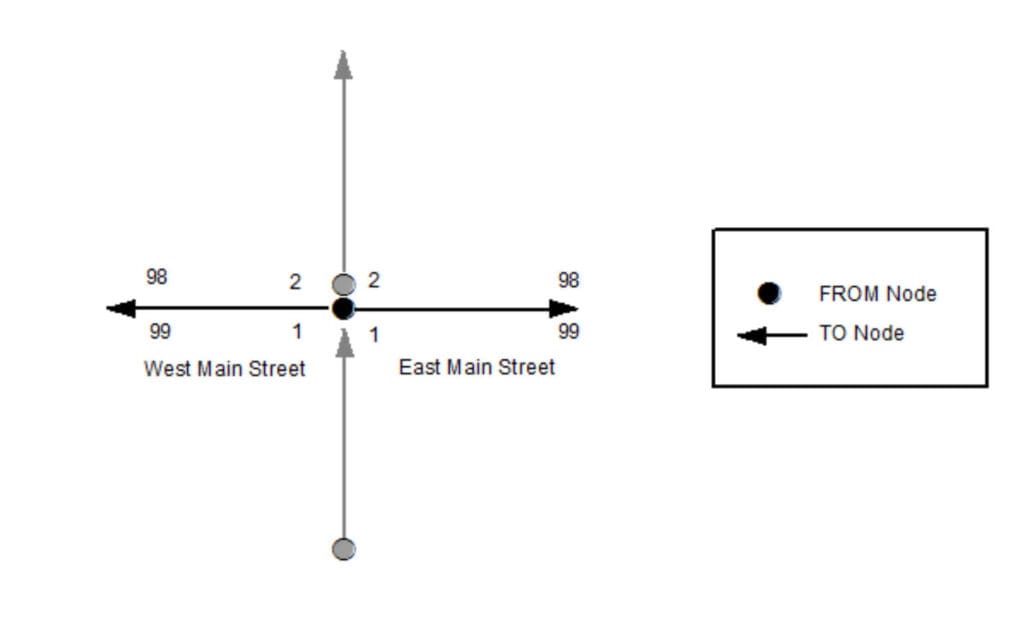
Example of Left FROM, Left TO, Right FROM, and Right TO Addresses
3.3.3 Left TO Address
Database Field Name: ToAddr_L
Data Type: LONG
Inclusion: Yes
Width: 6
Domain: Whole numbers from 0 to 999999
Examples:
123
Description:
The ending value of the address range on the left side of the road segment at the TO node (endpoint). This value can be lower than the Left FROM Address.
3.3.4 Right Address Number Prefix
Database Field Name: AdNumPre_R
Data Type: TEXT
Inclusion: Conditional
Width: 15
Domain:
Examples:
N123, W123, N, W, S123W
Description:
An extension of the Right FROM Address or Right TO Address on the right side of the road segment, consisting of the non-integer portion of the identifier for a parcel, house, building or other feature which precedes the address number, as defined by the official Addressing Authority for the given jurisdiction. Used commonly in Wisconsin to include the directional to an address number (e.g., N2554 Johnson Street). Also used in a few counties where grid address numbers exist to include the locally-defined grid cell reference. In Wisconsin, this is typically only the two directionals and the number between them (e.g., W180N8085 Town Hall Road).
3.3.5 Right FROM Address
Database Field Name: FromAddr_R
Data Type: LONG
Inclusion: Yes
Width: 6
Domain: Whole numbers from 0 to 999999
Examples:
123
Description:
The beginning value of the address range on the right side of the road segment at the FROM node (begin point). This value can be higher than the Right TO Address.
3.3.6 Right TO Address
Database Field Name: ToAddr_R
Data Type: LONG
Inclusion: Yes
Width: 6
Domain: Whole numbers from 0 to 999999
Examples:
123
Description:
The ending value of the address range on the right side of the road segment at the TO node (endpoint). This value can be lower than the Right FROM Address.
3.3.7 Street Name Pre Modifier
Database Field Name: St_PreMod
Data Type: TEXT
Inclusion: Conditional
Width: 15
Domain:
Examples:
Old North County Highway 12
Description:
A word or phrase that precedes all other Street Name elements and is separated from the Street Name element by a Street Name Pre Directional and/or a Street Name Pre Type element. Not commonly used and use should be minimized.
3.3.8 Street Name Pre Directional
Database Field Name: St_PreDir
Data Type: TEXT
Inclusion: Conditional
Width: 10
Domain: WLIA DirectionDomain
Examples:
East Main Street, Old North County Highway 12
Description:
A word or phrase preceding the Street Name element that indicates the direction taken by the road from an arbitrary starting point or the sector where it is located.
3.3.9 Street Name Pre Type
Database Field Name: St_PreType
Data Type: TEXT
Inclusion: Conditional
Width: 50
Domain: NENA Street Name Pre Types and Street Name Post Types Registry
Examples:
Avenue A, Old North County Highway 12, United States Highway 151, State Highway 46, Interstate 90
Description:
A word or phrase that precedes the Street Name element and identifies the type of thoroughfare in the Full Street Name.
3.3.10 Street Name Pre Type Separator
Database Field Name: St_PreSep
Data Type: TEXT
Inclusion: Conditional
Width: 20
Domain: NENA Street Name Pre Type Separators Registry
Examples:
Avenue of the Arts, Avenue of Champions
Description:
A preposition or prepositional phrase between the Street Name Pre Type and the Street Name element.
3.3.11 Street Name
Database Field Name: St_Name
Data Type: TEXT
Inclusion: Yes
Width: 254
Domain:
Examples:
Jones Road, County Highway KP, Avenue of the Arts, Avenue C, Azure Court South
Description:
The official name of the road as defined by the official Street Naming Authority for the given jurisdiction. The Street Name element does not include a street type, directional, or modifier unless assigned as such by the official Street Naming Authority.
3.3.12 Street Name Post Type
Database Field Name: St_PosTyp
Data Type: TEXT
Inclusion: Conditional
Width: 50
Domain: NENA Street Name Pre Types and Street Name Post Types Registry
Examples:
Jones Road, Azure Court South
Description:
A word or phrase that follows the Street Name element and identifies the type of thoroughfare in the Full Street Name.
3.3.13 Street Name Post Directional
Database Field Name: St_PosDir
Data Type: TEXT
Inclusion: Conditional
Width: 10
Domain: WLIA DirectionDomain
Examples:
Azure Court South, 10th Avenue West
Description:
A word or phrase following the Street Name element that indicates the direction taken by the road from an arbitrary starting point or the sector where it is located.
3.3.14 Street Name Post Modifier
Database Field Name: St_PosMod
Data Type: TEXT
Inclusion: Conditional
Width: 25
Domain:
Examples:
Bermuda Boulevard Lower, Lake Road Fire Road 8, Stoughton Road Frontage Road, Interstate 90 westbound
Description:
A word or phrase that follows all other Street Name elements and is separated from the Street Name element by a Street Name Post Directional and/or Street Name Post Type element. Not commonly used and use should be minimized.
3.3.15 Full Street Name
Database Field Name: FullStNm
Data Type: TEXT
Inclusion: Yes
Width: 245
Domain:
Examples:
Old North County Highway 12, Azure Court South, Lake Road Fire Road 8
Description:
The Street Name with all Pre/Post Modifiers, Pre/Post Directionals, Pre Type Separator, and Pre/Post Types concatenated: St_PreMod + St_PreDir + St_PreTyp + St_PreSep + St_Name + St_PosTyp + St_PosDir + St_PosMod
3.3.16 Abbreviated Full Street Name
Database Field Name: abFullStNm
Data Type: TEXT
Inclusion: No
Width: 175
Domain:
Examples:
Old N CTH 12, Azure Ct S, Lake Rd Fire Rd 8
Description:
The Full Street Name with abbreviations (where appropriate) used for the Pre/Post Modifiers, Pre/Post Types, and Pre/Post Directionals. This field is equivalent to the abFullStNm field in the WLIA Standard.
3.3.17 Legacy Street Name Pre Directional
Database Field Name: LSt_PreDir
Data Type: TEXT
Inclusion: Conditional
Width: 2
Domain: WLIA abvDirectionDomain
Examples:
E MAIN ST, S ELMWOOD DR
Description:
The street direction prefix as it appears in the MSAG, as assigned by the official Street Naming Authority. Casing should reflect what appears in the MSAG data.
3.3.18 Legacy Street Name
Database Field Name: LSt_Name
Data Type: TEXT
Inclusion: Conditional
Width: 75
Domain:
Examples:
E MAIN ST, S ELMWOOD DR, I 90, CTH U, 10TH AVE W, AZURE CT S
Description:
The street name field as it appears in the MSAG, as assigned by the official Street Naming Authority. Casing should reflect what appears in the MSAG data.
3.3.19 Legacy Street Name Type
Database Field Name: LSt_Type
Data Type: TEXT
Inclusion: Conditional
Width: 4
Domain: PSAP MSAG; USPS Publication 28, Appendix C1 [9]
Examples:
E MAIN ST, S ELMWOOD DR, 10TH AVE W, AZURE CT S
Description:
The valid street type abbreviation as it appears in the MSAG, as assigned by the official Street Naming Authority. Casing should reflect what appears in the MSAG data.
3.3.20 Legacy Street Name Post Directional
Database Field Name: LSt_PosDir
Data Type: TEXT
Inclusion: Conditional
Width: 2
Domain: WLIA abvDirectionDomain
Examples:
10TH AVE W, AZURE CT S
Description:
The street direction suffix as it appears in the MSAG, as assigned by the official Street Naming Authority. Casing should reflect what appears in the MSAG data.
3.3.21 Postal Code Left
Database Field Name: PostCode_L
Data Type: TEXT
Inclusion: No
Width: 7
Domain: USPS City State File Product [10]
Examples:
53527
Description:
The 5-digit code on the left side of the road segment that identifies the individual US Post Office or metropolitan area delivery station associated with the addresses on that side of the road.
3.3.22 Postal Code Right
Database Field Name: PostCode_R
Data Type: TEXT
Inclusion: No
Width: 7
Domain: USPS City State File Product [10]
Examples:
53527
Description:
The 5-digit code on the right side of the road segment that identifies the individual US Post Office or metropolitan area delivery station associated with the addresses on that side of the road.
3.3.23 Postal Community Name Left
Database Field Name: PostComm_L
Data Type: TEXT
Inclusion: No
Width: 40
Domain: USPS City State File Product [10]
Examples:
Cottage Grove, Eau Claire, Minocqua, Harshaw
Description:
The name on the left side of the road segment recognized by the USPS as valid for the ZIP Code of the addresses on that side of the road.
3.3.24 Postal Community Name Right
Database Field Name: PostComm_R
Data Type: TEXT
Inclusion: No
Width: 40
Domain: USPS City State File Product [10]
Examples:
Cottage Grove, Eau Claire, Minocqua, Harshaw
Description:
The name on the right side of the road segment recognized by the USPS as valid for the ZIP Code of the addresses on that side of the road.
3.4 Area Elements
3.4.1 Country Left
Database Field Name: Country_L
Data Type: TEXT
Inclusion: Yes
Width: 2
Domain: Restricted to the two-letter codes in ISO 3166-1 alpha-2 codes
Examples:
US, CA
Description:
The two-letter abbreviation of the Country on the left side of the road segment where the address is located. Must be in uppercase.
3.4.2 Country Right
Database Field Name: Country_R
Data Type: TEXT
Inclusion: Yes
Width: 2
Domain: Restricted to the two-letter codes in ISO 3166-1 alpha-2 codes
Examples:
US, CA
Description:
The two-letter abbreviation of the Country on the right side of the road segment where the address is located. Must be in uppercase.
3.4.3 State Left (A1)
Database Field Name: State_L
Data Type: TEXT
Inclusion: Yes
Width: 2
Domain: Restricted to the two-letter codes in ISO 3166-2 WLIA FIPSStateDomain
Examples:
WI, IL, MN, MI
Description:
The two-letter abbreviation of the State on the left side of the road segment where the address is located. Must be in uppercase.
3.4.4 State Right (A1)
Database Field Name: State_R
Data Type: TEXT
Inclusion: Yes
Width: 2
Domain: Restricted to the two-letter codes in ISO 3166-2 WLIA FIPSStateDomain
Examples:
WI, IL, MN, MI
Description:
The two-letter abbreviation of the State on the right side of the road segment where the address is located. Must be in uppercase.
3.4.5 County Left (A2)
Database Field Name: County_L
Data Type: TEXT
Inclusion: Yes
Width: 100
Domain: Restricted to the values in ANSI INCITS 31:2009, including casing and abbreviations [11] NG911CountyDomain
Examples:
La Crosse County, Racine County
Description:
The name of the County on the left side of the road segment where the address is located.
3.4.6 County Right (A2)
Database Field Name: County_R
Data Type: TEXT
Inclusion: Yes
Width: 100
Domain: Restricted to the values in ANSI INCITS 31:2009, including casing and abbreviations [11] NG911CountyDomain
Examples:
La Crosse County, Racine County
Description:
The name of the County on the right side of the road segment where the address is located.
3.4.7 Incorporated Municipality Left (A3)
Database Field Name: IncMuni_L
Data Type: TEXT
Inclusion: Yes
Width: 100
Domain: WLIA FIPSMunicipalityDomain
Examples:
Town of Cottage Grove, City of Green Bay, Village of North Hudson
Description:
The name of the Incorporated Municipality on the left side of the road segment where the address is located, including the incorporated municipality type.
3.4.8 Incorporated Municipality Right (A3)
Database Field Name: IncMuni_R
Data Type: TEXT
Inclusion: Yes
Width: 100
Domain: WLIA FIPSMunicipalityDomain
Examples:
Town of Cottage Grove, City of Green Bay, Village of North Hudson
Description:
The name of the Incorporated Municipality on the right side of the road segment where the address is located, including the incorporated municipality type.
3.4.9 Unincorporated Community Left (A4)
Database Field Name: UnincCom_L
Data Type: TEXT
Inclusion: No
Width: 100
Domain:
Examples:
Minocqua, Houlton, Gotham, Pray
Description:
The name of the Unincorporated Community on the left side of the road segment where the address is located.
3.4.10 Unincorporated Community Right (A4)
Database Field Name: UnincCom_R
Data Type: TEXT
Inclusion: No
Width: 100
Domain:
Examples:
Minocqua, Houlton, Gotham, Pray
Description:
The name of the Unincorporated Community on the right side of the road segment where the address is located.
3.4.11 Neighborhood Community Left (A5)
Database Field Name: NbrhdCom_L
Data Type: TEXT
Inclusion: No
Width: 100
Domain:
Examples:
Third Ward, Bassett, Greenbush
Description:
The name of an unincorporated neighborhood, subdivision, or area within an incorporated municipality on the left side of the road segment where the address point is located. Neighborhood communities are only used when they are known and have a clearly defined boundary.
3.4.12 Neighborhood Community Right (A5)
Database Field Name: NbrhdCom_R
Data Type: TEXT
Inclusion: No
Width: 100
Domain:
Examples:
Third Ward, Bassett, Greenbush
Description:
The name of an unincorporated neighborhood, subdivision, or area within an incorporated municipality on the right side of the road segment where the address point is located. Neighborhood communities are only used when they are known and have a clearly defined boundary.
3.4.13 Additional Code Left
Database Field Name: AddCode_L
Data Type: TEXT
Inclusion: No
Width: 6
Domain:
Examples:
Description:
Note: Since this field is not applicable in the US, it will not be populated in WI GIS data layers. A Standard Geographical Classification code used in Canada that specifies a geographic area and is used to differentiate two municipalities with the same name in a province that does not have counties.
3.4.14 Additional Code Right
Database Field Name: AddCode_R
Data Type: TEXT
Inclusion: No
Width: 6
Domain:
Examples:
Description:
Note: Since this field is not applicable in the US, it will not be populated in WI GIS data layers. A Standard Geographical Classification code used in Canada that specifies a geographic area and is used to differentiate two municipalities with the same name in a province that does not have counties.
3.5 Functional Elements
3.5.1 One-Way
Database Field Name: OneWay
Data Type: TEXT
Inclusion: No
Width: 2
Domain: B, TF, FT
Examples:
B, FT, TF
Description:
The direction of traffic movement along a road in relation to the FROM node and TO node of the road segment where: B (Travel allowed in both directions) FT (One-way, travel from FROM node to TO node) TF (One-way, travel from TO node to FROM node)
East Main Street
One-Way: FT
West Main Street
One-Way: TF
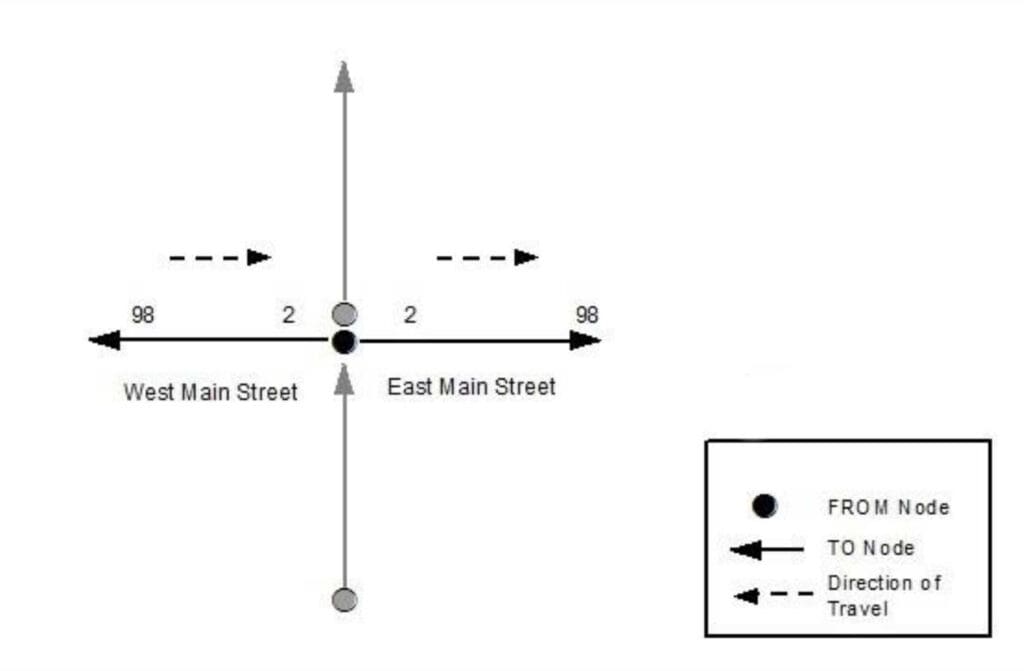
Example of OneWay attribution
3.5.2 Speed Limit
Database Field Name: SpeedLimit
Data Type: SHORT
Inclusion: No
Width: 3
Domain: WLIA SpeedLimitDomain
Examples:
10, 25, 30, 55, 65
Description:
The posted predominate speed limit of the road segment.
3.5.3 Road Class
Database Field Name: RoadClass
Data Type: TEXT
Inclusion: No
Width: 24
Domain: Primary, Secondary, Local, Ramp, Service Drive, Vehicular Trail, Walkway/Pedestrian Trail, Stairway, Alley, Private, Parking Lot, Bike Path or Trail, Bridle Path, Other
Examples:
Primary, Secondary, Local, Ramp, Alley, Private, Trail
Description:
The general description of the type of road. These values are based on road classification definitions from the Census MAF/TIGER Feature Class Codes (MTFCC) at https://www.census.gov/library/reference/code-lists/mt-feature-class-codes.html.
- Primary roads are generally divided, limited-access highways within the interstate highway system or under state management, and are distinguished by the presence of interchanges. These highways are accessible by ramps and may include some toll highways.
- Secondary roads are main arteries, usually in the US Highway, State Highway, or County Highway system. These roads have one or more lanes of traffic in each direction, may or may not be divided, and usually have at-grade intersections with many other roads and driveways.
- Local roads are generally a paved non-arterial street, road, or byway that usually has a single lane of traffic in each direction. Roads in this classification include neighborhood, rural roads, and city streets.
- Ramp designates a road that allows controlled access from adjacent roads onto a limited access highway, often in the form of a cloverleaf interchange. Ramps typically do not have address ranges.
- Service Drive provides access to structures along the highway, usually parallel to a limited access highway. If these roads are named and addressed, they may be considered local roads.
- Vehicular Trail (4WD, snowmobile) is an unpaved trail or path where a four-wheel-drive vehicle, snowmobile, or similar vehicle is required.
- Walkway/Pedestrian Trail is a path that is used for walking, being either too narrow for or legally restricted from vehicular traffic.
- Stairway is a pedestrian passageway from one level to another by a series of steps.
- Alley is generally a service road that does not generally have associated addressed structures and is usually unnamed. It is located at the rear of buildings and properties.
- Private (service vehicles, logging, oil fields, ranches, etc.) is a road within private property that is privately maintained for service, extractive, or other purposes. These roads are often unnamed.
- Parking Lot is the main travel route for vehicles through a paved parking area.
- Bike Path or Trail is a path that is used for manual or small, motorized bicycles, being either too narrow for or legally restricted from vehicular traffic.
- Bridle Path is a path that is used for horses, being either too narrow for or legally restricted from vehicular traffic.
- Other is any road or path type that does not fit into the above categories.
3.5.4 From Elevation
Database Field Name: FrElev
Data Type: SHORT
Inclusion: No
Width:
Domain: WLIA ElevationDomain
Examples:
0, 1, 2
Description:
Identifies the From routing for intersections and overpasses. Base elevation = 0.
3.5.5 To Elevation
Database Field Name: ToElev
Data Type: SHORT
Inclusion: No
Width:
Domain: WLIA ElevationDomain
Examples:
0, 1, 2
Description:
Identifies the To routing for intersections and overpasses. Base elevation = 0.
3.6 Management Elements
3.6.1 Date Updated
Database Field Name: DateUpdate
Data Type: DATE
Inclusion: Yes
Width:
Domain:
Examples:
2020-01-28T15:47.09.3-06:00 (representing a record updated on January 28, 2020 at 3:47 and 9.3 seconds PM US Central Standard Time, with a precision of .1 second); 2020-07-16T08:31:15.2-05:00 (representing a record updated on July 16, 2020 at 8:31 and 15.2 seconds AM US Central Daylight Time, with a precision of .1 second)
Description:
The date and time that the record was created or last modified.
3.6.2 Effective Date
Database Field Name: Effective
Data Type: DATE
Inclusion: No
Width:
Domain:
Examples:
2021-02-11T01:30:00.1-06:00 (representing a record that will become active on February 11, 2021 at 1:30 and 0.1 seconds AM US Central Standard Time, with a precision of .1 second); 2021-10-15T20:15:30.5-05:00 (representing a record that will become active on October 15, 2021 at 8:15 and 30.5 seconds PM US Central Daylight Time, with a precision of .1 second)
Description:
The date and time that the record is scheduled to take effect (e.g., the date and time an annexation takes effect and a copy of the road centerlines within the annexed area that have had their Incorporated Municipality, ESN, and MSAG Community Name fields populated with the new values are recognized for use in the NG9-1-1 system).
3.6.3 Expiration Date
Database Field Name: Expire
Data Type: DATE
Inclusion: No
Width:
Domain:
Examples:
2021-02-11T01:30:00.1-06:00 (representing a record that will expire and no longer be valid on February 11, 2021 at 1:30 and 0.1 seconds AM US Central Standard Time, with a precision of .1 second); 2021-10-15T20:15:30.5-05:00 (representing a record that will expire and no longer be valid on October 15, 2021 at 8:15 and 30.5 seconds PM US Central Daylight Time, with a precision of .1 second)
Description:
The date and time when the information in the record is no longer considered valid (e.g., the date and time an annexation takes effect and the road centerlines within the annexed area that have their Incorporated Municipality, ESN, and MSAG Community Name fields populated with the former values are no longer recognized for use in the NG9-1-1 system).
3.7 9-1-1 Elements
3.7.1 Discrepancy Agency ID
Database Field Name: DiscrpAgID
Data Type: TEXT
Inclusion: Yes
Width: 100
Domain:
Examples:
co.polk.wi.us, waukeshacounty.gov, countyofdane.com
Description:
Agency that receives a Discrepancy Report (DR), should a discrepancy in the GIS data be discovered, and will take responsibility for ensuring discrepancy resolution. This may or may not be the same as the 9-1-1 Authority. This MUST be represented by a domain name that is an Agency Identifier as defined in the NENA Master Glossary of 9-1-1 Terminology, NENA-ADM-000.23-2020 [21].
3.7.2 Parity Left
Database Field Name: Parity_L
Data Type: TEXT
Inclusion: Yes
Width: 1
Domain: O, E, B, Z
Examples:
O, E, B, Z
Description:
The even or odd property of the address number range on the left side of the road segment relative to the FROM Node where: O (only Odd addresses in the address range) E (only Even addresses in the address range) B (Both Even and Odd addresses in the address range) Z (Address Range is 0-0)
3.7.3 Parity Right
Database Field Name: Parity_R
Data Type: TEXT
Inclusion: Yes
Width: 1
Domain: O, E, B, Z
Examples:
O, E, B, Z
Description:
The even or odd property of the address number range on the right side of the road segment relative to the FROM Node where: O (only Odd addresses in the address range) E (only Even addresses in the address range) B (Both Even and Odd addresses in the address range) Z (Address Range is 0-0)
3.7.4 ESN Left
Database Field Name: ESN_L
Data Type: TEXT
Inclusion: Conditional
Width: 5
Domain: Characters from 000 to 99999
Examples:
35, 810, 7115
Description:
A 3-5 character alphanumeric string that represents the Emergency Service Zone (ESZ) on the left side of the road segment relative to the FROM Node. ESZ is used for 10-digit routing in Legacy Systems and is not used in a full NG9-1-1 implementation.
3.7.5 ESN Right
Database Field Name: ESN_R
Data Type: TEXT
Inclusion: Conditional
Width: 5
Domain: Characters from 000 to 99999
Examples:
35, 810, 7115
Description:
A 3-5 character alphanumeric string that represents the Emergency Service Zone (ESZ) on the right side of the road segment relative to the FROM Node. ESZ is used for 10-digit routing in Legacy Systems and is not used in a full NG9-1-1 implementation.
3.7.6 MSAG Community Name Left
Database Field Name: MSAGComm_L
Data Type: TEXT
Inclusion: Conditional
Width: 30
Domain:
Examples:
MADISON, MAYVILLE, REDGRANITE
Description:
The Community name on the left side of the road segment relative to the FROM Node, as it appears in the MSAG. This may or may not be the same as the Postal Community Name used by the US Postal Service.
3.7.7 MSAG Community Name Right
Database Field Name: MSAGComm_R
Data Type: TEXT
Inclusion: Conditional
Width: 30
Domain:
Examples:
MADISON, MAYVILLE, REDGRANITE
Description:
The Community name on the right side of the road segment relative to the FROM Node, as it appears in the MSAG. This may or may not be the same as the Postal Community Name used by the US Postal Service.
3.7.8 Validation Left
Database Field Name: Valid_L
Data Type: TEXT
Inclusion: No
Width: 1
Domain: WLIA YesNoDomain
Examples:
Y, N
Description:
Indicates if the address range on the left side of the road segment should be used for civic location validation. A value of “Y” means the Road Centerline layer can be used for address validation and therefore any Address Number within the address range on the left side of the road segment should be considered by the LVF to be valid. A value of “N” means the Road Centerline layer should not be used for validation and an Address Number within the address range on the left side of the road segment should only be validated using the Site/Structure Address Point layer. If no values are populated, a value of “Y” is assumed.
3.7.9 Validation Right
Database Field Name: Valid_R
Data Type: TEXT
Inclusion: No
Width: 1
Domain: WLIA YesNoDomain
Examples:
Y, N
Description:
Indicates if the address range on the right side of the road segment should be used for civic location validation. A value of “Y” means the Road Centerline layer can be used for address validation and therefore any Address Number within the address range on the right side of the road segment should be considered by the LVF to be valid. A value of “N” means the Road Centerline layer should not be used for validation and an Address Number within the address range on the right side of the road segment should only be validated using the Site/Structure Address Point layer. If no values are populated, a value of “Y” is assumed.
3.7.10 Exception
Database Field Name: Exception
Data Type: TEXT
Inclusion: Conditional
Width: 75
Domain: GMS, NGCS
Examples:
999, 401, OAB
Description:
Indicates if the segment is an exception. 999 is a global exception code that will remove the feature from being provisioned to the NG9-1-1 Core Service providers system.
4 SiteStructureAddressPoint (Site/Structure Address Point) – Summary Table
4.1 Identification Elements
Element Number: 4.1.1
Element Name: NENA Globally Unique ID
Database Field Name: NGUID
Field Type: TEXT
Field Width: 254
Inclusion: Yes
Domain:
Reference Standard: NENA
4.2 Relate Elements
Element Number: 4.2.1
Element Name: Road Centerline NENA Globally Unique ID (Foreign Key)
Database Field Name: RCL_NGUID
Field Type: TEXT
Field Width: 254
Inclusion: Conditional
Domain:
Reference Standard:WLIA
4.3 Address Elements
Element Number: 4.3.1
Element Name: Address Number Prefix
Database Field Name: AddNum_Pre
Field Type: TEXT
Field Width: 15
Inclusion: Conditional
Domain:
Reference Standard: NENA, WLIA
Element Number: 4.3.2
Element Name: Address Number
Database Field Name: Add_Number
Field Type: LONG
Field Width: 6
Inclusion: Conditional
Domain: Whole numbers from 0 to 999999
Reference Standard: NENA, WLIA
Element Number: 4.3.3
Element Name: Address Number Suffix
Database Field Name: AddNum_Suf
Field Type: TEXT
Field Width: 15
Inclusion: Conditional
Domain:
Reference Standard: NENA, WLIA
Element Number: 4.3.4
Element Name: Complete Landmark Name
Database Field Name: LandmkName
Field Type: TEXT
Field Width: 150
Inclusion: Conditional
Domain:
Reference Standard: NENA
Element Number: 4.3.5
Element Name: Mile Post
Database Field Name: MilePost
Field Type: TEXT
Field Width: 150
Inclusion: Conditional
Domain:
Reference Standard: NENA
Element Number: 4.3.6
Element Name: Building
Database Field Name: Building
Field Type: TEXT
Field Width: 75
Inclusion: No
Domain:
Reference Standard: NENA, WLIA
Element Number: 4.3.7
Element Name: Floor
Database Field Name: Floor
Field Type: TEXT
Field Width: 75
Inclusion: No
Domain:
Reference Standard: NENA, WLIA
Element Number: 4.3.8
Element Name: Unit Pre Type
Database Field Name: Unit_PreType
Field Type: TEXT
Field Width: 75
Inclusion: No
Domain:
Reference Standard: NENA, WLIA
Element Number: 4.3.9
Element Name: Unit Value
Database Field Name: Unit_Value
Field Type: TEXT
Field Width: 75
Inclusion: No
Domain:
Reference Standard: NENA, WLIA
Element Number: 4.3.10
Element Name: Room
Database Field Name: Room
Field Type: TEXT
Field Width: 75
Inclusion: No
Domain:
Reference Standard: NENA, WLIA
Element Number: 4.3.11
Element Name: Seat
Database Field Name: Seat
Field Type: TEXT
Field Width: 75
Inclusion: No
Domain:
Reference Standard: NENA, WLIA
Element Number: 4.3.12
Element Name: Additional Location Information
Database Field Name: Addtl_Loc
Field Type: TEXT
Field Width: 225
Inclusion: No
Domain:
Reference Standard: NENA, WLIA
Element Number: 4.3.13
Element Name: Street Name Pre Modifier
Database Field Name: St_PreMod
Field Type: TEXT
Field Width: 15
Inclusion: Conditional
Domain:
Reference Standard: NENA, WLIA
Element Number: 4.3.14
Element Name: Street Name Pre Directional
Database Field Name: St_PreDir
Field Type: TEXT
Field Width: 10
Inclusion: Conditional
Domain: WLIA DirectionDomain
Reference Standard: NENA, WLIA
Element Number: 4.3.15
Element Name: Street Name Pre Type
Database Field Name: St_PreTyp
Field Type: TEXT
Field Width: 50
Inclusion: Conditional
Domain: NENA Street Name Pre Types and Street Name Post Types Registry
Reference Standard: NENA, WLIA
Element Number: 4.3.16
Element Name: Street Name Pre Type Separator
Database Field Name: St_PreSep
Field Type: TEXT
Field Width: 20
Inclusion: Conditional
Domain: NENA Street Name Pre Type Separators Registry
Reference Standard: NENA, WLIA
Element Number: 4.3.17
Element Name: Street Name
Database Field Name: St_Name
Field Type: TEXT
Field Width: 254
Inclusion: Conditional
Domain:
Reference Standard: NENA, WLIA
Element Number: 4.3.18
Element Name: Street Name Post Type
Database Field Name: St_PosTyp
Field Type: TEXT
Field Width: 50
Inclusion: Conditional
Domain: NENA Street Name Pre Types and Street Name Post Types Registry
Reference Standard: NENA, WLIA
Element Number: 4.3.19
Element Name: Street Name Post Directional
Database Field Name: St_PosDir
Field Type: TEXT
Field Width: 10
Inclusion: Conditional
Domain: WLIA DirectionDomain
Reference Standard: NENA, WLIA
Element Number: 4.3.20
Element Name: Street Name Post Modifier
Database Field Name: St_PosMod
Field Type: TEXT
Field Width: 25
Inclusion: Conditional
Domain:
Reference Standard: NENA, WLIA
Element Number: 4.3.21
Element Name: Full Street Name
Database Field Name: FullStNm
Field Type: TEXT
Field Width: 245
Inclusion: Yes
Domain:
Reference Standard: WLIA
Element Number: 4.3.22
Element Name: Abbreviated Full Street Name
Database Field Name: abFullStNm
Field Type: TEXT
Field Width: 175
Inclusion: No
Domain:
Reference Standard: WLIA
Element Number: 4.3.23
Element Name: Legacy Street Name Pre Directional
Database Field Name: LSt_PreDir
Field Type: TEXT
Field Width: 2
Inclusion: Conditional
Domain: WLIA abvDirectionDomain
Reference Standard: NENA
Element Number: 4.3.24
Element Name: Legacy Street Name
Database Field Name: LSt_Name
Field Type: TEXT
Field Width: 75
Inclusion: Conditional
Domain:
Reference Standard: NENA
Element Number: 4.3.25
Element Name: Legacy Street Name Type
Database Field Name: LSt_Type
Field Type: TEXT
Field Width: 4
Inclusion: Conditional
Domain: PSAP MSAG; USPS Publication 28, Appendix C1
Reference Standard: NENA
Element Number: 4.3.26
Element Name: Legacy Street Name Post Directional
Database Field Name: LSt_PosDir
Field Type: TEXT
Field Width: 2
Inclusion: Conditional
Domain: WLIA abvDirectionDomain
Reference Standard: NENA
Element Number: 4.3.27
Element Name: Postal Code
Database Field Name: Post_Code
Field Type: TEXT
Field Width: 7
Inclusion: No
Domain: USPS City State File Product
Reference Standard: USPS, NENA, WLIA
Element Number: 4.3.28
Element Name: ZIP Plus 4
Database Field Name: Post_Code4
Field Type: TEXT
Field Width: 4
Inclusion: No
Domain: USPS City State File Product
Reference Standard: USPS, NENA
Element Number: 4.3.29
Element Name: Postal Community Name
Database Field Name: Post_Comm
Field Type: TEXT
Field Width: 40
Inclusion: No
Domain: USPS City State File Product
Reference Standard: USPS, NENA, WLIA
4.4 Area Elements
Element Number: 4.4.1
Element Name: Country
Database Field Name: Country
Field Type: TEXT
Field Width: 2
Inclusion: Yes
Domain:
Reference Standard: NENA
Element Number: 4.4.2
Element Name: State (A1)
Database Field Name: State
Field Type: TEXT
Field Width: 2
Inclusion: Yes
Domain: WLIA FIPSStateDomain
Reference Standard: US Census, NENA, WLIA
Element Number: 4.4.3
Element Name: County (A2)
Database Field Name: County
Field Type: TEXT
Field Width: 100
Inclusion: Yes
Domain: NG911CountyDomain
Reference Standard: US Census, NENA, WLIA
Element Number: 4.4.4
Element Name: Incorporated Municipality (A3)
Database Field Name: Inc_Muni
Field Type: TEXT
Field Width: 100
Inclusion: Yes
Domain: WLIA FIPSMunicipalityDomain
Reference Standard: US Census, NENA, WLIA
Element Number: 4.4.5
Element Name: Unincorporated Community (A4)
Database Field Name: Uninc_Comm
Field Type: TEXT
Field Width: 100
Inclusion: No
Domain:
Reference Standard: NENA
Element Number: 4.4.6
Element Name: Neighborhood Community (A5)
Database Field Name: Nbrhd_Comm
Field Type: TEXT
Field Width: 100
Inclusion: No
Domain:
Reference Standard: NENA
Element Number: 4.4.7
Element Name: Additional Code
Database Field Name: AddCode
Field Type: TEXT
Field Width: 6
Inclusion: No
Domain:
Reference Standard: NENA
4.5 Functional Elements
Element Number: 4.5.1
Element Name: Placement Method
Database Field Name: Placement
Field Type: TEXT
Field Width: 25
Inclusion: No
Domain: NENA Site/Structure Address Point Placement Method Registry
Reference Standard: NENA, WLIA
Element Number: 4.5.2
Element Name: Place Type
Database Field Name: Place_Type
Field Type: TEXT
Field Width: 50
Inclusion: No
Domain:
Reference Standard: NENA
Element Number: 4.5.3
Element Name: Additional Data URI
Database Field Name: AddDataURI
Field Type: TEXT
Field Width: 254
Inclusion: Conditional
Domain:
Reference Standard: NENA
Element Number: 4.5.4
Element Name: Structure
Database Field Name: Structure
Field Type: TEXT
Field Width: 3
Inclusion: Conditional
Domain: WLIA YesNoDomain
Reference Standard: WLIA
4.6 Management Elements
Element Number: 4.6.1
Element Name: Date Updated
Database Field Name: DateUpdate
Field Type: DATE
Field Width:
Inclusion: Yes
Domain:
Reference Standard: NENA
Element Number: 4.6.2
Element Name: Effective Date
Database Field Name: Effective
Field Type: DATE
Field Width:
Inclusion: No
Domain:
Reference Standard: NENA
Element Number: 4.6.3
Element Name: Expiration Date
Database Field Name: Expire
Field Type: DATE
Field Width:
Inclusion: No
Domain:
Reference Standard: NENA
4.7 9-1-1 Elements
Element Number: 4.7.1
Element Name: Discrepancy Agency ID
Database Field Name: DiscrpAgID
Field Type: TEXT
Field Width: 100
Inclusion: Yes
Domain:
Reference Standard: NENA
Element Number: 4.7.2
Element Name: ESN
Database Field Name: ESN
Field Type: TEXT
Field Width: 5
Inclusion: Conditional
Domain: Characters from 000 to 99999
Reference Standard: NENA
Element Number: 4.7.3
Element Name: MSAG Community Name
Database Field Name: MSAGComm
Field Type: TEXT
Field Width: 30
Inclusion: Conditional
Domain:
Reference Standard: NENA
Element Number: 4.7.4
Element Name: Latitude
Database Field Name: Lat
Field Type: FLOAT
Field Width:
Inclusion: No
Domain:
Reference Standard: NENA
Element Number: 4.7.5
Element Name: Longitude
Database Field Name: Long
Field Type: FLOAT
Field Width:
Inclusion: No
Domain:
Reference Standard: NENA
Element Number: 4.7.6
Element Name: Elevation
Database Field Name: Elev
Field Type: LONG
Field Width: 6
Inclusion: No
Domain:
Reference Standard: NENA
Element Number: 4.7.7
Element Name: Exception
Database Field Name: Exception
Field Type: TEXT
Field Width: 75
Inclusion: Conditional
Domain: GMS, NGCS
Reference Standard:
SiteStructureAddressPoint (Site/Structure Address Point) – Data Element Details
4.1 Identification Elements
4.1.1 NENA Globally Unique ID
Database Field Name: NGUID
Data Type: TEXT
Inclusion: Yes
Width: 254
Domain:
Examples:
urn:emergency:uid:gis:SSAP:17342239:co.polk.wi.us, urn:emergency:uid:gis:SSAP:100373182:waukeshacounty.gov, urn:emergency:uid:gis:SSAP:44f161f2jk7f4g1v45b1hgaw71av189c:countyofdane.co m
Description:
The NENA Globally Unique ID (Primary Key) for each record in a GIS data layer. Each record in the GIS data layer MUST have a globally unique ID. When coalescing data from other local 9-1-1 Authorities into the ECRF and LVF, this unique ID MUST continue to have only one occurrence. Additional details on how to construct the NGUID can be found in section 2.4 NENA Globally Unique IDs (NGUID). The locally assigned unique ID may be the SAP_ExtID (WLIA Standard), an autogenerated unique ID, or a manually generated unique ID.
4.2 Relate Elements
4.2.1 Road Centerline NENA Globally Unique ID (Foreign Key)
Database Field Name: RCL_NGUID
Data Type: TEXT
Inclusion: Yes
Width: 254
Domain:
Examples:
urn:emergency:uid:gis:RCL:47824393:co.polk.wi.us, urn:emergency:uid:gis:RCL:587392034:waukeshacounty.gov, urn:emergency:uid:gis:RCL:90a942e1bc7f4g1h94c5acaadv24r89h:countyofdane.com
Description:
The Road Centerline NENA Globally Unique ID (RCL_NGUID) is used in the StreetNameAliasTable and SiteStructureAddressPoint as a foreign key relationship between the StreetNameAliasTable and the RoadCenterLine layer or the SiteStructureAddressPoint and the RoadCenterLine layer. A foreign key acts as a cross-reference between RCL_NGUID field in the StreetNameAliasTable and SiteStructureAddressPoint because it references the NGUID field primary key in the RoadCenterLine layer, thereby establishing a link between them. A RoadCenterLine record may have zero to many (0:M) StreetNameAliasTable records and SiteStructureAddressPoint features. Without this relationship, it would not be possible to identify any street name aliases of a road centerline. The values in the RCL_NGUID field MUST exist in the values of the NGUID field in the RoadCenterLine layer.
4.3 Address Elements
4.3.1 Address Number Prefix
Database Field Name: AddNum_Pre
Data Type: TEXT
Inclusion: Conditional
Width: 15
Domain:
Examples:
N123, W123, N, W, S123W
Description:
The non-integer portion of the identifier for a parcel, house, building or other feature which precedes the address number, as defined by the official Addressing Authority for the given jurisdiction. Used commonly in Wisconsin to include the directional to an address number (e.g., N2554 Johnson Street). Also used in a few counties where grid address numbers exist to include the locally-defined grid cell reference. In Wisconsin, this is typically only the two directionals and the number between them (e.g., W180N8085 Town Hall Road).
4.3.2 Address Number
Database Field Name: Add_Number
Data Type: LONG
Inclusion: Conditional
Width: 6
Domain: Whole numbers from 0 to 999999
Examples:
123, 10546
Description:
The numeric identifier for a parcel, house, building or other feature, as defined by the official Addressing Authority for a given jurisdiction.
4.3.3 Address Number Suffix
Database Field Name: AddNum_Suf
Data Type: TEXT
Inclusion: Conditional
Width: 15
Domain:
Examples:
A, 1/2
Description:
The non-integer portion of the identifier for a parcel, house, building or other feature which follows the address number, as defined by the official Addressing Authority for a given jurisdiction. Not commonly used and use should be minimized. Not to be confused with Unit divisions within a building.
4.3.4 Complete Landmark Name
Database Field Name: LandmkName
Data Type: TEXT
Inclusion: Conditional
Width: 150
Domain:
Examples:
Lambeau Field, Camp Randall Stadium, Devil’s Lake, Gibraltar Rock, Pop’s Cave, Grand Dad’s Bluff
Description:
The name by which a prominent site or structure is publicly known and which may or may not be associated with a civic address. Note: This element may be impacted by a potential future change in NENA Standards. See Section 9 for more information.
4.3.5 Mile Post
Database Field Name: MilePost
Data Type: TEXT
Inclusion: Conditional
Width: 150
Domain:
Examples:
Mile Marker 284.8, MIN10
Description:
A measured distance travelled along a road, highway, trail, navigable waterway, or other unaddressed route, from a given point, that is typically posted with a milepost sign, a mile marker sign, or other marker. Mile Post numbers may be used in place of, or in addition to, Address Numbers.
4.3.6 Building
Database Field Name: Building
Data Type: TEXT
Inclusion: No
Width: 75
Domain:
Examples:
Building 1, Building 2, Tower A, Tower B
Description:
The type (e.g., Building, Tower) and identifier (e.g., 2, B) for a building among a group of buildings that have the same Address Number and Full Street Name. Note: This element may be impacted by a potential future change in NENA Standards. See Section 9 for more information.
4.3.7 Floor
Database Field Name: Floor
Data Type: TEXT
Inclusion: No
Width: 75
Domain:
Examples:
Floor 4, First Floor, 11, Mezzanine
Description:
The floor, story, or level within a building.
4.3.8 Unit Pre Type
Database Field Name: Unit_PreType
Data Type: TEXT
Inclusion: No
Width: 75
Domain:
Examples:
Suite, Apartment, Unit
Description:
Part of the complete unit identifier that precedes the Unit Value and indicates the kind of unit.
4.3.9 Unit Value
Database Field Name: Unit_Value
Data Type: TEXT
Inclusion: No
Width: 75
Domain:
Examples:
2102, 3C, 12, Penthouse
Description:
Part of the complete unit identifier that uniquely identifies a particular unit.
4.3.10 Room
Database Field Name: Room
Data Type: TEXT
Inclusion: No
Width: 75
Domain:
Examples:
Room 101A, 1202, E, Capitol Ballroom
Description:
The name or identifier of a single room within a building.
4.3.11 Seat
Database Field Name: Seat
Data Type: TEXT
Inclusion: No
Width: 75
Domain:
Examples:
1, 2, A, B, Registration Desk, Cubicle D6
Description:
An individual seat location.
4.3.12 Additional Location Information
Database Field Name: Addtl_Loc
Data Type: TEXT
Inclusion: No
Width: 225
Domain:
Examples:
Concourse B; Gate C14; Loading Dock 2B, Stairwell D
Description:
The type and identifier for a part of a subaddress that is not a Building, Floor, Unit, Room, or Seat.
4.3.13 Street Name Pre Modifier
Database Field Name: St_PreMod
Data Type: TEXT
Inclusion: Conditional
Width: 15
Domain:
Examples:
Old North County Highway 12
Description:
A word or phrase that precedes all other Street Name elements and is separated from the Street Name element by a Street Name Pre Directional and/or a Street Name Pre Type element. Not commonly used and use should be minimized.
4.3.14 Street Name Pre Directional
Database Field Name: St_PreDir
Data Type: TEXT
Inclusion: Conditional
Width: 10
Domain: WLIA DirectionDomain
Examples:
East Main Street, Old North County Highway 12
Description:
A word or phrase preceding the Street Name element that indicates the direction taken by the road from an arbitrary starting point or the sector where it is located.
4.3.15 Street Name Pre Type
Database Field Name: St_PreTyp
Data Type: TEXT
Inclusion: Conditional
Width: 50
Domain: NENA Street Name Pre Types and Street Name Post Types Registry
Examples:
Avenue A, Old North County Highway 12, United States Highway 151, State Highway 46, Interstate 90
Description:
A word or phrase that precedes the Street Name element and identifies the type of thoroughfare in the Full Street Name.
4.3.16 Street Name Pre Type Separator
Database Field Name: St_PreSep
Data Type: TEXT
Inclusion: Conditional
Width: 20
Domain: NENA Street Name Pre Type Separators Registry
Examples:
Avenue of the Arts, Avenue of Champions
Description:
A preposition or prepositional phrase between the Street Name Pre Type and the Street Name element.
4.3.17 Street Name
Database Field Name: St_Name
Data Type: TEXT
Inclusion: Conditional
Width: 254
Domain:
Examples:
Jones Road, County Highway KP, Avenue of the Arts, Avenue C, Azure Court South
Description:
The official name of the road as defined by the official Street Naming Authority for the given jurisdiction. The Street Name element does not include a street type, directional, or modifier unless assigned as such by the official Street Naming Authority.
4.3.18 Street Name Post Type
Database Field Name: St_PosTyp
Data Type: TEXT
Inclusion: Conditional
Width: 50
Domain: NENA Street Name Pre Types and Street Name Post Types Registry
Examples:
Jones Road, Azure Court South
Description:
A word or phrase that follows the Street Name element and identifies the type of thoroughfare in the Full Street Name.
4.3.19 Street Name Post Directional
Database Field Name: St_PosDir
Data Type: TEXT
Inclusion: Conditional
Width: 10
Domain: WLIA DirectionDomain
Examples:
Azure Court South, 10th Avenue West
Description:
A word or phrase following the Street Name element that indicates the direction taken by the road from an arbitrary starting point or the sector where it is located.
4.3.20 Street Name Post Modifier
Database Field Name: St_PosMod
Data Type: TEXT
Inclusion: Conditional
Width: 25
Domain:
Examples:
Bermuda Boulevard Lower, Lake Road Fire Road 8, Stoughton Road Frontage Road, Interstate 90 westbound
Description:
A word or phrase that follows all other Street Name elements and is separated from the Street Name element by a Street Name Post Directional and/or Street Name Post Type element. Not commonly used and use should be minimized.
4.3.21 Full Street Name
Database Field Name: FullStNm
Data Type: TEXT
Inclusion: Yes
Width: 245
Domain:
Examples:
Old North County Highway 12, Azure Court South, Lake Road Fire Road 8
Description:
The Street Name with all Pre/Post Modifiers, Pre/Post Directionals, Pre Type Separator, and Pre/Post Types concatenated: St_PreMod + St_PreDir + St_PreTyp + St_PreSep + St_Name + St_PosTyp + St_PosDir + St_PosMod
4.3.22 Abbreviated Full Street Name
Database Field Name: abFullStNm
Data Type: TEXT
Inclusion: No
Width: 175
Domain:
Examples:
Old N CTH 12, Azure Ct S, Lake Rd Fire Rd 8
Description:
The Full Street Name with abbreviations (where appropriate) used for the Pre/Post Modifiers, Pre/Post Types, and Pre/Post Directionals. This field is equivalent to the abFullStNm field in the WLIA Standard.
4.3.23 Legacy Street Name Pre Directional
Database Field Name: LSt_PreDir
Data Type: TEXT
Inclusion: Conditional
Width: 2
Domain: WLIA abvDirectionDomain
Examples:
E MAIN ST, S ELMWOOD DR
Description:
The street direction prefix as it appears in the MSAG, as assigned by the official Street Naming Authority. Casing should reflect what appears in the MSAG data.
4.3.24 Legacy Street Name
Database Field Name: LSt_Name
Data Type: TEXT
Inclusion: Conditional
Width: 75
Domain:
Examples:
E MAIN ST, S ELMWOOD DR, I 90, CTH U, 10TH AVE W, AZURE CT S
Description:
The street name field as it appears in the MSAG, as assigned by the official Street Naming Authority. Casing should reflect what appears in the MSAG data.
4.3.25 Legacy Street Name Type
Database Field Name: LSt_Type
Data Type: TEXT
Inclusion: Conditional
Width: 4
Domain: PSAP MSAG; USPS Publication 28, Appendix C1 [9]
Examples:
E MAIN ST, S ELMWOOD DR, 10TH AVE W, AZURE CT S
Description:
The valid street type abbreviation as it appears in the MSAG, as assigned by the official Street Naming Authority. Casing should reflect what appears in the MSAG data.
4.3.26 Legacy Street Name Post Directional
Database Field Name: LSt_PosDir
Data Type: TEXT
Inclusion: Conditional
Width: 2
Domain: WLIA abvDirectionDomain
Examples:
10TH AVE W, AZURE CT S
Description:
The street direction suffix as it appears in the MSAG, as assigned by the official Street Naming Authority. Casing should reflect what appears in the MSAG data.
4.3.27 Postal Code
Database Field Name: Post_Code
Data Type: TEXT
Inclusion: No
Width: 7
Domain: USPS City State File Product [10]
Examples:
53527, 54703
Description:
The 5-digit code that identifies the individual US Post Office or metropolitan area delivery station associated with an address.
4.3.28 ZIP Plus 4
Database Field Name: Post_Code4
Data Type: TEXT
Inclusion: No
Width: 4
Domain: USPS City State File Product [10]
Examples:
9675, 2871
Description:
A system of 4-digit codes that are used after the 5-digit Postal Code to specify a range of USPS delivery addresses.
4.3.29 Postal Community Name
Database Field Name: Post_Comm
Data Type: TEXT
Inclusion: No
Width: 40
Domain: USPS City State File Product [10]
Examples:
Cottage Grove, Eau Claire
Description:
The municipal name recognized by the USPS as valid for the ZIP Code of an address.
4.4 Area Elements
4.4.1 Country
Database Field Name: Country
Data Type: TEXT
Inclusion: Yes
Width: 2
Domain: Restricted to the two-letter codes in ISO 3166-1 alpha-2 codes
Examples:
US, CA
Description:
The two-letter abbreviation of the Country where the address is located. Must be in uppercase.
4.4.2 State (A1)
Database Field Name: State
Data Type: TEXT
Inclusion: Yes
Width: 2
Domain: Restricted to the two-letter codes in ISO 3166-2 WLIA FIPSStateDomain
Examples:
WI, IL, MN, MI
Description:
The two-letter abbreviation of the State where the address is located. Must be in uppercase.
4.4.3 County (A2)
Database Field Name: County
Data Type: TEXT
Inclusion: Yes
Width: 100
Domain: Restricted to the values in ANSI INCITS 31:2009, including casing and abbreviations [11] NG911CountyDomain
Examples:
La Crosse County, Racine County
Description:
The name of the County where the address is located.
4.4.4 Incorporated Municipality (A3)
Database Field Name: Inc_Muni
Data Type: TEXT
Inclusion: Yes
Width: 100
Domain: WLIA FIPSMunicipalityDomain
Examples:
Town of Cottage Grove, City of Green Bay, Village of North Hudson
Description:
The name of the Incorporated Municipality where the address is located, including the incorporated municipality type.
4.4.5 Unincorporated Community (A4)
Database Field Name: Uninc_Comm
Data Type: TEXT
Inclusion: No
Width: 100
Domain:
Examples:
Minocqua, Houlton, Gotham, Pray
Description:
The name of the Unincorporated Community where the address is located.
4.4.6 Neighborhood Community (A5)
Database Field Name: Nbrhd_Comm
Data Type: TEXT
Inclusion: No
Width: 100
Domain:
Examples:
Third Ward, Bassett, Greenbush
Description:
The name of an unincorporated neighborhood, subdivision, or area within an incorporated municipality where the address is located. Neighborhood communities are only used when they are known and have a clearly defined boundary.
4.4.7 Additional Code
Database Field Name: AddCode
Data Type: TEXT
Inclusion: No
Width: 6
Domain:
Examples:
Description:
Note: Since this field is not applicable in the US, it will not be populated in WI GIS data layers. A Standard Geographical Classification code used in Canada that specifies a geographic area and is used to differentiate two municipalities with the same name in a province that does not have counties.
4.5 Functional Elements
4.5.1 Placement Method
Database Field Name: Placement
Data Type: TEXT
Inclusion: No
Width: 25
Domain: NENA Site/Structure Address Point Placement Method Registry
Examples:
Geocoding, Parcel, PropertyAccess, Site, Structure, Unknown
Description:
The methodology used for placement of the address point.
4.5.2 Place Type
Database Field Name: Place_Type
Data Type: TEXT
Inclusion: No
Width: 50
Domain: Restricted to the values in RFC 4589 [12]
Examples:
Airport, bank, hotel, office, residence, stadium, store
Description:
The type of feature identified by the address.
4.5.3 Additional Data URI
Database Field Name: AddDataURI
Data Type: TEXT
Inclusion: Conditional
Width: 254
Domain:
Examples:
https://addtl12345.example.com
Description:
A Uniform Resource Identifier (URI) that defines the Service URI for accessing additional data and information associated with the address location, including building information (e.g., blueprints, contact info, floor plans).
4.5.4 Structure
Database Field Name: Structure
Data Type: TEXT
Inclusion: Conditional
Width: 3
Domain: WLIA YesNoDomain
Examples:
Yes, No
Description:
Indicates if the address point is associated with a structure.
4.6 Management Elements
4.6.1 Date Updated
Database Field Name: DateUpdate
Data Type: DATE
Inclusion: Yes
Width:
Domain:
Examples:
2020-01-28T15:47.09.3-06:00 (representing a record updated on January 28, 2020 at 3:47 and 9.3 seconds PM US Central Standard Time, with a precision of .1 second); 2020-07-16T08:31:15.2-05:00 (representing a record updated on July 16, 2020 at 8:31 and 15.2 seconds AM US Central Daylight Time, with a precision of .1 second)
Description:
The date and time that the record was created or last modified.
4.6.2 Effective Date
Database Field Name: Effective
Data Type: DATE
Inclusion: No
Width:
Domain:
Examples:
2021-02-11T01:30:00.1-06:00 (representing a record that will become active on February 11, 2021 at 1:30 and 0.1 seconds AM US Central Standard Time, with a precision of .1 second); 2021-10-15T20:15:30.5-05:00 (representing a record that will become active on October 15, 2021 at 8:15 and 30.5 seconds PM US Central Daylight Time, with a precision of .1 second)
Description:
The date and time that the record is scheduled to take effect (e.g., the date and time an annexation takes effect and a copy of the Site/Structure Address Points within the annexed area that have had their Incorporated Municipality, ESN, and MSAG Community Name fields populated with the new values are recognized for use in the NG9 1 1 system).
4.6.3 Expiration Date
Database Field Name: Expire
Data Type: DATE
Inclusion: No
Width:
Domain:
Examples:
2021-02-11T01:30:00.1-06:00 (representing a record that will expire and no longer be valid on February 11, 2021 at 1:30 and 0.1 seconds AM US Central Standard Time, with a precision of .1 second); 2021-10-15T20:15:30.5-05:00 (representing a record that will expire and no longer be valid on October 15, 2021 at 8:15 and 30.5 seconds PM US Central Daylight Time, with a precision of .1 second)
Description:
The date and time when the information in the record is no longer considered valid (e.g., the date and time an annexation takes effect and the Site/Structure Address Points within the annexed area that have their Incorporated Municipality, ESN, and MSAG Community Name fields populated with the former values are no longer recognized for use in the NG9-1-1 system).
4.7 9-1-1 Elements
4.7.1 Discrepancy Agency ID
Database Field Name: DiscrpAgID
Data Type: TEXT
Inclusion: Yes
Width: 100
Domain:
Examples:
co.polk.wi.us, waukeshacounty.gov, countyofdane.com
Description:
Agency that receives a Discrepancy Report (DR), should a discrepancy in the GIS data be discovered, and will take responsibility for ensuring discrepancy resolution. This may or may not be the same as the 9-1-1 Authority. This MUST be represented by a domain name that is an Agency Identifier as defined in the NENA Master Glossary of 9-1-1 Terminology, NENA-ADM-000.23.2020 [21].
4.7.2 ESN
Database Field Name: ESN
Data Type: TEXT
Inclusion: Conditional
Width: 5
Domain: Characters from 000 to 99999
Examples:
35, 810, 7115
Description:
A 3 to 5 character alphanumeric string that represents the Emergency Service Zone (ESZ) where the address is located.
4.7.3 MSAG Community Name
Database Field Name: MSAGComm
Data Type: TEXT
Inclusion: Conditional
Width: 30
Domain:
Examples:
MADISON, MAYVILLE, REDGRANITE
Description:
The Community name where the address is located, as it appears in the MSAG. This may or may not be the same as the Postal Community Name used by the US Postal Service.
4.7.4 Latitude
Database Field Name: Lat
Data Type: FLOAT
Inclusion: No
Width:
Domain: +90 degrees to -90 degrees
Examples:
43.075450
Description:
The angular distance of the address point location north or south of the equator as defined by the coordinate system, expressed in decimal degrees.
4.7.5 Longitude
Database Field Name: Long
Data Type: FLOAT
Inclusion: No
Width:
Domain: -180 degrees to +180 degrees
Examples:
-89.385161
Description:
The angular distance of the address point location east or west of the prime meridian of the coordinate system, expressed in decimal degrees.
4.7.6 Elevation
Database Field Name: Elev
Data Type: LONG
Inclusion: No
Width: 6
Domain: Whole numbers from 0 to 999999
Examples:
68, 136
Description:
The WGS84 (GPS) elevation, given in meters above the ellipsoid, associated with the address.
4.7.7 Exception
Database Field Name: Exception
Data Type: TEXT
Inclusion: Conditional
Width: 75
Domain: GMS, NGCS
Examples:
999, 401, OAB
Description:
Indicates if the segment is an exception. 999 is a global exception code that will remove the feature from being provisioned to the NG9-1-1 Core Service providers system.
5 PsapPolygon (PSAP Boundary) – Summary Table
This layer represents the geographic extent of each PSAP’s primary call-taking responsibility.
5.1 Identification Elements
Element Number: 5.1.1
Element Name: NENA Globally Unique ID
Database Field Name: NGUID
Field Type: TEXT
Field Width: 254
Inclusion: Yes
Domain:
Reference Standard: NENA
5.2 Relate Elements
Not Applicable.
5.3 Address Elements
Not Applicable.
5.4 Area Elements
Element Number: 5.4.1
Element Name: Country
Database Field Name: Country
Field Type: TEXT
Field Width: 2
Inclusion: No
Domain:
Reference Standard: NENA
Element Number: 5.4.2
Element Name: State (A1)
Database Field Name: State
Field Type: TEXT
Field Width: 2
Inclusion: No
Domain: WLIA FIPSStateDomain
Reference Standard: US Census, NENA
5.5 Functional Elements
Element Number: 5.5.1
Element Name: Agency Identifier
Database Field Name: Agency_ID
Field Type: TEXT
Field Width: 100
Inclusion: Yes
Domain:
Reference Standard: NENA
Element Number: 5.5.2
Element Name: Service URI
Database Field Name: ServiceURI
Field Type: TEXT
Field Width: 254
Inclusion: Yes
Domain:
Reference Standard: NENA
Element Number: 5.5.3
Element Name: Service URN
Database Field Name: ServiceURN
Field Type: TEXT
Field Width: 55
Inclusion: Yes
Domain: urn:emergency:service:sos Registry
Reference Standard: NENA
Element Number: 5.5.4
Element Name: Service Number
Database Field Name: ServiceNum
Field Type: TEXT
Field Width: 15
Inclusion: No
Domain:
Reference Standard: NENA
Element Number: 5.5.5
Element Name: Agency vCard URI
Database Field Name: AVcard_URI
Field Type: TEXT
Field Width: 254
Inclusion: No
Domain:
Reference Standard: NENA
Element Number: 5.5.6
Element Name: Display Name
Database Field Name: DsplayName
Field Type: TEXT
Field Width: 60
Inclusion: Yes
Domain:
Reference Standard: NENA
5.6 Management Elements
Element Number: 5.6.1
Element Name: Date Updated
Database Field Name: DateUpdate
Field Type: DATE
Field Width:
Inclusion: Yes
Domain:
Reference Standard: NENA
Element Number: 5.6.2
Element Name: Effective Date
Database Field Name: Effective
Field Type: DATE
Field Width:
Inclusion: No
Domain:
Reference Standard: NENA
Element Number: 5.6.3
Element Name: Expiration Date
Database Field Name: Expire
Field Type: DATE
Field Width:
Inclusion: No
Domain:
Reference Standard: NENA
5.7 9-1-1 Elements
Element Number: 5.7.1
Element Name: Discrepancy Agency ID
Database Field Name: DiscrpAgID
Field Type: TEXT
Field Width: 100
Inclusion: Yes
Domain:
Reference Standard: NENA
Element Number: 5.7.2
Element Name: Exception
Database Field Name: Exception
Field Type: TEXT
Field Width: 75
Inclusion: Conditional
Domain:
Reference Standard:
PsapPolygon (PSAP Boundary) – Data Element Details
5.1 Identification Elements
5.1.1 NENA Globally Unique ID
Database Field Name: NGUID
Data Type: TEXT
Inclusion: Yes
Width: 254
Domain:
Examples:
urn:emergency:uid:gis:Psap:57311256:co.polk.wi.us, urn:emergency:uid:gis:Psap:410371581:waukeshacounty.gov, urn:emergency:uid:gis:Psap:45a133f2jm7f2g5n41b1hjpw18ay583t:countyofdane.com
Description:
The NENA Globally Unique ID (Primary Key) for each record in a GIS data layer. Each record in the GIS data layer MUST have a globally unique ID. When coalescing data from other local 9-1-1 Authorities into the ECRF and LVF, this unique ID MUST continue to have only one occurrence. Additional detail on how to construct the NGUID can be found in section 2.4 NENA Globally Unique IDs (NGUID).
5.2 Relate Elements
5.3 Address Elements
5.4 Area Elements
5.4.1 Country
Database Field Name: Country
Data Type: TEXT
Inclusion: No
Width: 2
Domain: Restricted to the two-letter codes in ISO 3166-1 alpha-2 codes
Examples:
US, CA
Description:
The two-letter abbreviation of the Country where the polygon is located. Must be in uppercase.
5.4.2 State (A1)
Database Field Name: State
Data Type: TEXT
Inclusion: No
Width: 2
Domain: Restricted to the two-letter codes in ISO 3166-2 WLIA FIPSStateDomain
Examples:
WI, IL, MN, MI
Description:
The two-letter abbreviation of the State where the address is located. Must be in uppercase.
5.5 Functional Elements
5.5.1 Agency ID
Database Field Name: Agency_ID
Data Type: TEXT
Inclusion: Yes
Width: 100
Domain: Must be a registered domain name
Examples:
co.polk.wi.us, waukeshacounty.gov, countyofdane.com
Description:
A Domain Name System (DNS) registered domain name which is used to uniquely identify an agency. An agency is represented by a domain name as defined in Internet Engineering Task Force (IETF) RFC 1034 [6]. Each agency MUST use one domain name consistently in order to correlate actions across a wide range of calls and incidents. Any domain name in the public DNS is acceptable so long as each distinct agency uses a different domain name to ensure that each agency ID is globally unique.
5.5.2 Service URI
Database Field Name: ServiceURI
Data Type: TEXT
Inclusion: Yes
Width: 254
Domain: Must be a registered domain name
Examples:
co.polk.wi.us, waukeshacounty.gov, countyofdane.com
Description:
The Uniform Resource Identifier (URI) used for call routing that defines the URI of the specific service. The URI is usually a Session Initiation Protocol (SIP or SIPs) URI but may be a telephone number (e.g., tel) URI that defines the route to reach the service. Internet Engineering Task Force (IETF) RFC 1035 [13] defines the process to register a domain name
5.5.3 Service URN
Database Field Name: ServiceURN
Data Type: TEXT
Inclusion: Yes
Width: 55
Domain: NENA urn:emergency:service:responder Registry
Examples:
urn:emergency:service:sos.psap; urn: emergency:service:responder.police; urn: emergency:service:responder.fire; urn: emergency:service:responder.ems
Description:
The Uniform Resource Name (URN) used to select the service for which a route is desired. The ECRF is queried with a location and a Service URN, and then returns the Service URI. NOTE: Spatial Interface providers may auto populate the Service URN based on their system requirements.
5.5.4 Service Number
Database Field Name: ServiceNum
Data Type: TEXT
Inclusion: No
Width: 15
Domain: A dialable number or dial string
Examples:
911, 18002221212
Description:
The numbers that would be dialed on a 12 digit keypad to reach the emergency service appropriate for the location. This is not the same as an Emergency Service Number (ESN) in Legacy E9-1-1 systems. This field is used for all Emergency Boundaries including PSAP; Law; Fire; EMS; and others such as Poison Control. Within the United States the Service Number for most emergency services is 9-1-1, however, there may be Emergency Service boundaries that have a different number that may be associated with them such as Poison Control.
5.5.5 Agency vCard URI
Database Field Name: AVcard_URI
Data Type: TEXT
Inclusion: No
Width: 254
Domain:
Examples:
https://vcard.psap.allegheny.pa.us; https://vcard.houstontx.gov/fire
Description:
The numbers that would be dialed on a 12 digit keypad to reach the emergency service appropriate for the location. This is not the same as an Emergency Service Number (ESN) in Legacy E9-1-1 systems. This field is used for all Emergency Boundaries including PSAP; Law; Fire; EMS; and others such as Poison Control. Within the United States the Service Number for most emergency services is 9-1-1, however, there may be Emergency Service boundaries that have a different number that may be associated with them such as Poison Control.
5.5.6 Display Name
Database Field Name: DsplayName
Data Type: TEXT
Inclusion: Yes
Width: 60
Domain:
Examples:
New York Police Department, Med Life Ambulance Services, Houston FD
Description:
A name or description of the entity offering emergency services within a PSAP or Emergency Service Boundary. This value must be suitable for display.
5.6 Management Elements
5.6.1 Date Updated
Database Field Name: DateUpdate
Data Type: DATE
Inclusion: Yes
Width:
Domain:
Examples:
2020-01-28T15:47.09.3-06:00 (representing a record updated on January 28, 2020 at 3:47 and 9.3 seconds PM US Central Standard Time, with a precision of .1 second); 2020-07-16T08:31:15.2-05:00 (representing a record updated on July 16, 2020 at 8:31 and 15.2 seconds AM US Central Daylight Time, with a precision of .1 second)
Description:
The date and time that the record was created or last modified.
5.6.2 Effective Date
Database Field Name: Effective
Data Type: DATE
Inclusion: No
Width:
Domain:
Examples:
2021-02-11T01:30:00.1-06:00 (representing a record that will become active on February 11, 2021 at 1:30 and 0.1 seconds AM US Central Standard Time, with a precision of .1 second); 2021-10-15T20:15:30.5-05:00 (representing a record that will become active on October 15, 2021 at 8:15 and 30.5 seconds PM US Central Daylight Time, with a precision of .1 second)
Description:
The date and time that the record is scheduled to take effect (e.g., the date and time an annexation takes effect and the new PSAP Boundary is recognized for use in the NG9-1-1 system).
5.6.3 Expiration Date
Database Field Name: Expire
Data Type: DATE
Inclusion: No
Width:
Domain:
Examples:
2021-02-11T01:30:00.1-06:00 (representing a record that will expire and no longer be valid on February 11, 2021 at 1:30 and 0.1 seconds AM US Central Standard Time, with a precision of .1 second); 2021-10-15T20:15:30.5-05:00 (representing a record that will expire and no longer be valid on October 15, 2021 at 8:15 and 30.5 seconds PM US Central Daylight Time, with a precision of .1 second)
Description:
The date and time when the information in the record is no longer considered valid (e.g., the date and time an annexation takes effect and the former PSAP Boundary is no longer recognized for use in the NG9-1-1 system).
5.7 9-1-1 Elements
5.7.1 Discrepancy Agency ID
Database Field Name: DiscrpAgID
Data Type: TEXT
Inclusion: Yes
Width: 100
Domain:
Examples:
co.polk.wi.us, waukeshacounty.gov, countyofdane.com
Description:
Agency that receives a Discrepancy Report (DR), should a discrepancy be discovered in the GIS data, and will take responsibility for ensuring discrepancy resolution. This may or may not be the same as the 9-1-1 Authority. This MUST be represented by a domain name that is an Agency Identifier as defined in the NENA Master Glossary of 9-1-1 Terminology, NENA-ADM-000.23-2020 [21].
5.7.2 Exception
Database Field Name: Exception
Data Type: TEXT
Inclusion: Conditional
Width: 75
Domain: GMS, NGCS
Examples:
999, 401, OAB
Description:
Indicates if the segment is an exception. 999 is a global exception code that will remove the feature from being provisioned to the NG9-1-1 Core Service providers system.
6 FirePolygon, PolicePolygon, EmsPolygon (Emergency Service Boundary) – Summary Table
In an NG9-1-1 deployment, the selective transfer of 9-1-1 calls and Emergency Incident Data Objects (EIDOs) to another PSAP or downstream agency uses service boundary layers, all with the same data structure.
The following layers (formerly known as Emergency Service Boundaries), which may be maintained as separate or combined, are the next highest priority for NG9-1-1 deployment. Primary Emergency Services MUST include the following:
- Police
- Fire
- Emergency Medical Services
Each of these layers is used by the ECRF to perform a geographic query to determine which agencies are responsible for providing service to a location in the event a selective transfer is desired, or to direct an EIDO to an agency for dispatch, or to display the responsible agencies at the PSAP. In addition, service boundary layers are used by PSAPs to identify the appropriate entities/first responders to be dispatched. Each layer representing a primary emergency service may contain one or more polygon boundaries that define the primary emergency services for that geographic area.
*Note: The service boundary layers described here are intended to represent the entirety of the service boundary of the agencies. In many agencies, the service boundary is broken into smaller areas served by a station/beat/platoon, with the service area of the agency being the union of the smaller areas. The layer can contain a polygon set (more than one polygon), which is intended to cover holes, and disconnected areas of service, which does occur. Because a polygon set is allowed, if this layer had the smaller polygons and if all of them have the same Service URI and Service URN (but not necessarily the same Display Name, for example), it
would work correctly. It has the downside of increasing work on the ECRF since it has more polygons to consider. The SI Operator can advise whether small polygons can be accommodated in any given implementation. A future edition of this document will address this issue and specifically handle station/beat/platoon service areas directly.
6.1 Identification Elements
Element Number: 6.1.1
Element Name: NENA Globally Unique ID
Database Field Name: NGUID
Field Type: TEXT
Field Width: 254
Inclusion: Yes
Domain:
Reference Standard: NENA
6.2 Relate Elements
Not applicable
6.3 Address Elements
Not applicable
6.4 Area Elements
Element Number: 6.4.1
Element Name: Country
Database Field Name: Country
Field Type: TEXT
Field Width: 2
Inclusion: No
Domain:
Reference Standard: NENA
Element Number: 6.4.2
Element Name: State (A1)
Database Field Name: State
Field Type: TEXT
Field Width: 2
Inclusion: No
Domain: WLIA FIPSStateDomain
Reference Standard: US Census, NENA
6.5 Functional Elements
Element Number: 6.5.1
Element Name: Agency ID
Database Field Name: Agency_ID
Field Type: TEXT
Field Width: 100
Inclusion: Yes
Domain:
Reference Standard: NENA
Element Number: 6.5.2
Element Name: Service URI
Database Field Name: ServiceURI
Field Type: TEXT
Field Width: 254
Inclusion: Yes
Domain:
Reference Standard: NENA
Element Number: 6.5.3
Element Name: Service URN
Database Field Name: ServiceURN
Field Type: TEXT
Field Width: 55
Inclusion: Yes
Domain: NENA urn:emergency:service:sos Registry
Reference Standard: NENA
Element Number: 6.5.4
Element Name: Service Number
Database Field Name: ServiceNum
Field Type: TEXT
Field Width: 15
Inclusion: No
Domain:
Reference Standard: NENA
Element Number: 6.5.5
Element Name: Agency vCard URI
Database Field Name: AVcard_URI
Field Type: TEXT
Field Width: 254
Inclusion: No
Domain:
Reference Standard: NENA
Element Number: 6.5.6
Element Name: Display Name
Database Field Name: DsplayName
Field Type: TEXT
Field Width: 60
Inclusion: Yes
Domain:
Reference Standard: NENA
6.6 Management Elements
Element Number: 6.6.1
Element Name: Date Updated
Database Field Name: DateUpdate
Field Type: DATE
Field Width:
Inclusion: Yes
Domain:
Reference Standard: NENA
Element Number: 6.6.2
Element Name: Effective Date
Database Field Name: Effective
Field Type: DATE
Field Width:
Inclusion: No
Domain:
Reference Standard: NENA
Element Number: 6.6.3
Element Name: Expiration Date
Database Field Name: Expire
Field Type: DATE
Field Width:
Inclusion: No
Domain:
Reference Standard: NENA
6.7 9-1-1 Elements
Element Number: 6.7.1
Element Name: Discrepancy Agency ID
Database Field Name: DiscrpAgID
Field Type: TEXT
Field Width: 100
Inclusion: Yes
Domain:
Reference Standard: NENA
Element Number: 6.7.2
Element Name: Exception
Database Field Name: Exception
Field Type: TEXT
Field Width: 75
Inclusion: Conditional
Domain:
Reference Standard:
FirePolygon, PolicePolygon, EmsPolygon (Emergency Service Boundary) – Data Element Details
6.1 Identification Elements
6.1.1 NENA Globally Unique ID
Database Field Name: NGUID
Data Type: TEXT
Inclusion: Yes
Width: 254
Domain:
Examples:
urn:emergency:uid:gis:Pol:71378233:co.polk.wi.us, urn:emergency:uid:gis:Fire:617271786:waukeshacounty.gov, urn:emergency:uid:gis:Ems:54a513f2kk7g5h7n41b0hxwa81jw531c:countyofdane.com
Description:
The NENA Globally Unique ID (Primary Key) for each record in a GIS data layer. Each record in the GIS data layer MUST have a globally unique ID. When coalescing data from other local 9-1-1 Authorities into the ECRF and LVF, this unique ID MUST continue to have only one occurrence. Additional detail on how to construct the NGUID can be found in section 2.4 NENA Globally Unique IDs (NGUID).
6.2 Relate Elements
6.3 Address Elements
6.4 Area Elements
6.4.1 Country
Database Field Name: Country
Data Type: TEXT
Inclusion: No
Width: 2
Domain: Restricted to the two-letter codes in ISO 3166-1 alpha-2 codes
Examples:
US, CA
Description:
The two-letter abbreviation of the Country where the polygon is located. Must be in uppercase.
6.4.2 State (A1)
Database Field Name: State
Data Type: TEXT
Inclusion: No
Width: 2
Domain: Restricted to the two-letter codes in ISO 3166-2 WLIA FIPSStateDomain
Examples:
WI, IL, MN, MI
Description:
The two letter abbreviation of the State where the polygon is located. Must be in uppercase.
6.5 Functional Elements
6.5.1 Agency ID
Database Field Name: Agency_ID
Data Type: TEXT
Inclusion: Yes
Width: 100
Domain: Must be a registered domain name
Examples:
co.polk.wi.us, waukeshacounty.gov, countyofdane.com
Description:
A Domain Name System (DNS) registered domain name which is used to uniquely identify an agency. An agency is represented by a domain name as defined in Internet Engineering Task Force (IETF) RFC 1034 [15]. Each agency MUST use one domain name consistently in order to correlate actions across a wide range of calls and incidents. Any domain name in the public DNS is acceptable so long as each distinct agency uses a different domain name to ensure that each agency ID is globally unique.
6.5.2 Service URI
Database Field Name: ServiceURI
Data Type: TEXT
Inclusion: Yes
Width: 254
Domain: Must be a registered domain name
Examples:
sips:sos@psap.columbus.oh.us; tel:+16145551212
Description:
The Uniform Resource Identifier (URI) used for call routing that defines the URI of the specific service. The URI is usually a Session Initiation Protocol (SIP or SIPs) URI but may be a telephone number (e.g., tel) URI that defines the route to reach the service. Internet Engineering Task Force (IETF) RFC 1035 [13] defines the process to register a domain name
6.5.3 Service URN
Database Field Name: ServiceURN
Data Type: TEXT
Inclusion: Yes
Width: 55
Domain: NENA urn:emergency:service:responder Registry
Examples:
urn:emergency:service:sos.psap; urn: emergency:service:responder.police; urn: emergency:service:responder.fire; urn: emergency:service:responder.ems
Description:
The Uniform Resource Name (URN) used to select the service for which a route is desired. The ECRF is queried with a location and a Service URN, and then returns the Service URI. NOTE: Spatial Interface providers may auto populate the Service URN based on their system requirements.
6.5.4 Service Number
Database Field Name: ServiceNum
Data Type: TEXT
Inclusion: No
Width: 15
Domain: A dialable number or dial string
Examples:
911, 18002221212
Description:
The numbers that would be dialed on a 12 digit keypad to reach the emergency service appropriate for the location. This is not the same as an Emergency Service Number (ESN) in Legacy E9-1-1 systems. This field is used for all Emergency Boundaries including PSAP; Law; Fire; EMS; and others such as Poison Control. Within the United States the Service Number for most emergency services is 9-1-1, however, there may be Emergency Service boundaries that have a different number that may be associated with them such as Poison Control.
6.5.5 Agency vCard URI
Database Field Name: AVcard_URI
Data Type: TEXT
Inclusion: No
Width: 254
Domain:
Examples:
https://vcard.psap.allegheny.pa.us; https://vcard.houstontx.gov/fire
Description:
Note: This field will be considered for deletion in a future version of this document to align with future changes in the NENA NG911 GIS Data Model. A vCard is a file format standard for electronic business cards. The Agency vCard URI is the internet address of a JavaScript Object Notation (JSON) data structure which contains contact information (Name of Agency, Contact phone numbers, etc.) in the form of a jCard (RFC 7095) [14]. The vCard URI is used in the service boundary layers to provide contact information for each agency. The Service/Agency Locator (see NENA STA-010.3e-2021 [16]) will provide these URIs for agencies listed within it. NOTE: Spatial Interface providers may auto populate the Agency vCard URI based on their system requirements.
6.5.6 Display Name
Database Field Name: DisplayName
Data Type: TEXT
Inclusion: Yes
Width: 60
Domain:
Examples:
New York Police Department, Med Life Ambulance Services, Houston FD
Description:
A name or description of the entity offering emergency services within a PSAP or Emergency Service Boundary. This value must be suitable for display.
6.6 Management Elements
6.6.1 Date Updated
Database Field Name: DateUpdate
Data Type: DATE
Inclusion: Yes
Width:
Domain:
Examples:
2020-01-28T15:47.09.3-06:00 (representing a record updated on January 28, 2020 at 3:47 and 9.3 seconds PM US Central Standard Time, with a precision of .1 second); 2020-07-16T08:31:15.2-05:00 (representing a record updated on July 16, 2020 at 8:31 and 15.2 seconds AM US Central Daylight Time, with a precision of .1 second)
Description:
The date and time that the record was created or last modified.
6.6.2 Effective Date
Database Field Name: Effective
Data Type: DATE
Inclusion: No
Width:
Domain:
Examples:
2021-02-11T01:30:00.1-06:00 (representing a record that will become active on February 11, 2021 at 1:30 and 0.1 seconds AM US Central Standard Time, with a precision of .1 second); 2021-10-15T20:15:30.5-05:00 (representing a record that will become active on October 15, 2021 at 8:15 and 30.5 seconds PM US Central Daylight Time, with a precision of .1 second)
Description:
The date and time that the record is scheduled to take effect (e.g., the date and time an annexation takes effect and the new Emergency Service Boundary is recognized for use in the NG9-1-1 system).
6.6.3 Expiration Date
Database Field Name: Expire
Data Type: DATE
Inclusion: No
Width:
Domain:
Examples:
2021-02-11T01:30:00.1-06:00 (representing a record that will expire and no longer be valid on February 11, 2021 at 1:30 and 0.1 seconds AM US Central Standard Time, with a precision of .1 second); 2021-10-15T20:15:30.5-05:00 (representing a record that will expire and no longer be valid on October 15, 2021 at 8:15 and 30.5 seconds PM US Central Daylight Time, with a precision of .1 second)
Description:
The date and time when the information in the record is no longer considered valid (e.g., the date and time an annexation takes effect and the former Emergency Service Boundary is no longer recognized for use in the NG9-1-1 system).
6.7 9-1-1 Elements
6.7.1 Discrepancy Agency ID
Database Field Name: DiscrpAgID
Data Type: TEXT
Inclusion: Yes
Width: 100
Domain:
Examples:
co.polk.wi.us, waukeshacounty.gov, countyofdane.com
Description:
Agency that receives a Discrepancy Report (DR), should a discrepancy be discovered in the GIS data, and will take responsibility for ensuring discrepancy resolution. This may or may not be the same as the 9-1-1 Authority. This MUST be represented by a domain name that is an Agency Identifier as defined in the NENA Master Glossary of 9-1-1 Terminology, NENA-ADM-000.23-2020 [21].
6.7.2 Exception
Database Field Name: Exception
Data Type: TEXT
Inclusion: Conditional
Width: 100
Domain: GMS, NGCS
Examples:
999, 401, OAB
Description:
Indicates if the segment is an exception. 999 is a global exception code that will remove the feature from being provisioned to the NG9-1-1 Core Service providers system.
7 ProvisioningPolygon (Provisioning Boundary) – Summary Table
This layer represents the coverage area for which GIS data providers are responsible for submitting GIS data for NG9-1-1. The data provided must cover the entire extent of the coverage area that defines their geographic area of responsibility but data must not extend beyond the identified coverage area.
7.1 Identification Elements
Element Number: 7.1.1
Element Name: NENA Globally Unique ID
Database Field Name: NGUID
Field Type: TEXT
Field Width: 254
Inclusion: Yes
Domain:
Reference Standard: NENA
7.2 Related Elements
Not applicable
7.3 Address Elements
Not applicable
7.4 Area Elements
Not applicable
7.5 Functional Elements
Not applicable
7.6 Management Elements
Element Number: 7.6.1
Element Name: Date Updated
Database Field Name: DateUpdate
Field Type: DATE
Field Width:
Inclusion: Yes
Domain:
Reference Standard: NENA
Element Number: 7.6.2
Element Name: Effective Date
Database Field Name: Effective
Field Type: DATE
Field Width:
Inclusion: No
Domain:
Reference Standard: NENA
Element Number: 7.6.3
Element Name: Expiration Date
Database Field Name: Expire
Field Type: DATE
Field Width:
Inclusion: No
Domain:
Reference Standard: NENA
7.7 9-1-1 Elements
Element Number: 7.7.1
Element Name: Discrepancy Agency ID
Database Field Name: DiscrpAgID
Field Type: TEXT
Field Width: 100
Inclusion: Yes
Domain:
Reference Standard: NENA
ProvisioningPolygon (Provisioning Boundary) – Data Element Details
7.1 Identification Elements
7.1.1 NENA Globally Unique ID
Database Field Name: NGUID
Data Type: TEXT
Inclusion: Yes
Width: 254
Domain:
Examples:
urn:emergency:uid:gis:Prov:16424289:co.polk.wi.us, urn:emergency:uid:gis:Prov:210252128:waukeshacounty.gov, urn:emergency:uid:gis:Prov:65e160f2ad7f2g1w55k1hjwa74ap891v:countyofdane.com
Description:
The NENA Globally Unique ID (Primary Key) for each record in a GIS data layer. Each record in the GIS data layer MUST have a globally unique ID. When coalescing data from other local 9-1-1 Authorities into the ECRF and LVF, this unique ID MUST continue to have only one occurrence. Additional detail on how to construct the NGUID can be found in section 2.4 NENA Globally Unique IDs (NGUID).
7.2 Relate Elements
7.3 Address Elements
7.4 Area Elements
7.5 Functional Elements
7.6 Management Elements
7.6.1 Date Updated
Database Field Name: DateUpdate
Data Type: DATE
Inclusion: Yes
Width:
Domain:
Examples:
2020-01-28T15:47.09.3-06:00 (representing a record updated on January 28, 2020 at 3:47 and 9.3 seconds PM US Central Standard Time, with a precision of .1 second); 2020-07-16T08:31:15.2-05:00 (representing a record updated on July 16, 2020 at 8:31 and 15.2 seconds AM US Central Daylight Time, with a precision of .1 second)
Description:
The date and time that the record was created or last modified.
7.6.2 Effective Date
Database Field Name: Effective
Data Type: DATE
Inclusion: No
Width:
Domain:
Examples:
2021-02-11T01:30:00.1-06:00 (representing a record that will become active on February 11, 2021 at 1:30 and 0.1 seconds AM US Central Standard Time, with a precision of .1 second); 2021-10-15T20:15:30.5-05:00 (representing a record that will become active on October 15, 2021 at 8:15 and 30.5 seconds PM US Central Daylight Time, with a precision of .1 second)
Description:
The date and time that the record is scheduled to take effect (e.g., the date and time an annexation takes effect and the new Provisioning Boundary is recognized for use in the NG9-1-1 system).
7.6.3 Expiration Date
Database Field Name: Expire
Data Type: DATE
Inclusion: No
Width:
Domain:
Examples:
2021-02-11T01:30:00.1-06:00 (representing a record that will become active on February 11, 2021 at 1:30 and 0.1 seconds AM US Central Standard Time, with a precision of .1 second); 2021-10-15T20:15:30.5-05:00 (representing a record that will become active on October 15, 2021 at 8:15 and 30.5 seconds PM US Central Daylight Time, with a precision of .1 second)
Description:
The date and time when the information in the record is no longer considered valid (e.g., the date and time an annexation takes effect and the former Provisioning Boundary is no longer recognized for use in the NG9-1-1 system).
7.7 9-1-1 Elements
7.7.1 Discrepancy Agency ID
Database Field Name: DiscrpAgID
Data Type: TEXT
Inclusion: Yes
Width: 100
Domain:
Examples:
co.polk.wi.us, waukeshacounty.gov, countyofdane.com
Description:
Agency that receives a Discrepancy Report (DR), should a discrepancy be discovered in the GIS data, and will take responsibility for ensuring discrepancy resolution. This may or may not be the same as the 9-1-1 Authority. This MUST be represented by a domain name that is an Agency Identifier as defined in the NENA Master Glossary of 9-1-1 Terminology, NENA-ADM-000.23-2020 [21].
8 Schema Crosswalk Tables
Data maintained locally in the Wisconsin Land Information Association (WLIA) Street Centerline Data Standard [3] or the WLIA Address Point Data Standard [4] contains many of the same data fields as in the Wisconsin NG9-1-1 GIS Data Standard. Most fields in the WLIA Standards can be directly crosswalked into this standard. The Road Centerline and Site/Structure Address Point tables below list all of the Wisconsin NG9-1-1 Element Names and their associated Field Names. Where an equivalent WLIA data field exists, the WLIA Element Name and WLIA Field Name are provided in the first two columns, otherwise if no equivalent WLIA field exists, the columns are left blank. The Crosswalk Notes column provides information regarding WLIA data fields that may be helpful with initial data population of the Wisconsin NG9-1-1 GIS Data Standard elements if no equivalent WLIA element exists. The column also identifies fields that are not required in the NENA Standard for NG9-1-1 GIS Data Model [5] but were included in the Wisconsin NG9-1-1 GIS Data Standard to meet the State of Wisconsin’s needs.
8.1 RoadCenterLine (Road Centerline)
3.1 Identification Elements
WLIA Standard Element Name:
WLIA Field Name:
NG9-1-1 Standard Element Name: NENA Globally Unique ID
NG9-1-1 Field Name: NGUID
Crosswalk Notes:
3.2 Relate Elements
Not applicable
3.3 Address Elements
WLIA Standard Element Name: Address Prefix Left
WLIA Field Name: AddPre_L
NG9-1-1 Standard Element Name: Left Address Number Prefix
NG9-1-1 Field Name: AdNumPre_L
Crosswalk Notes:
WLIA Standard Element Name: From Address Left
WLIA Field Name: FrAdd_L
NG9-1-1 Standard Element Name: Left FROM Address
NG9-1-1 Field Name: FromAddr_L
Crosswalk Notes:
WLIA Standard Element Name: To Address Left
WLIA Field Name: ToAddr_L
NG9-1-1 Standard Element Name: Left TO Address
NG9-1-1 Field Name: ToAddr_L
Crosswalk Notes:
WLIA Standard Element Name: Address Prefix Right
WLIA Field Name: AddPre_R
NG9-1-1 Standard Element Name: Right Address Number Prefix
NG9-1-1 Field Name: AdNumPre_R
Crosswalk Notes:
WLIA Standard Element Name: From Address Right
WLIA Field Name: FrAdd_R
NG9-1-1 Standard Element Name: Right FROM Address
NG9-1-1 Field Name: FromAddr_R
Crosswalk Notes:
WLIA Standard Element Name: To Address Right
WLIA Field Name: ToAddr_R
NG9-1-1 Standard Element Name: Right TO Address
NG9-1-1 Field Name: ToAddr_R
Crosswalk Notes:
WLIA Standard Element Name: Street Name Pre-Modifier
WLIA Field Name: StPreMod
NG9-1-1 Standard Element Name: Street Name Pre Modifier
NG9-1-1 Field Name: St_PreMod
Crosswalk Notes:
WLIA Standard Element Name: Street Name Pre-Directional
WLIA Field Name: StPreDir
NG9-1-1 Standard Element Name: Street Name Pre Directional
NG9-1-1 Field Name: St_PreDir
Crosswalk Notes:
WLIA Standard Element Name: Street Name Pre-Type
WLIA Field Name: StPreType
NG9-1-1 Standard Element Name: Street Name Pre Type
NG9-1-1 Field Name: St_PreType
Crosswalk Notes:
WLIA Standard Element Name: Street Name Pre-Type Separator
WLIA Field Name: StPreSep
NG9-1-1 Standard Element Name: Street Name Pre Type Separator
NG9-1-1 Field Name: St_PreSep
Crosswalk Notes:
WLIA Standard Element Name: Base Street Name
WLIA Field Name: StBaseNm
NG9-1-1 Standard Element Name: Street Name
NG9-1-1 Field Name: St_Name
Crosswalk Notes:
WLIA Standard Element Name: Street Name Post-Type
WLIA Field Name: StPosTyp
NG9-1-1 Standard Element Name: Street Name Post Type
NG9-1-1 Field Name: St_PosTyp
Crosswalk Notes:
WLIA Standard Element Name: Street Name Post-Directional
WLIA Field Name: StPosDir
NG9-1-1 Standard Element Name: Street Name Post Directional
NG9-1-1 Field Name: St_PosDir
Crosswalk Notes:
WLIA Standard Element Name: Street Name Post-Modifier
WLIA Field Name: StPosMod
NG9-1-1 Standard Element Name: Street Name Post Modifier
NG9-1-1 Field Name: St_PosMod
Crosswalk Notes:
WLIA Standard Element Name: Full Street Name
WLIA Field Name: FullStNm
NG9-1-1 Standard Element Name: Full Street Name
NG9-1-1 Field Name: FullStNm
Crosswalk Notes: Not a NENA field
WLIA Standard Element Name: Abbreviated Full Street Name
WLIA Field Name: abFullStNm
NG9-1-1 Standard Element Name: Abbreviated Full Street Name
NG9-1-1 Field Name: abFullStNm
Crosswalk Notes: Not a NENA field
WLIA Standard Element Name:
WLIA Field Name:
NG9-1-1 Standard Element Name: Legacy Street Name Pre Directional
NG9-1-1 Field Name: LSt_PreDir
Crosswalk Notes:
WLIA Standard Element Name:
WLIA Field Name:
NG9-1-1 Standard Element Name: Legacy Street Name
NG9-1-1 Field Name: LSt_Name
Crosswalk Notes:
WLIA Standard Element Name:
WLIA Field Name:
NG9-1-1 Standard Element Name: Legacy Street Name Type
NG9-1-1 Field Name: LSt_Type
Crosswalk Notes:
WLIA Standard Element Name:
WLIA Field Name:
NG9-1-1 Standard Element Name: Legacy Street Name Post Directional
NG9-1-1 Field Name: LSt_PosDir
Crosswalk Notes:
WLIA Standard Element Name: Zip Code Left
WLIA Field Name: ZIPCode_L
NG9-1-1 Standard Element Name: Postal Code Left
NG9-1-1 Field Name: PostCode_L
Crosswalk Notes:
WLIA Standard Element Name: Zip Code Right
WLIA Field Name: ZIPCode_R
NG9-1-1 Standard Element Name: Postal Code Right
NG9-1-1 Field Name: PostCode_R
Crosswalk Notes:
WLIA Standard Element Name: Municipal Zip Code Name Left
WLIA Field Name: ZIPMuni_L
NG9-1-1 Standard Element Name: Postal Community Name Left
NG9-1-1 Field Name: PostComm_L
Crosswalk Notes:
WLIA Standard Element Name: Municipal Zip Code Name Right
WLIA Field Name: ZIPMuni_R
NG9-1-1 Standard Element Name: Postal Community Name Right
NG9-1-1 Field Name: PostComm_R
Crosswalk Notes:
3.4 Area Elements
WLIA Standard Element Name:
WLIA Field Name:
NG9-1-1 Standard Element Name: Country Left
NG9-1-1 Field Name: Country_L
Crosswalk Notes:
WLIA Standard Element Name:
WLIA Field Name:
NG9-1-1 Standard Element Name: Country Right
NG9-1-1 Field Name: Country_R
Crosswalk Notes:
WLIA Standard Element Name: State Name Left
WLIA Field Name: StateNameL
NG9-1-1 Standard Element Name: State Left (A1)
NG9-1-1 Field Name: State_L
Crosswalk Notes:
WLIA Standard Element Name: State Name Right
WLIA Field Name: StateNameR
NG9-1-1 Standard Element Name: State Right (A1)
NG9-1-1 Field Name: State_R
Crosswalk Notes:
WLIA Standard Element Name: County Name Left
WLIA Field Name: CntyName_L
NG9-1-1 Standard Element Name: County Left (A2)
NG9-1-1 Field Name: County_L
Crosswalk Notes:
WLIA Standard Element Name: County Name Right
WLIA Field Name: CntyName_R
NG9-1-1 Standard Element Name: County Right (A2)
NG9-1-1 Field Name: County_R
Crosswalk Notes:
WLIA Standard Element Name: Municipal Name Left
WLIA Field Name: MuniName_L
NG9-1-1 Standard Element Name: Incorporated Municipality Left (A3)
NG9-1-1 Field Name: IncMuni_L
Crosswalk Notes:
WLIA Standard Element Name: Municipal Name Right
WLIA Field Name: MuniName_R
NG9-1-1 Standard Element Name: Incorporated Municipality Right (A3)
NG9-1-1 Field Name: IncMuni_R
Crosswalk Notes:
WLIA Standard Element Name:
WLIA Field Name:
NG9-1-1 Standard Element Name: Unincorporated Community Left (A4)
NG9-1-1 Field Name: UnincCom_L
Crosswalk Notes:
WLIA Standard Element Name:
WLIA Field Name:
NG9-1-1 Standard Element Name: Unincorporated Community Right (A4)
NG9-1-1 Field Name: UnincCom_R
Crosswalk Notes:
WLIA Standard Element Name:
WLIA Field Name:
NG9-1-1 Standard Element Name: Neighborhood Community Left (A5)
NG9-1-1 Field Name: NbrhdCom_L
Crosswalk Notes:
WLIA Standard Element Name:
WLIA Field Name:
NG9-1-1 Standard Element Name: Neighborhood Community Right (A5)
NG9-1-1 Field Name: NbrhdCom_R
Crosswalk Notes:
3.5 Functional Elements
WLIA Standard Element Name: The Flow of Routing
WLIA Field Name: OneWay
NG9-1-1 Standard Element Name: One-Way
NG9-1-1 Field Name: OneWay
Crosswalk Notes:Change WLIA “N” values to “B” for NG9-1-1 use
WLIA Standard Element Name: Speed Limit
WLIA Field Name: SpeedLimit
NG9-1-1 Standard Element Name: Speed Limit
NG9-1-1 Field Name: SpeedLimit
Crosswalk Notes:
WLIA Standard Element Name:
WLIA Field Name:
NG9-1-1 Standard Element Name: Road Class
NG9-1-1 Field Name: RoadClass
Crosswalk Notes:WLIA Road Classification (RdCode) is not a 1-to-1 match with NENA Road Class but may be useful for initial population.
3.5.4 Management Elements
WLIA Standard Element Name: Date Edited
WLIA Field Name: DateChange
NG9-1-1 Standard Element Name: Date Updated
NG9-1-1 Field Name: DateUpdate
Crosswalk Notes:
WLIA Standard Element Name:
WLIA Field Name:
NG9-1-1 Standard Element Name: Effective Date
NG9-1-1 Field Name: Effective
Crosswalk Notes:
WLIA Standard Element Name:
WLIA Field Name:
NG9-1-1 Standard Element Name: Expiration Date
NG9-1-1 Field Name: Expire
Crosswalk Notes:
3.7 9-1-1 Elements
WLIA Standard Element Name: Discrepancy Agency Identifier
WLIA Field Name: DiscrpAgID
NG9-1-1 Standard Element Name: Discrepancy Agency ID
NG9-1-1 Field Name: DiscrpAgID
Crosswalk Notes:
WLIA Standard Element Name: Parity Left
WLIA Field Name: Parity_L
NG9-1-1 Standard Element Name: Parity Left
NG9-1-1 Field Name: Parity_L
Crosswalk Notes:
WLIA Standard Element Name: Parity Right
WLIA Field Name: Parity_R
NG9-1-1 Standard Element Name: Parity Right
NG9-1-1 Field Name: Parity_R
Crosswalk Notes:
WLIA Standard Element Name: Emergency Service Number Left
WLIA Field Name: ESN_L
NG9-1-1 Standard Element Name: ESN Left
NG9-1-1 Field Name: ESN_L
Crosswalk Notes:
WLIA Standard Element Name: Emergency Service Number Right
WLIA Field Name: ESN_R
NG9-1-1 Standard Element Name: ESN Right
NG9-1-1 Field Name: ESN_R
Crosswalk Notes:
WLIA Standard Element Name:
WLIA Field Name:
NG9-1-1 Standard Element Name: MSAG Community Name Left
NG9-1-1 Field Name: MSAGComm_L
Crosswalk Notes:
WLIA Standard Element Name:
WLIA Field Name:
NG9-1-1 Standard Element Name: MSAG Community Name Right
NG9-1-1 Field Name: MSAGComm_R
Crosswalk Notes:
WLIA Standard Element Name:
WLIA Field Name:
NG9-1-1 Standard Element Name: Validation Left
NG9-1-1 Field Name: Valid_L
Crosswalk Notes:
WLIA Standard Element Name:
WLIA Field Name:
NG9-1-1 Standard Element Name: Validation Right
NG9-1-1 Field Name: Valid_R
Crosswalk Notes:
8.2 SiteStructureAddressPoint (Site/StructureAddressPoint)
4.1 Identification Elements
WLIA Standard Element Name:
WLIA Field Name:
NG9-1-1 Standard Element Name: NENA Globally Unique ID
NG9-1-1 Field Name: NGUID
Crosswalk Notes:
4.2 Relate Elements
WLIA Standard Element Name:
WLIA Field Name:
NG9-1-1 Standard Element Name: Road Centerline NENA Globally Unique ID
NG9-1-1 Field Name: RCL_NGUID
Crosswalk Notes:
4.3 Address Elements
WLIA Standard Element Name: Address Number Prefix
WLIA Field Name: AddNumPre
NG9-1-1 Standard Element Name: Address Number Prefix
NG9-1-1 Field Name: AddNum_Pre
Crosswalk Notes:
WLIA Standard Element Name: Address Number
WLIA Field Name: AddNum
NG9-1-1 Standard Element Name: Address Number
NG9-1-1 Field Name: Add_Number
Crosswalk Notes:
WLIA Standard Element Name: Address Number Suffix
WLIA Field Name: AddNumSuf
NG9-1-1 Standard Element Name: Address Number Suffix
NG9-1-1 Field Name: AddNum_Suf
Crosswalk Notes:
WLIA Standard Element Name:
WLIA Field Name:
NG9-1-1 Standard Element Name: Complete Landmark Name
NG9-1-1 Field Name: LandmkName
Crosswalk Notes:
WLIA Standard Element Name:
WLIA Field Name:
NG9-1-1 Standard Element Name: Mile Post
NG9-1-1 Field Name: MilePost
Crosswalk Notes:
WLIA Standard Element Name: Building Identifier
WLIA Field Name: Building
NG9-1-1 Standard Element Name: Building
NG9-1-1 Field Name: Building
Crosswalk Notes:
WLIA Standard Element Name: Building Floor
WLIA Field Name: Floor
NG9-1-1 Standard Element Name: Floor
NG9-1-1 Field Name: Floor
Crosswalk Notes:
WLIA Standard Element Name: Unit Type
WLIA Field Name: UnitType
NG9-1-1 Standard Element Name: Unit Pre Type
NG9-1-1 Field Name: Unit_PreType
Crosswalk Notes:
WLIA Standard Element Name: Unit Number
WLIA Field Name: UnitNum
NG9-1-1 Standard Element Name: Unit Value
NG9-1-1 Field Name: Unit_Value
Crosswalk Notes:
WLIA Standard Element Name: Building Room
WLIA Field Name: Room
NG9-1-1 Standard Element Name: Room
NG9-1-1 Field Name: Room
Crosswalk Notes:
WLIA Standard Element Name: Seat Identifier
WLIA Field Name: Seat
NG9-1-1 Standard Element Name: Seat
NG9-1-1 Field Name: Seat
Crosswalk Notes:
WLIA Standard Element Name:
WLIA Field Name:
NG9-1-1 Standard Element Name: Additional Location
NG9-1-1 Field Name: Addtl_Loc
Crosswalk Notes:
WLIA Standard Element Name: Pre-Modifier
WLIA Field Name: StPreMod
NG9-1-1 Standard Element Name: Street Name Pre Modifier
NG9-1-1 Field Name: St_PreMod
Crosswalk Notes:
WLIA Standard Element Name: Pre-Directional
WLIA Field Name: StPreDir
NG9-1-1 Standard Element Name: Street Name Pre Directional
NG9-1-1 Field Name: St_PreDir
Crosswalk Notes:
WLIA Standard Element Name: Pre-Type
WLIA Field Name: StPreTyp
NG9-1-1 Standard Element Name: Street Name Pre Type
NG9-1-1 Field Name: St_PreTyp
Crosswalk Notes:
WLIA Standard Element Name: Pre-Type Separator
WLIA Field Name: StPreSep
NG9-1-1 Standard Element Name: Street Name Pre Type Separator
NG9-1-1 Field Name: St_PreSep
Crosswalk Notes:
WLIA Standard Element Name: Base Name
WLIA Field Name: StBaseNm
NG9-1-1 Standard Element Name: Street Name
NG9-1-1 Field Name: St_Name
Crosswalk Notes:
WLIA Standard Element Name: Post-Type
WLIA Field Name: StPosTyp
NG9-1-1 Standard Element Name: Street Name Post Type
NG9-1-1 Field Name: St_PosTyp
Crosswalk Notes:
WLIA Standard Element Name: Post-Directional
WLIA Field Name: StPosDir
NG9-1-1 Standard Element Name: Street Name Post Directional
NG9-1-1 Field Name: St_PosDir
Crosswalk Notes:
WLIA Standard Element Name: Post-Modifier
WLIA Field Name: StPosMod
NG9-1-1 Standard Element Name: Street Name Post Modifier
NG9-1-1 Field Name: St_PosMod
Crosswalk Notes:
WLIA Standard Element Name: Full Street Name
WLIA Field Name: FullStNm
NG9-1-1 Standard Element Name: Full Street Name
NG9-1-1 Field Name: FullStNm
Crosswalk Notes: Not a NENA field
WLIA Standard Element Name: Abbreviated Full Street Name
WLIA Field Name: abFullStNm
NG9-1-1 Standard Element Name: Abbreviated Full Street Name
NG9-1-1 Field Name: abFullStNm
Crosswalk Notes: Not a NENA field
WLIA Standard Element Name:
WLIA Field Name:
NG9-1-1 Standard Element Name: Legacy Street Name Pre Directional
NG9-1-1 Field Name: LSt_PreDir
Crosswalk Notes:
WLIA Standard Element Name:
WLIA Field Name:
NG9-1-1 Standard Element Name: Legacy Street Name
NG9-1-1 Field Name: LSt_Name
Crosswalk Notes:
WLIA Standard Element Name:
WLIA Field Name:
NG9-1-1 Standard Element Name: Legacy Street Name Type
NG9-1-1 Field Name: LSt_Type
Crosswalk Notes:
WLIA Standard Element Name:
WLIA Field Name:
NG9-1-1 Standard Element Name: Legacy Street Name Post Directional
NG9-1-1 Field Name: LSt_PosDir
Crosswalk Notes:
WLIA Standard Element Name: Zip Code
WLIA Field Name: ZIPCode
NG9-1-1 Standard Element Name: Postal Code
NG9-1-1 Field Name: Post_Code
Crosswalk Notes:
WLIA Standard Element Name:
WLIA Field Name:
NG9-1-1 Standard Element Name: ZIP Plus 4
NG9-1-1 Field Name: Post_Code4
Crosswalk Notes:
WLIA Standard Element Name: Municipal Zip Code Name
WLIA Field Name: ZIPMuni
NG9-1-1 Standard Element Name: Postal Community Name
NG9-1-1 Field Name: Post_Comm
Crosswalk Notes:
4.4 Area Elements
WLIA Standard Element Name:
WLIA Field Name:
NG9-1-1 Standard Element Name: Country
NG9-1-1 Field Name: Country
Crosswalk Notes:
WLIA Standard Element Name: State Name
WLIA Field Name: StateName
NG9-1-1 Standard Element Name: State (A1)
NG9-1-1 Field Name: State
Crosswalk Notes:
WLIA Standard Element Name: US Census County name
WLIA Field Name: CntyName
NG9-1-1 Standard Element Name: County (A2)
NG9-1-1 Field Name: County
Crosswalk Notes:
WLIA Standard Element Name: US Census Municipal Name
WLIA Field Name: MuniName
NG9-1-1 Standard Element Name: Incorporated Municipality (A3)
NG9-1-1 Field Name: Inc_Muni
Crosswalk Notes:
WLIA Standard Element Name:
WLIA Field Name:
NG9-1-1 Standard Element Name: Unincorporated Community (A4)
NG9-1-1 Field Name: Uninc_Comm
Crosswalk Notes:
WLIA Standard Element Name:
WLIA Field Name:
NG9-1-1 Standard Element Name: Neighborhood Community (A5)
NG9-1-1 Field Name: Nbrhd_Comm
Crosswalk Notes:
WLIA Standard Element Name:
WLIA Field Name:
NG9-1-1 Standard Element Name: Additional Code
NG9-1-1 Field Name: AddCode
Crosswalk Notes:
4.5 Functional Elements
WLIA Standard Element Name: Location Type
WLIA Field Name: Loc_Type
NG9-1-1 Standard Element Name: Placement Method
NG9-1-1 Field Name: Placement
Crosswalk Notes:
WLIA Standard Element Name:
WLIA Field Name:
NG9-1-1 Standard Element Name: Place Type
NG9-1-1 Field Name: Place_Type
Crosswalk Notes:
WLIA Standard Element Name:
WLIA Field Name:
NG9-1-1 Standard Element Name: Additional Data URI
NG9-1-1 Field Name: AddDataURI
Crosswalk Notes:
WLIA Standard Element Name: Structure
WLIA Field Name: Structure
NG9-1-1 Standard Element Name: Structure
NG9-1-1 Field Name: Structure
Crosswalk Notes:Not a NENA field
4.6 Management Elements
WLIA Standard Element Name: Date Edited
WLIA Field Name: DateChange
NG9-1-1 Standard Element Name: Date Updated
NG9-1-1 Field Name: DateUpdate
Crosswalk Notes:
WLIA Standard Element Name:
WLIA Field Name:
NG9-1-1 Standard Element Name: Effective Date
NG9-1-1 Field Name: Effective
Crosswalk Notes:
WLIA Standard Element Name:
WLIA Field Name:
NG9-1-1 Standard Element Name: Expiration Date
NG9-1-1 Field Name: Expire
Crosswalk Notes:
4.7 9-1-1 Elements
WLIA Standard Element Name: Discrepancy Agency Identifier
WLIA Field Name: DiscrpAgID
NG9-1-1 Standard Element Name: Discrepancy Agency ID
NG9-1-1 Field Name: DiscrpAgID
Crosswalk Notes:
WLIA Standard Element Name:
WLIA Field Name:
NG9-1-1 Standard Element Name: ESN
NG9-1-1 Field Name: ESN
Crosswalk Notes:
WLIA Standard Element Name:
WLIA Field Name:
NG9-1-1 Standard Element Name: MSAG Community Name
NG9-1-1 Field Name: MSAGComm
Crosswalk Notes:
WLIA Standard Element Name:
WLIA Field Name:
NG9-1-1 Standard Element Name: Latitude
NG9-1-1 Field Name: Lat
Crosswalk Notes:
WLIA Standard Element Name:
WLIA Field Name:
NG9-1-1 Standard Element Name: Longitude
NG9-1-1 Field Name: Long
Crosswalk Notes:
WLIA Standard Element Name:
WLIA Field Name:
NG9-1-1 Standard Element Name: Elevation
NG9-1-1 Field Name: Elev
Crosswalk Notes:
9 Potential Future Changes in NENA Standards Impacting this Standard
NENA NG9-1-1 Standards undergo continuous review and update, particularly as the implementation of the NENA Standards often identifies areas needing improvement, clarification, or reconsideration. It is important for the State of Wisconsin to monitor the development of NENA NG9-1-1 GIS standards and how elements in this standard may be impacted by potential future changes in the NENA Standards. The NENA NG9-1-1 Civic Location Data Exchange Format (CLDXF) Standard [17] and the NENA Standard for NG9-1-1 GIS Data Model [5] (NG9-1-1 GIS Data Model) are both undergoing an update as of the release of this document. Noted below are planned changes in these documents that may impact the Wisconsin NG9-1-1 GIS Data Standard.
New elements planned to be added in version 2 of the NENA CLDXF Standard, which will eventually result in equivalent additions to the NENA NG9-1-1 GIS Data Model Standard:
- Site
- Subsite
- Structure
- Unit PreType
- Unit Value
- Wing
- Section
- Row
Existing elements planned for removal and replacement with new element(s) in version 2 of the NENA CLDXF Standard, which will eventually result in equivalent changes to the NENA NG9-1-1 GIS Data Model Standard:
- Complete Landmark Name – to be replaced by new Site, Subsite, and Structure elements
- Building – to be replaced by new Structure element
- Unit – to be replaced with new Unit PreType and Unit Value elements
The Unit PreType element was added during the last revision to this document. The WLIA standard has an existing field, Unit Type, aligning both standards. Unit Value element was also updated to reflect the division of the field and alignment with the WLIA Address Point Data Standard [4].
10 Considerations for GIS Data Development and Maintenance
10.1 General Considerations
Not all attribute fields are required for the ECRF and LVF to function. Having a strategy to populate these optional fields over time will help keep costs in check while making the best use of available resources. A good local data development and maintenance plan should be created at the earliest stages to ensure the best use of available resources and address data. Considerations when developing such a plan are discussed throughout Section 10, Considerations for GIS Data Development and Maintenance.
10.1.1 Metadata
Metadata is information about the dataset that explains the who, what, where, when, why, and how. This information is important when sharing data with others so that the recipient clearly understands what the data contains and who to contact if there are additional questions. Minimum metadata to consider providing with the data include:
- Identification information (abstract, purpose for creating)
- Date updated (date when changes were last made to the data)
- Point of Contact (person, position, organization, contact information)
- Reference system information (datum, coordinate system, projection)
10.1.2 Use of Orthoimagery versus GPS Data Collection Devices
The availability of current, high resolution orthoimagery can provide a cost-effective way to create spatially accurate address points, add new road centerlines, or compile changes in existing road centerlines. Road centerline compilation and address point placement that is done in the office is much more efficient than sending staff into the field with GPS units to collect geospatial coordinates for addressed locations and road alignments that clearly exist in the orthoimagery. Consider limiting GPS use to collect locations for:
- Subaddresses
- Sites, structures, and new roads not yet present in the existing imagery
- Sites, structures, and road centerlines that are not clearly discernible in the existing imagery
The State of Wisconsin does not have a statewide aerial imagery program. Instead, imagery acquisition is driven by the local governments and their business needs. Acquiring orthoimagery can be cost prohibitive for many organizations. The Wisconsin Regional Orthoimagery Consortium (WROC) [22] provides assistance coordinating the acquisition of digital orthoimagery across Wisconsin on a continuing 2-5 year cycle, at a reduced cost for participants in the program. Participants choose the products that meet their needs, manage their projects, and distribute their orthoimagery and other products. Participating in WROC is a cost-effective option for acquiring high resolution orthoimagery for maintaining and updating the required NG9-1-1 GIS data layers.
The State Cartographer’s Office website [23] is a good resource for locating where to acquire existing aerial imagery data. While orthoimagery may provide an excellent resource for mapping existing features, updated imagery is necessary to capture new roads and addressed features.
The Wisconsin Department of Transportation (WisDOT) is another valuable resource for new road alignments. Prior to GPS collection of new road centerlines, consult with the WisDOT Regional Office [24] to see if they already have new road information available in their digital Roadway Design Files. These detailed engineering files provide not just the new road centerlines but also curbs, medians, and other edge of pavement designations.
10.2 Considerations for Road Centerlines
10.2.1 Accuracy of Boundary Data (for alignment/segmentation at boundaries)
Boundary data is essential for accurate NG9-1-1 data. Overlapping boundaries can create issues when segmenting data. This is especially important when aligning Road Centerlines with state and county boundaries. When aligning and segmenting Road Centerlines with any boundary, the local jurisdiction should always check with the entity responsible for maintaining that boundary alignment to ensure the correct boundary is being used.
10.2.2 Limitations of CAD Software
Each CAD software has its own requirements when dealing with road centerline data. In some cases, CAD software may require 0-0 ranges, while others may not. Some CAD software may also allow for Z (height) values which will affect how road centerlines are split at over/underpasses. Currently, not all CAD software programs can natively ingest GIS data in NENA’s NG9-1-1 GIS Data Model [5] format (upon which the Wisconsin NG9-1-1 GIS Data Standard is based) and may require the use of abbreviations or different parsing of the street names and addresses. These best practices do not take into account each CAD software vendor’s solutions, and therefore the data developer should always refer to CAD software requirements when updating Road Centerlines.
10.3 Considerations for Site/Structure Address Points
Organizations developing Site/Structure Address Points need to carefully consider the level of positional accuracy desired and the resources available, not just for initial data development but long-term data maintenance. In general, address point placement methodologies that result in more spatially accurate points require more resources to create and maintain them.
10.3.1 Placement Method (e.g., Structure, Site, Property Access, Parcel, Geocoding)
Some address point placement methodologies require minimal resources while others are very resource intensive. Consider starting with a less spatially accurate placement method and over time gradually improve the spatially accuracy of the address points as resources allow. For example, use available parcel data to generate address points from parcel centroids and then as resources permit, use orthoimagery to move the address points onto the sites and structures. This allows for quick creation of a Site/Structure Address Point layer that can be used immediately in 9-1-1 applications. Similarly, if using orthoimagery to place address points but field research is required for an address that cannot be clearly discerned on the imagery, create a temporary address point using the parcel centroid location if the parcel upon which it is located is known or create a Property Access point at the driveway entrance to the addressed property if the driveway is visible in the orthoimagery. Population of the Placement Method attribute is recommended in these situations to provide data users with information on the address point’s positional accuracy.
10.3.2 Amount of Subaddress Detail Needed
Costs increase directly with the amount of subaddress detail that is collected. When determining the amount of subaddress detail needed, consider how 9-1-1 applications will use the data and how precise the address point location needs to be. At a minimum, enough subaddress detail should be provided to route 9-1-1 calls to the appropriate PSAP and get first responders to the correct location. Consider beginning with a low level of subaddress information and increase in granularity as time and resources permit. For example, collect subaddress information that will at least get responders to a specific building. Additional subaddress detail may be needed where a large site or building is split by an Emergency Service Boundary and subaddresses at that location are served by different responding agencies.
10.3.3 Limitations of CAD Software
It is important to understand the limitations and requirements of your CAD software as currently not all CAD software programs can natively ingest GIS data in NENA’s NG9-1-1 GIS Data Model [5] format and may require the use of abbreviations or different parsing of the street names and addresses. Some optional fields may not be recognized and therefore population of those fields could be postponed.
Consider the CAD software’s ability to use stacked points, subaddress data in a related table structure, or even recognize subaddresses as unique addresses. Also consider if the CAD software can differentiate between the Placement Methods or requires a specific Placement Method (e.g., Property Access versus Structure). For example, a structure located far from the road it is addressed off of may benefit from having two address points: a Property Access address point at the driveway entrance and a Structure address point on the structure. If the CAD software cannot differentiate between the points, it may be preferred to only show one point.
10.4 Considerations for PSAP, Emergency Service (Service), and Provisioning Boundaries
Organizations developing these GIS data layers need to understand that these layers often are not identical to the legal county, city, village, or other administrative boundaries within Wisconsin. Existing agreements between PSAPs that define their areas of responsibility, particularly in areas where the boundary differs from the administrative boundaries, need to be properly reflected in the GIS data layers.
10.4.1 Accuracy of the PSAP and Emergency Service Boundaries
There should be no unintentional gaps or overlaps within the PSAP Boundary layer or the Emergency Service Boundary layers. Gaps in PSAP boundaries prevent the ECRF from identifying which PSAP to route a call should a civic or geodetic location fall within that gap. Similarly, if a civic or geodetic location fell within an area where PSAP Boundaries overlapped, the ECRF would not be able to identify which of the PSAPs to route the call. Similarly, gaps and overlaps within an Emergency Service Boundary would prevent the ECRF from determining the correct Service Provider.
Boundaries with unintentional overlaps also create issues when segmenting data. For example, Road Centerlines segmenting at these boundaries would result in attribution conflicts for the segment in the overlapping area, including the address, area, and 9-1-1 attribution elements.
GIS Data Providers must work together to resolve any discrepancies in these layers such that there are no unintentional gaps or overlaps.
10.4.2 Accuracy of the Provisioning Boundary
There should be no unintentional gaps or overlaps within the Provisioning Boundary layer. Overlapping boundaries would result in multiple GIS Data Providers being able to submit GIS data for the same area which could result in duplicate GIS features (e.g., Road Centerlines, Site/Structure Address Points) in the overlapping area. GIS Data Providers must work together to resolve these discrepancies such that their Provisioning Boundary covers the entire extent of their geographic area of responsibility but does not extend beyond their coverage area into a neighboring jurisdiction’s geographic area of responsibility.
11 Quality Control of Next Generation 9-1-1 GIS Data
Quality Control is an all-encompassing management approach that combines technical, qualitative and human resources to evaluate the quality of GIS data to meet the requirements of a system. Each GIS data layer, individually and in relation to each other, is analyzed to determine where integrity issues exist.
Integrity issues for NG9-1-1 GIS data is categorized into two categories: critical and non-critical. Critical issues will cause issues with the NG9-1-1 Location Validation and Emergency Call Routing Functions and will not be accepted into the NG9-1-1 Core Services components. Non-critical issues have the potential to cause issues with both of these functions, however additional features within the system will ensure the calls are correctly routed. Non-critical errors may be identified by the NG9-1-1 Core Services Provider but will not prevent the data from being provisioned into the system.
Prior to and during transition to a NG9-1-1 system, quality control between the 9-1-1 GIS data and the E9-1-1 routing databases, ALI and MSAG, must continue to be quality controlled through data synchronization. It is important to utilize the legacy street name elements within the Road Centerline and Site/Structure Address Point datasets for synchronization with the legacy E9-1-1 databases. Integrity issues identified during the data synchronization process may need to be resolved through updates to the ALI and/or MSAG and the GIS data.
The process for quality control can be dependent on a variety of factors, however the major factors are the software utilized to perform the analysis and the format of the GIS data. Resolution of all errors identified as Critical errors, is of utmost important. For NG9-1-1, 98% is often cited as a benchmark for resolution of GIS data errors and ALI to Road Centerlines errors, with a goal to continually improve the GIS data and achieve 100% resolution of all errors. Accuracy requirements should be discussed with your NGCS Provider.
11.1 Definitions of Commonly Used Quality Control Terms
11.1.1 Street Name Elements
Description: All the NENA CLDXF Standard [17] (fully spelled out) street name fields and/or all the legacy (abbreviated) street name fields in both the Road Centerline and Site/Structure Address Point feature classes.
CLDXF: Street Name Pre Modifier, Street Name Pre Directional, Street Name Pre Type, Street Name Pre Type Separator, Street Name, Street Name Post Type, Street Name Post Directional, Street Name Post Modifier
LegacyL Legacy Street Name Pre Directional, Legacy Street Name, Legacy Street Name Type, Legacy Street Name Post Directional
11.1.2 Zone
Description: Any field or combination of fields used to ensure location uniqueness.
CLDXF: May include Country, State (A1), County (A2), Incorporated Municipality (A3)
Legacy: May include MSAG Community Name and ESN
11.1.3 Address Elements
Description: All the address and subaddress elements including Address Number Prefix, Address Number, Address Number Suffix, Building, Floor, Unit, Room, Seat, Additional Location Information.
11.2 General Quality Control
The following checks should be performed during quality control on all GIS data layers by the WI GIS Data Management tool:
- Field format validation (Critical): Check to identify where fields are not formatted to meet the Wisconsin NG9-1-1 GIS Data Standard.
- Unique Identifier (Critical): Check to identify duplicate unique identifiers within individual or all source feature classes.
- Missing mandatory field values (Critical): Check to identify where mandatory field attribution, as defined in the Wisconsin NG9-1-1 GIS Data Standard, is missing.
- Field values outside of domain (Critical): Check to identify where field values are outside of the acceptable domain values as defined by the Wisconsin NG9-1-1 GIS Data Standard.
11.3 Boundary Quality Control
Includes Provisioning Boundary, PSAP Boundary and Emergency Service Boundary; may also include County Boundary, Incorporated Municipality Boundary, Unincorporated Community Boundary, and Neighborhood Community Boundary where available. Overlap errors are critical only for the Provisioning Boundary, PSAP Boundary, and Emergency Service Boundary layers.
The following quality control checks are performed for NG9-1-1 purposes by the WI GIS Data Management tool:
- Boundary has gap (Critical): Check to identify where gaps exist between polygons in each boundary feature class.
- Boundary has overlaps (Critical): Check to identify where overlaps exist between polygons in each boundary feature class.
- Boundary does not cover the Provisioning Boundary (Critical): Check to identify where an Emergency Service Boundary does not cover the Provisioning Boundary in its entirety.
11.4 Site/Structure Address Point Quality Control
The following quality control checks are performed for NG9-1-1 purposes by the WI GIS Data Management tool:
- Address found multiple times (Critical): Check to identify where site/structure addresses occur multiple times in a single Site/Structure Address Point dataset. This check analyzes all the street name elements, address elements and zone(s) to determine duplication of address points.
- Site/Structure Address Point outside Provisioning Boundary (Critical): Check to identify where site/structure address points exist outside of the Provisioning Boundary.
- Site/Structure Address Point multipart geometry (Critical): Check to identify features that contain more than one geometry.
- Site/Structure Address Point full address does not match parsed values (Warning): Check to identify where the individual parsed address fields of an address do not match the full address field.
- Site/Structure Address Point zone attribution against intersecting polygon attribution (Warning): Check to identify discrepancies between a site/structure address point’s zone attribution (incorporated municipality) and the associated boundary (incorporated municipal boundary) it intersects within a buffer distance around the site/structure address point.
11.5 Road Centerline Quality Control
11.5.1 NG9-1-1 Quality Control Check
The following quality control checks are performed for NG9-1-1 purposes by the WI GIS Data Management tool:
- Road Centerline segments have overlapping address range values (Critical): Check to identify where road segments have overlapping address ranges in a given zone. The zone must be defined by the governing entity
- Road Centerline outside Provisioning Boundary (Critical): Check to identify where road segments exist outside of the Provisioning Boundary.
- Road Centerline segment crosses a boundary layer (Critical & Warning): Check to identify where road segments cross a boundary and a split should occur. All boundaries where attribute values change should be included in the quality control. Critical for Provisioning and PSAP Boundaries only; all other boundaries are warnings. Includes, but may not be limited to: Incorporated Municipality Boundary, County Boundary, Provisioning Boundary, Emergency Service Boundary.
- Road Centerline full street name does not match parsed values (Warning): Check to identify where the individual parsed street name fields of an address do not match the full street name field.
- Road Centerline segment not snapped to adjacent segments (Warning): Check to identify where road segments are not snapped to an adjacent segment.
- Road Centerline has stacked segments (Warning): Check to identify where road segments are stacked.
11.5.2 Local 9-1-1 Mapping Quality Control Check
The following quality control checks should be performed for 911 mapping system purposes by each local entity:
- Road Centerline segment FROM value is higher than the TO value: Check to identify where road segment address ranges have a higher FROM value than TO value.
- Road Centerline segment has incorrect line directions: Check to identify where road segments are drawn in the opposite direction of addressing.
- Road Centerline has incorrect one-way value: Check to identify where roads are spatially continuous but one-way values are inconsistent or incorrect.
- Road Centerline has range gaps: Check to identify where theoretically/potentially ranged road centerlines have address range gaps; zero ranged roads are ignored. Only ran on counties with potential ranging.
- Road Centerline segment parity issue: Check to identify where a road segment has a mixture of even and odd address ranges on the same side of the segment and conflicts with the Parity Left and Parity Right field values.
- Road Centerline segment has zero in address range value: Check to identify where road segment address ranges have a zero in one address range value and the other has a nonzero value.
- Road Centerline zone attribution against intersecting polygon attribution: Check to identify discrepancies between a road centerline’s zone attribution (incorporated municipality) and the associated boundary (incorporated municipal boundary) it intersects within a buffer distance around the road centerline.
11.6 Site/Structure Address Point to Road Centerline Quality Control
Site/Structure Address Point to Road Centerline Quality Control is considered a warning for the purpose of NG9-1-1.
- Fail on full street name: Check to identify where the site/structure address point’s street name elements and road segment’s street name elements are not identical.
- Fail on zone: Check to identify where the site/structure address point’s address number and street name elements match the road segment but are not found in the same zone.
- Fail on address range: Check to identify where the site/structure address point’s street name elements and zone match the road segment, but the address number falls outside of the road segment’s address ranges.
- Fail on block: Check to identify where the site/structure address point’s street name elements, zone and address number match the road segment, but the site/structure address point does not fall on the correct block.
- Fail on parity: Check to identify where the site/structure address point’s street name elements, zone and address number match the road segment, but the site/structure address point falls on the wrong side of the road segment.
11.7 Synchronization of ALI and MSAG to GIS Data
In order to transition to NG9-1-1 the ALI to Road Centerline synchronization rate must be at or above 98% however the NG9-1-1 Core Service Provider may allow a lower initial synchronization rate in agreement with the PSAP for the transition.
11.7.1 ALI to Road Centerline Synchronization
- Fail on full street name: Check to identify where the ALI street name elements and road segment’s street name elements are not identical.
- Fail on zone: Check to identify where the ALI address number and street name elements match the road segment but are not found in the same zone.
- Fail on address range: Check to identify where the ALI street name elements and zone match the road segment, but the address number falls outside of the road segment’s address ranges.
11.7.2 ALI to Site/Structure Address Point Synchronization
- Fail on full street name: Check to identify where the ALI street name elements and site/structure address point’s street name elements are not identical.
- Fail on zone: Check to identify where the ALI address number and street name elements match the site/structure address point but are not found in the same zone.
- Fail on address range: Check to identify where the ALI street name elements and zone match the site/structure address point, but no exact address number match can be made.
- Fail on address number suffix: Check to identify where the ALI address number, street name elements and zone match the site/structure address point, but no exact address number suffix match can be made.
11.7.3 MSAG (Low and High) to Road Centerlines
- Fail on full street name: Check to identify where the MSAG street name elements and the road segment’s street name elements are not identical.
- Fail on zone: Check to identify where an MSAG address range (high or low) and street name elements match the road segment but are not found in the same zone.
- Fail on address range: Check to identify where the MSAG street name elements and zone match the road segment, but no exact address range value match can be made.
11.7.4 MSAG and GIS Alignment
Transition to NG9-1-1 requires alignment of the MSAG and ALI to the GIS data to ensure the E9-1-1 records can be located with the Road Centerlines and Site/Structure Address Points.
Counties should strive to standardize the abbreviations of Highways to ensure interoperability of datasets between counties. The standardization should occur in the GIS Data, if needed, and the MSAG database. The most common abbreviations are:
- County Highway = CTH
- State Highway = STH
- United State Highway = USH
Each Next Generation Core Service provider has a defined process to update MSAG records in bulk. If a bulk update is needed reach out to the provider and request an update.
It is vitally important that the GIS Data Provider and local MSAG Coordinator work closely together to ensure the legacy MSAG database and GIS data remain aligned as long as there is a legacy MSAG database for the PSAP. If an ALI Discrepancy Report (DR) occurs the MSAG Coordinator should confirm with the GIS Data Provider that the record is a valid address and ensure proper abbreviations are maintained.
There are cases in Wisconsin where surrounding counties MSAG and ALI records are contained within the PSAPs records. In these cases, the GIS Data Provider should determine which ESNs are outside their PSAP and provide the list to the GIS Data Management service provider to ensure those records are not geocoded within the Next Generation Core Service providers system.
The use of non-USPS abbreviations for types is allowed to standardize the Legacy Street Name Type values to the MSAG and ALI. Incorrect types, not specific to the abbreviation, found in the MSAG and ALI should be updated to match the actual type as issued by the Addressing Authority. Example: If a street name type is issued as Crescent (CRES) but the MSAG has an additional type of Street (ST) the MSAG should be updated to remove the ST. Questions related to the values in the Legacy Street Type can be sent to the GIS point of contact at OEM.
Below are examples from an MSAG where street name updates are required:
Original MSAG Street Names
- CTY TK VV
- HY 113
- HY 12
- MANCHESTER CROSSING
- MANDAN CRESCENT ST
- MEADOW OAK TR
- MILW ST
- MINERAL PT RD
- NEWMARKET MEWS ST
- UNIV AV
Updated MSAG Street Names
- CTH VV
- STH 113
- USH 12
- MANCHESTER XING
- MANDAN CRES
- MEADOW OAK TRL
- MILWAUKEE ST
- MINERAL POINT RD
- NEWMARKET MEWS
- UNIVERSITY AVE
11.8 Quality Control Exceptions
Exceptions are flags at the feature level that notify QC checks to omit the feature from a specific check. Features may have multiple exceptions. The use of exceptions should only be used to accommodate real-world situations that are identified as errors in the quality control process. Caution should be used when setting exceptions for features within a GIS dataset and should only be used when there is a viable exception that will cause an error to be identified. While there is no single specific process of implementing exceptions and the use of exception codes, the typical process is to add an exceptions field to each GIS data layer and populate with a defined code for each needed exception at the feature level. WI has multiple NGCS Providers; each jurisdiction should consult their NGCS Provider on quality control exception codes to be used within their system.
12 Parsing Street Names and Addresses into the Wisconsin Standard
Parsing addresses into their appropriate Address elements is not complicated. The Address Number is the integer portion with anything preceding the integer being placed in the Address Number Prefix field and anything following the integer being placed in the Address Number Suffix field. Most confusion arises when parsing addresses that are based on local addressing grids. Table 12-1 provides examples of how to parse address numbers into their appropriate fields.
Table 12-1 Example Parsing of Address Numbers
Address Number Prefix:
Address Number: 2
Address Number Suffix:
Street Name Pre Modifier:
Street Name Pre Directional: East
Street Name Pre Type:
Street Name Pre Type Separator:
Street Name: Main
Street Name Post Type: Street
Street Name Post Directional:
Street Name Post Modifier:
Address Number Prefix:
Address Number: 45
Address Number Suffix: A
Street Name Pre Modifier:
Street Name Pre Directional: East
Street Name Pre Type:
Street Name Pre Type Separator:
Street Name: Lakeview
Street Name Post Type: Road
Street Name Post Directional:
Street Name Post Modifier:
Address Number Prefix:
Address Number: 142
Address Number Suffix: 1/2
Street Name Pre Modifier:
Street Name Pre Directional:
Street Name Pre Type:
Street Name Pre Type Separator:
Street Name: Main
Street Name Post Type: Street
Street Name Post Directional:
Street Name Post Modifier:
Address Number Prefix:
Address Number: 6895
Address Number Suffix: 5
Street Name Pre Modifier:
Street Name Pre Directional:
Street Name Pre Type:
Street Name Pre Type Separator:
Street Name: Gorham
Street Name Post Type: Street
Street Name Post Directional:
Street Name Post Modifier:
Address Number Prefix:
Address Number: 798
Address Number Suffix: A
Street Name Pre Modifier:
Street Name Pre Directional:
Street Name Pre Type:
Street Name Pre Type Separator:
Street Name: 26th
Street Name Post Type: Street
Street Name Post Directional:
Street Name Post Modifier:
Address Number Prefix: N
Address Number: 2554
Address Number Suffix:
Street Name Pre Modifier:
Street Name Pre Directional:
Street Name Pre Type:
Street Name Pre Type Separator:
Street Name: Johnson
Street Name Post Type: Street
Street Name Post Directional:
Street Name Post Modifier:
Address Number Prefix: S
Address Number: 12279
Address Number Suffix:
Street Name Pre Modifier:
Street Name Pre Directional:
Street Name Pre Type:
Street Name Pre Type Separator:
Street Name: Liegel
Street Name Post Type: Court
Street Name Post Directional:
Street Name Post Modifier:
Address Number Prefix: W180N
Address Number: 8085
Address Number Suffix:
Street Name Pre Modifier:
Street Name Pre Directional:
Street Name Pre Type:
Street Name Pre Type Separator:
Street Name: Town Hall
Street Name Post Type: Road
Street Name Post Directional:
Street Name Post Modifier:
Address Number Prefix: N54W
Address Number: 16164
Address Number Suffix:
Street Name Pre Modifier:
Street Name Pre Directional: West
Street Name Pre Type:
Street Name Pre Type Separator:
Street Name: Becker
Street Name Post Type: Lane
Street Name Post Directional:
Street Name Post Modifier:
Parsing street names into their appropriate Street Name elements usually is straightforward and mirrors how the Street Name is parsed in legacy 9-1-1 databases. Most confusion arises when populating the Street Name Pre Modifier, Street Name Pre Type, Street Name Pre Type Separator, and Street Name Post Modifier elements as these are new fields not found in legacy 9-1-1 databases that were based on the USPS Publication 28 [9] postal addressing standard. Of these four new fields, the Street Name Pre Type field will be the one most used, mostly for numbered routes. The other three fields are not commonly used but must be populated if the address parsing rules apply. It is recommended to avoid assigning new Street Names that require usage of the Street Name Pre Modifier or Street Name Post Modifier fields.
Details on each Street Name element are provided in Section 3, Road Centerline – Data Element Details. The NENA CLDXF Standard [17] defines the detailed civic location data elements needed for address data exchange. Review of the document is strongly recommended as it provides an in-depth discussion of address parsing for NG9-1-1 purposes.
Table 12-2 provides examples of how to parse Street Names into their appropriate fields. Footnotes immediately follow the table to explain the parsing of Street Names that have special considerations.
Table 12-2 Example Parsing of Street Names
Street Name Pre Modifier:
Street Name Pre Directional:
Street Name Pre Type:
Street Name Pre Type Separator:
Street Name: Broadway
Street Name Post Type:
Street Name Post Directional:
Street Name Post Modifier:
Street Name Pre Modifier:
Street Name Pre Directional:
Street Name Pre Type:
Street Name Pre Type Separator:
Street Name: Saint Albert the Great
Street Name Post Type: Drive
Street Name Post Directional:
Street Name Post Modifier:
Street Name Pre Modifier:
Street Name Pre Directional:
Street Name Pre Type:
Street Name Pre Type Separator:
Street Name: Saint Anne1
Street Name Post Type: Street
Street Name Post Directional:
Street Name Post Modifier:
Street Name Pre Modifier:
Street Name Pre Directional:
Street Name Pre Type:
Street Name Pre Type Separator:
Street Name: O’Neil2
Street Name Post Type: Road
Street Name Post Directional:
Street Name Post Modifier:
Street Name Pre Modifier:
Street Name Pre Directional:
Street Name Pre Type:
Street Name Pre Type Separator:
Street Name: Rod & Gun Club2
Street Name Post Type: Road
Street Name Post Directional:
Street Name Post Modifier:
Street Name Pre Modifier:
Street Name Pre Directional: South
Street Name Pre Type:
Street Name Pre Type Separator:
Street Name: Elmwood
Street Name Post Type: Drive
Street Name Post Directional:
Street Name Post Modifier:
Street Name Pre Modifier:
Street Name Pre Directional: East
Street Name Pre Type:
Street Name Pre Type Separator:
Street Name: South
Street Name Post Type: Avenue
Street Name Post Directional:
Street Name Post Modifier:
Street Name Pre Modifier:
Street Name Pre Directional:
Street Name Pre Type:
Street Name Pre Type Separator:
Street Name: South Dakota3
Street Name Post Type: Avenue
Street Name Post Directional:
Street Name Post Modifier:
Street Name Pre Modifier:
Street Name Pre Directional:
Street Name Pre Type:
Street Name Pre Type Separator:
Street Name: East Bluff3
Street Name Post Type:
Street Name Post Directional:
Street Name Post Modifier:
Street Name Pre Modifier:
Street Name Pre Directional:
Street Name Pre Type:
Street Name Pre Type Separator:
Street Name: North Star3
Street Name Post Type: Road
Street Name Post Directional:
Street Name Post Modifier:
Street Name Pre Modifier: West4
Street Name Pre Directional: South
Street Name Pre Type:
Street Name Pre Type Separator:
Street Name: 4th
Street Name Post Type: Street
Street Name Post Directional:
Street Name Post Modifier:
Street Name Pre Modifier:
Street Name Pre Directional:
Street Name Pre Type: Interstate
Street Name Pre Type Separator:
Street Name: 90
Street Name Post Type:
Street Name Post Directional:
Street Name Post Modifier:
Street Name Pre Modifier:
Street Name Pre Directional:
Street Name Pre Type: United States Highway
Street Name Pre Type Separator:
Street Name: 63
Street Name Post Type:
Street Name Post Directional:
Street Name Post Modifier:
Street Name Pre Modifier:
Street Name Pre Directional:
Street Name Pre Type: State Highway
Street Name Pre Type Separator:
Street Name: 21
Street Name Post Type:
Street Name Post Directional:
Street Name Post Modifier:
Street Name Pre Modifier: Old
Street Name Pre Directional:
Street Name Pre Type: State Highway
Street Name Pre Type Separator:
Street Name: 21
Street Name Post Type: Road
Street Name Post Directional:
Street Name Post Modifier:
Street Name Pre Modifier:
Street Name Pre Directional:
Street Name Pre Type: State Highway
Street Name Pre Type Separator:
Street Name: 21
Street Name Post Type:
Street Name Post Directional:
Street Name Post Modifier: Frontage Road
Street Name Pre Modifier:
Street Name Pre Directional:
Street Name Pre Type: United States Highway
Street Name Pre Type Separator:
Street Name: 18 & 1512,5
Street Name Post Type:
Street Name Post Directional:
Street Name Post Modifier:
Street Name Pre Modifier:
Street Name Pre Directional:
Street Name Pre Type: State Highway
Street Name Pre Type Separator:
Street Name: 13/3452,5
Street Name Post Type:
Street Name Post Directional:
Street Name Post Modifier:
Street Name Pre Modifier:
Street Name Pre Directional:
Street Name Pre Type: Highway
Street Name Pre Type Separator:
Street Name: 45 and 325
Street Name Post Type:
Street Name Post Directional:
Street Name Post Modifier:
Street Name Pre Modifier:
Street Name Pre Directional:
Street Name Pre Type: County Trunk Highway
Street Name Pre Type Separator:
Street Name: E
Street Name Post Type:
Street Name Post Directional:
Street Name Post Modifier:
Street Name Pre Modifier:
Street Name Pre Directional:
Street Name Pre Type: County Highway
Street Name Pre Type Separator:
Street Name: AA
Street Name Post Type:
Street Name Post Directional:
Street Name Post Modifier:
Street Name Pre Modifier:
Street Name Pre Directional:
Street Name Pre Type: County Road
Street Name Pre Type Separator:
Street Name: G
Street Name Post Type:
Street Name Post Directional:
Street Name Post Modifier:
Street Name Pre Modifier: Old
Street Name Pre Directional:
Street Name Pre Type: County Road
Street Name Pre Type Separator:
Street Name: W
Street Name Post Type:
Street Name Post Directional:
Street Name Post Modifier:
Street Name Pre Modifier:
Street Name Pre Directional:
Street Name Pre Type:
Street Name Pre Type Separator:
Street Name: 75th Avenue County Road M5
Street Name Post Type:
Street Name Post Directional:
Street Name Post Modifier:
Street Name Pre Modifier:
Street Name Pre Directional:
Street Name Pre Type:
Street Name Pre Type Separator:
Street Name: 75th
Street Name Post Type: Avenue
Street Name Post Directional:
Street Name Post Modifier: County Road M5
Street Name Pre Modifier:
Street Name Pre Directional:
Street Name Pre Type: Rue6
Street Name Pre Type Separator:
Street Name: Parc
Street Name Post Type:
Street Name Post Directional:
Street Name Post Modifier:
Street Name Pre Modifier:
Street Name Pre Directional:
Street Name Pre Type:
Street Name Pre Type Separator:
Street Name: Old Park
Street Name Post Type: Street
Street Name Post Directional:
Street Name Post Modifier:
Street Name Pre Modifier: Old7
Street Name Pre Directional:
Street Name Pre Type:
Street Name Pre Type Separator:
Street Name: Park
Street Name Post Type: Street
Street Name Post Directional:
Street Name Post Modifier:
Street Name Pre Modifier:
Street Name Pre Directional:
Street Name Pre Type: Avenue
Street Name Pre Type Separator: of the
Street Name: Arts
Street Name Post Type:
Street Name Post Directional:
Street Name Post Modifier:
Street Name Pre Modifier:
Street Name Pre Directional:
Street Name Pre Type: Avenue
Street Name Pre Type Separator: of the
Street Name: Bear
Street Name Post Type:
Street Name Post Directional:
Street Name Post Modifier:
Street Name Pre Modifier:
Street Name Pre Directional:
Street Name Pre Type:
Street Name Pre Type Separator:
Street Name: Chiken in the Woods8
Street Name Post Type: Road
Street Name Post Directional:
Street Name Post Modifier:
Street Name Pre Modifier:
Street Name Pre Directional:
Street Name Pre Type:
Street Name Pre Type Separator:
Street Name: Azure
Street Name Post Type: Court
Street Name Post Directional: South
Street Name Post Modifier:
Street Name Pre Modifier:
Street Name Pre Directional:
Street Name Pre Type:
Street Name Pre Type Separator:
Street Name: East
Street Name Post Type: Avenue
Street Name Post Directional: North
Street Name Post Modifier:
Street Name Pre Modifier:
Street Name Pre Directional:
Street Name Pre Type:
Street Name Pre Type Separator:
Street Name: Nishishin
Street Name Post Type:
Street Name Post Directional: Northeast
Street Name Post Modifier:
Street Name Pre Modifier:
Street Name Pre Directional:
Street Name Pre Type:
Street Name Pre Type Separator:
Street Name: Main
Street Name Post Type: Street Road9
Street Name Post Directional:
Street Name Post Modifier:
Street Name Pre Modifier:
Street Name Pre Directional:
Street Name Pre Type:
Street Name Pre Type Separator:
Street Name: Main Street
Street Name Post Type: Road9
Street Name Post Directional:
Street Name Post Modifier:
Street Name Pre Modifier:
Street Name Pre Directional:
Street Name Pre Type:
Street Name Pre Type Separator:
Street Name: Bermuda
Street Name Post Type: Boulevard
Street Name Post Directional:
Street Name Post Modifier: Lower
Street Name Pre Modifier:
Street Name Pre Directional: West
Street Name Pre Type:
Street Name Pre Type Separator:
Street Name: Washington
Street Name Post Type: Avenue
Street Name Post Directional:
Street Name Post Modifier: Frontage Road
Street Name Pre Modifier:
Street Name Pre Directional:
Street Name Pre Type:
Street Name Pre Type Separator:
Street Name: Main
Street Name Post Type: Street
Street Name Post Directional:
Street Name Post Modifier: Extended10
Street Name Pre Modifier:
Street Name Pre Directional:
Street Name Pre Type: Interstate
Street Name Pre Type Separator:
Street Name: 90
Street Name Post Type:
Street Name Post Directional:
Street Name Post Modifier: Eastbound11
Street Name Pre Modifier:
Street Name Pre Directional:
Street Name Pre Type: United States Highway
Street Name Pre Type Separator:
Street Name: 151
Street Name Post Type:
Street Name Post Directional:
Street Name Post Modifier: Southbound11
NOTES:
1 All street name field values must be fully spelled out to remove confusion and ambiguity. This is important as abbreviations could have multiple interpretations. For example, “ST” could be Saint, Street, or Sandra Theresa (someone’s initials).
2 Special characters are allowed in NG9-1-1 Street Name fields which have a field type of Printable ASCII characters (decimal codes 32 to 126) or UTF-8 character sets. Consult with your Core Service Provider regarding their recommendation for current 9-1-1 and CAD system requirements.
3 When the Street Name is the name of a place, geographic feature, landmark, or other similar feature, the directional is included in the Street Name field and is not parsed as a Street Name Pre Directional (requires local knowledge as to whether the directional is part of the name of the place, geographic feature, landmark, or other similar feature).
4 When two directional words occur together before the Street Name and the second directional is not the name of a place, geographic feature, landmark, or other similar feature, the first occurrence is a Street Name Pre Modifier and the second is a Street Name Pre Directional.
5 Some street names are a combination of two route numbers or a route number and a local street name. When the street name is a combination of two route numbers, the jurisdiction is placed in the Street Name Pre Type and both route numbers are placed in the Street Name, typically separated by ‘&’, ‘/’, or ‘and’ (note: the separator used should be consistent across the jurisdiction). When the street name is a combination of a route number and a local street name, both are placed in the Street Name. Alternatively, the first name is parsed normally and the second name is placed in the Street Name Post Modifier. In all cases, consult with your Core Service Provider regarding their recommendation for current 9-1-1 and CAD system requirements.
6 Foreign language (e.g. French, Spanish, Italian) equivalents of Street Name Pre Types and Street Name Pre Type Separators are parsed into these fields and not in the Street Name field.
7 A Pre Modifier must be separated from the Street Name by either a Street Name Pre Directional or a Street Name Pre Type unless the Street Naming Authority has established a local practice where words such as “The” or “Old” that precede a Street Name are placed in the Street Name Pre Modifier field so the Street Name can be placed properly in an alphabetized list.
8 Since “Chicken” is not a valid Street Name Pre Type and is not in the NENA Street Name Pre Types and Street Name Post Types Registry or USPS Publication 28, Appendix C1 [9], it is included in the Street Name.
9 When two Street Name Post Types occur after the Street Name, both are placed in the Street Name Post Type. However, if local addressing rules consider the first occurrence part of the Street Name, the first occurrence is included in the Street Name field and the second is parsed as a Street Name Post Type.
10 Since “Extended” is not in the NENA Street Name Pre Types and Street Name Post Types Registry or USPS Publication 28, Appendix C1 [9], it is parsed as a Street Name Post Modifier.
11 The traveling direction on divided roads is parsed as a Street Name Post Modifier (in lowercase).
13 Road Centerline Recommendations and Best Practices for GIS Data Development and Maintenance
13.1 General Best Practices
The Quality Control checks described in Section 11, Quality Control of Next Generation 9-1-1 GIS Data, provide valuable information into how the validation software looks at the Road Centerline layer to identify integrity issues and ensure consistent, valid data throughout the dataset. Ensuring that the data meets the requirements of the Road Centerline QC checks and the synchronization of the ALI and MSAG to the Road Centerline layer will eliminate unnecessary rework and ensure that the data meets the required specifications for the NG9-1-1 Location Validation and Emergency Call Routing Functions. Quality control is a continuous process. The data maintenance plan for the Road Centerline layer must include these QC checks and at a minimum, resolution of all critical errors.
Road centerlines should be compiled from current orthoimagery or a high-quality data collection device and attributed using source data with reliable attribution. The accuracy of the Road Centerline layer is only as good as the least accurate data source or data collection device that was used to create it.
Additional guidance from NENA can be found in the NENA Information Document for GIS Data Stewardship for Next Generation 9-1-1 (NG9-1-1) NENA-INF-028.2-2023 [20].
13.2 Road Centerline Digitizing Direction
13.2.1 Limited Access Roads
Limited access roads typically have some type of physical barrier (e.g., concrete wall or curb, metal barrier, grassy median, ditches) separating the opposing traffic flow. These should be digitized with two centerlines, each representing a different direction of travel. A single centerline is used when there is only yellow painted striping or a flat surface separating the opposing traffic flow that can be easily driven over without damaging a vehicle.
13.2.2 Cul-de-sacs
Cul-de-sacs should be represented with linework that supports geocoding of a civic location with use of right and left offsets, as applicable, so that the geocoded location falls into the appropriate routing polygons within each Emergency Service Boundary layer. True curves and Bezier curves (i.e., curves that are mathematically derived rather than being represented by a series of connected vertices) should be avoided as they have been known to be problematic with data transformation.
For Location Validation Function (LVF) processing of location validation and ECRF call routing purposes, cul-de-sacs can be represented with a single, straight line segment, even if a physical island exists in the cul-de-sac.
13.2.3 Road Centerline Digitization
Road centerlines should be digitized in the direction of increasing addressing. Highways and other unaddressed limited-access roads should be digitized in the direction of increasing mile marker numbering, the direction of the local addressing grid, or the direction of travel. Whichever method is chosen, it is important to be consistent throughout the jurisdiction.
13.2.4 Unaddressed and Private Road Digitization
Addressed roads with parity issues and unaddressed local or private roads should be digitized following the direction of the local addressing grid. If a local addressing grid does not exist, they should be digitized in the same direction as other nearby road centerlines.
13.3 Road Centerline Segmentation
Road segmentation is an important consideration during development and maintenance of the NG9-1-1 Road Centerline layer. Roads should always be split in the following cases:
- Road intersections
- Boundaries: County, Incorporated Municipality, PSAP, Emergency Services, ESN, MSAG Community
- Other boundaries: Unincorporated Community, Neighborhood Community, Postal Community (only if these Optional fields are being maintained in the Road Centerline layer)
- Change in the Street Name
- Change in the addressing grid
- Change in other attribute values: One-Way, Speed Limit, Road Class (only if these Optional fields are being maintained in the Road Centerline layer)
13.3.1 Overpasses and Underpasses
It is standard practice to split road centerlines at intersections where two roads physically come together at the same elevation (at-grade intersections). Grade is the vertical position relative to ground level. This practice will not affect the functionality of the LVF or ECRF. To maintain vehicle routability in a road network, road centerlines must either contain elevation attributes (expressed as grades) or be split only at intersections where each intersecting road centerline is at the same grade. Recognizing the impact
that splitting road centerlines at intersections may have on internal uses of an RCL layer, it is recommended that these best practices are followed:
- If road centerline elevations are maintained internally, splitting them at intersections should not affect other business uses and they may be split at the discretion of the 9-1-1 GIS Data Provider. For example, the proper attribution of elevation in Figure 13-1 allows the road centerlines to be split at all intersections (regardless of whether the two intersecting road centerlines are at the same grade), if desired.
- In the absence of elevation attribution, splitting of road centerlines at intersections should only occur where the intersecting roads are at the same grade as shown in Figure 13-2.
One advantage of splitting road centerlines at intersections where two roads physically come together at the same elevation is that a geocoded location will then have cross-street information in systems such as CAD. Aside from considering other internal uses of the RCL data, it is a general best practice to represent the road centerline as it appears physically. Intersections in RCL data tend to represent physical intersection of roads. Roads that are not at-grade are not physically connecting; therefore, the two should not be split where they intersect without the proper elevation attribution.
Relative elevation (grade separation) is represented in the figures below as grades 0, 1, and 2. The labels represent the “from elevation” and “to elevation,” respectively.
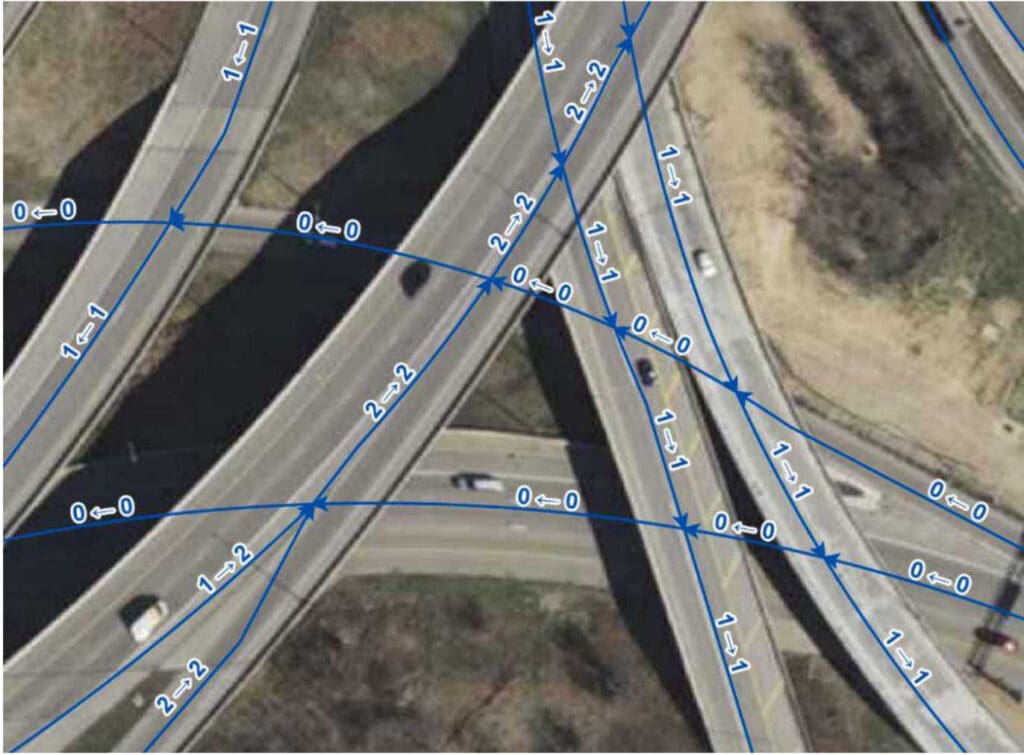
Figure 13-1 shows a junction of ramps where the road centerlines carry proper elevation attributes and therefore can be split at all intersections (regardless of whether these are true at-grade intersections) without affecting other business uses such as vehicle routing. Arrows along a road centerline indicate the end of that road centerline (i.e., a split).
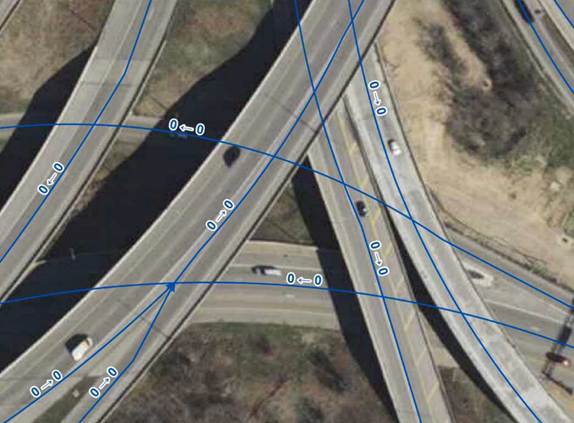
Figure 13-2 shows the same junction of ramps as in Figure 13-1, but the road centerlines do not carry proper elevation attributes and therefore are only split at true at-grade intersections so as not to interfere with other business uses such as vehicle routing. Arrows along a road centerline indicate the end of that road centerline (i.e., a split).
13.3.2 Segmenting Roads Special Cases.
In most cases, roads should not be split at driveways, unnamed roads, or parking lots. There are some situations where splitting a road centerline at these intersections may be beneficial for routing first responders, particularly in rural areas where there are not many addressed properties or where an addressed structure may not be visible from or is located a long distance from the road. Breaking a road centerline at these intersections allows the address ranges to be refined and provide more accurate geocoding results.
Special consideration is needed for segmentation at intersections with unaddressed alleys. Generally, if an alley is named and routable, the intersecting street should be broken. However, these named alleys should be assigned a very low speed limit (e.g., 5 or 10mph maximum) to deter automated routing of vehicles down then. Inclusion of unaddressed alleys is a local decision and should consider the capabilities of the local CAD software.
There are often specific requirements for roads segmentation based on the needs of the local CAD software and attributes that may need to be carried in the Road Centerline layer to support CAD functionality.
Consultation with the Core Services Provider and understanding the requirements of the local CAD software is necessary to determine when additional segmentation may be needed.
13.3.3 Changes in Addressing Grids
Road centerlines in the areas of Wisconsin that use local addressing grids require segmentation where the address range prefix changes. This can occur anywhere along a road centerline and not necessarily at an intersection with another road. Some of the local addressing grids in Wisconsin include directionals (N, S, E, W) in the address range prefix, representing a number of blocks in one direction, and then a second direction, from a starting point.
In Figure 13-3 below, Saint James Drive requires segmentation when crossing into the next grid block to the west, where the number part of the Address Number Prefix changes from W184N to W185N.
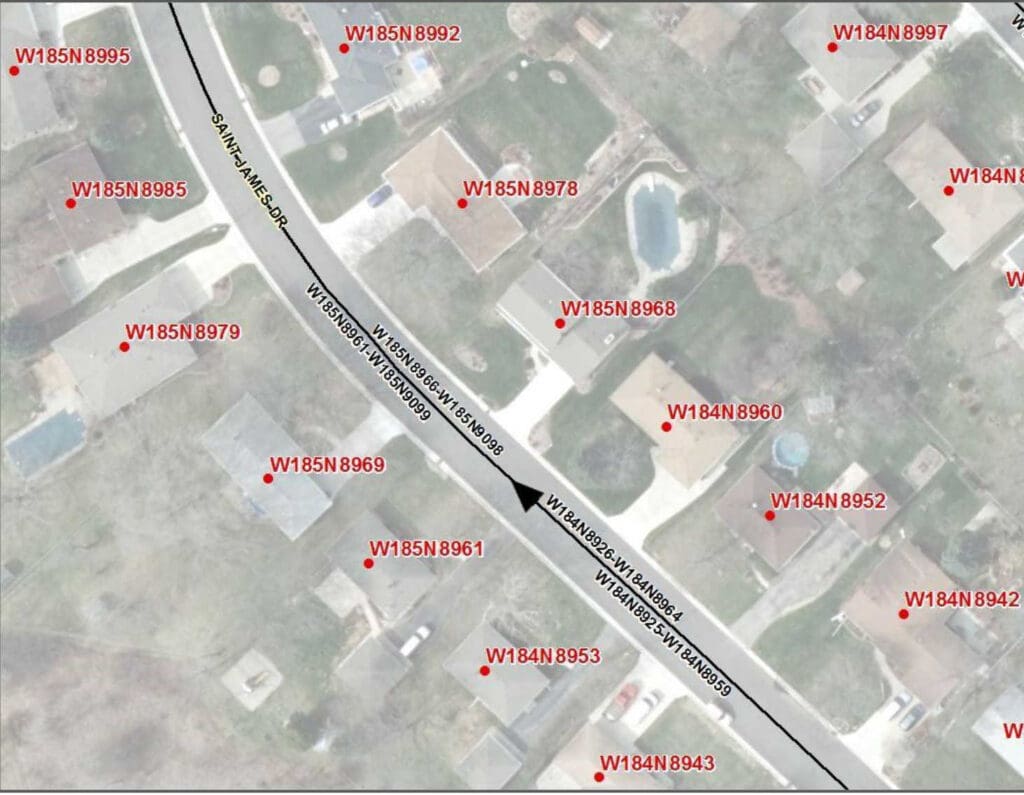
Sometimes the entire Address Number Prefix changes such as when a road changes direction. For example, in Figure 13-4 below, where Quail Run is generally running E/W, the Address Number Prefix is S37W. However, when Quail Run turns and begins running in a more N/S direction, the Address Number Prefix changes to W286S. Quail Run requires segmentation when the Address Number Prefix changes from S37W to W286S.
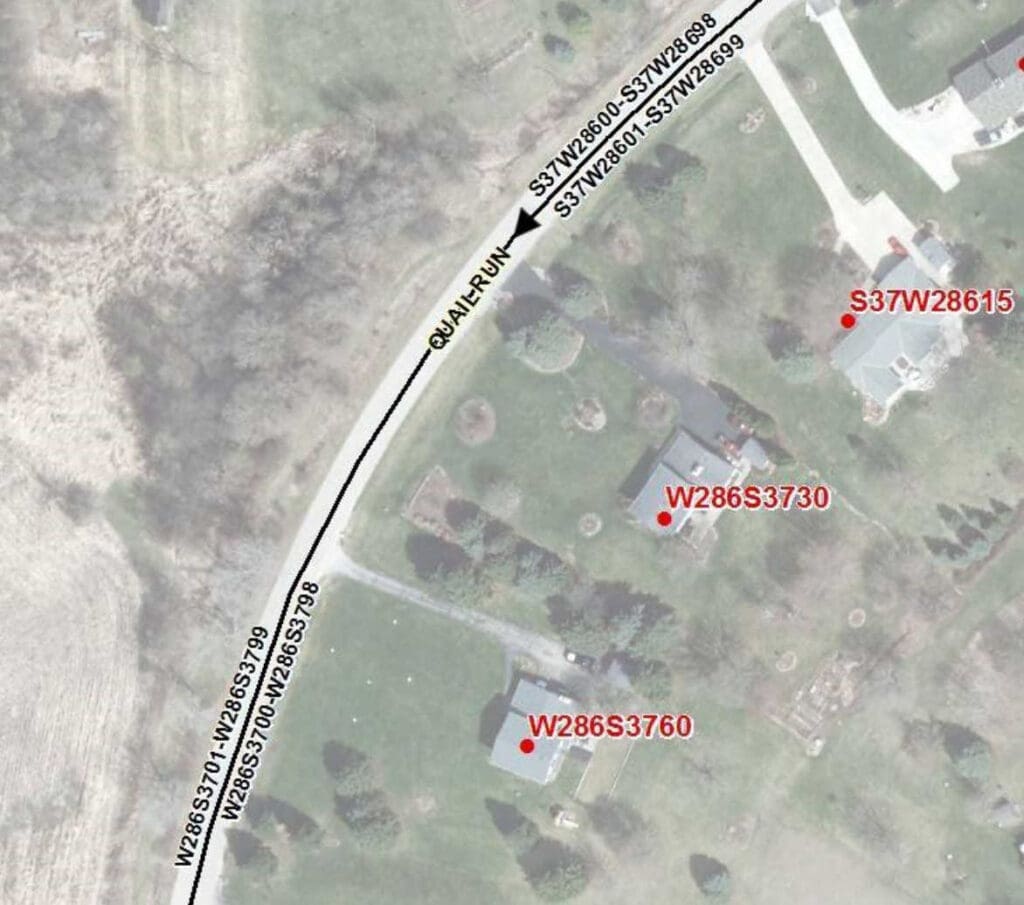
Not all local addressing grids in Wisconsin include directionals in their grid system. In Figure 13-5 below, the address ranges for the N/S section of North Breezeland Road start at 1200/1201 while the address ranges for the E/W section of North Breezeland Road start at 34800/34801. Not only is there a large gap in the address ranges, the direction of increasing addressing is away from each other. North Breezeland Road requires segmentation where the address ranges change due to the local addressing grid numbering.
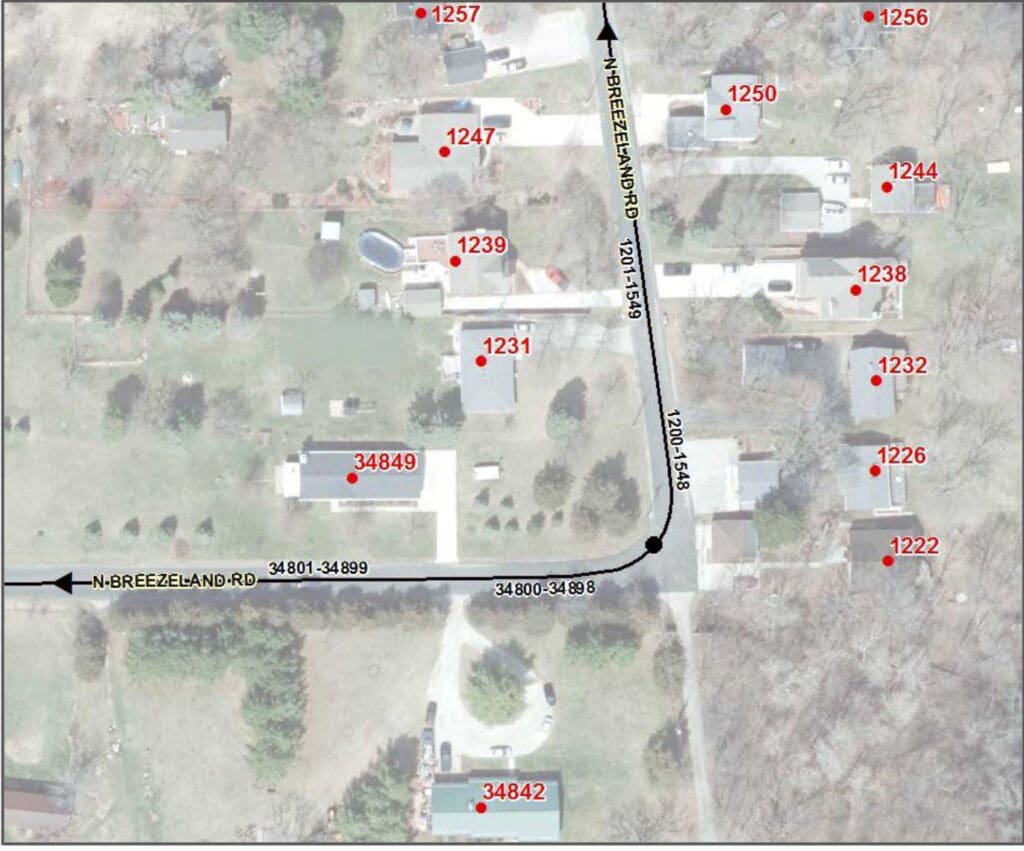
13.3.4 Segmentation and Alignment at Boundaries
Aligning Road Centerlines at boundaries is essential for providing accurate locations for the NG9-1-1 Location Validation and Emergency Call Routing Functions and other 9-1-1 applications that rely upon geocoded locations derived from the Road Centerline address ranges. Road Centerlines must be aligned and snapped to boundaries with different jurisdictions or emergency service responsibilities so that the geocoded locations fall within the correct jurisdiction, PSAP, and Emergency Service Provider boundaries.
Road centerline splitting is critical when Required field values such as Country, State, County, Incorporated Municipality, or PSAP Boundary change as these values impact call routing.
To reduce the amount of road centerline splitting, some 9-1-1 Authorities have adopted best practices recommending Public Safety agencies develop jurisdictional boundaries that coincide with existing/natural centerline breaks such as intersections, bridges, etc.
If a Road Centerline is contiguous with a boundary (e.g., County Line Road), it must be aligned with the corresponding boundary, node for node. This is especially critical for Emergency Call Routing where the slightest deviation may result in a geocoded location being placed into the wrong PSAP Boundary polygon and then the call being routed to the incorrect PSAP.
Agreement on exactly where these boundaries are located is necessary for emergency response and data maintenance responsibilities. It is recommended that a “stitch point layer” be created that represents the location of points where GIS data from one jurisdiction ends and where the GIS data for the adjacent jurisdiction begins. These would be points where road centerline segments would be
snapped to and the vertices where polygon boundaries between neighboring jurisdictions would need to align and be snapped to. Counties and local municipalities must agree on the location of these points both within Wisconsin and between their neighboring states. These points do not need to represent formal or legal boundaries but instead represent their agreed upon location for data maintenance purposes.
When aligning road centerline data with these neighboring jurisdictions, counties and other states, care should be taken to ensure that there are no spatial overlaps or gaps in the data. Working directly with the neighboring jurisdictions will greatly reduce these issues with the data.
In some cases, a PSAP Boundary does not align with a County Boundary due to the agreed upon response areas. Road centerlines must be split at the PSAP boundary and the County Boundary, regardless of how close they may be located to each other. Figure 13-6 below shows Hahn Road split at the Vilas and Forest County line. Even if the three addresses in Vilas County were within the Forest County PSAP Boundary, Hahn Road must still be split at the county boundary to accommodate the Area Name elements (e.g., County, Incorporated Municipality) and the change in the local addressing grid for the address ranges.
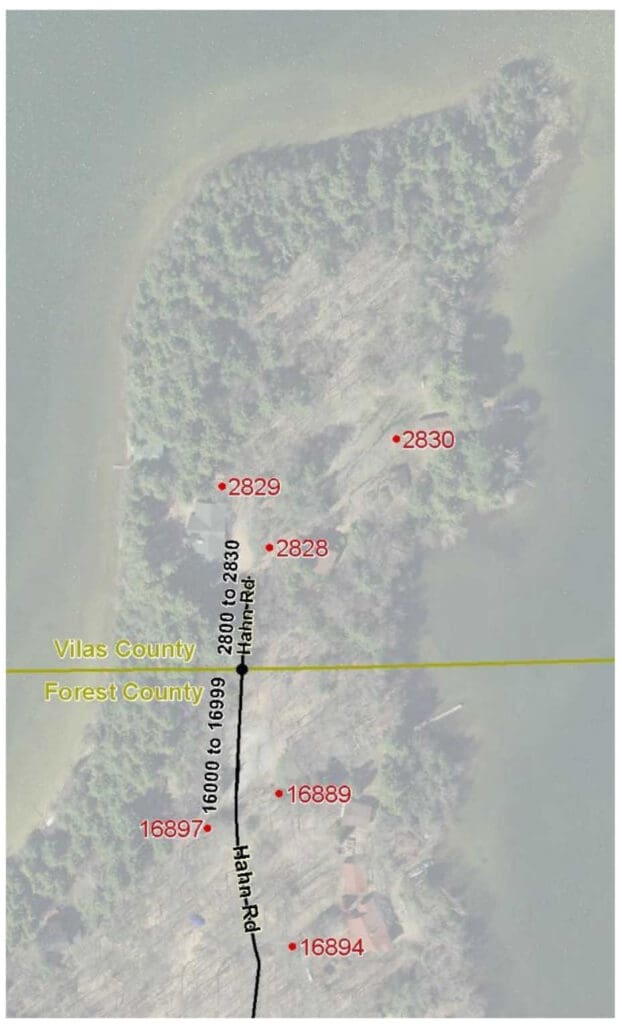
13.4 Naming and Addressing
13.4.1 Address Ranges
For use in NG9-1-1, the address ranges on adjacent Road Centerlines with the same street name that are within the same jurisdiction must not have unintentional gaps and overlaps. In Wisconsin, intentional gaps often exist at jurisdictional boundaries (e.g., ranges change from 4 digit numbers to 6 digit numbers) and at changes in the local addressing grid. When a street name extends over a boundary, the address ranges should be checked to confirm that there are no unintentional gaps or overlaps in the address ranges. Any issues should be brought to the attention of the local Addressing Authorities for resolution so that the address ranges properly reflect the addresses each PSAP is responsible for on the Road Centerlines within their PSAP Boundary.
There is no NENA requirement for address ranges to be populated as potential address ranges (also known as theoretical or buffered ranges) or as actual address ranges. There are pros and cons with each method, although potential address ranges generally require less maintenance. Consultation with the Core Services Provider and understanding the requirements of the local CAD software and other local GIS needs may impact which address range method to use.
Currently, some jurisdictions utilize 0-0 address ranges to accommodate local CAD software requirements such as on the median side of limited-access roads or within a large intersection of a divided road where there is no gap in the assigned addresses on each side of the intersection. In general, 0-0 address ranges should be avoided as 0-0 ranges may conflict with some quality control processes (e.g., duplicate 0-0 address ranges with the same Street Name). On rare occasions, an address range may need to start with 0 if the first assigned address has a value less than one (e.g., ½, ¼, .5).
13.4.2 Different Street Names on Each Side of the Road Centerline
Though uncommon, there are some roads along jurisdictional boundaries that have been assigned different street names on each side of the road. This can be confusing to responders and require GIS data to be falsely portrayed in order to include both street names for use in the NG9-1-1 Location Validation and Emergency Call Routing Functions. Rather than trying to make the GIS data fit the situation, the Street Naming Authorities should work together to come to agreement on a single street name that can be used for both sides of the street. If a common resolution is unable to be obtained, it is recommended that two Road Centerlines be created and placed slightly offset (parallel) to each other, representing their direction of travel, and be brought back together at a single point at intersections. Each alignment would be populated with the Street Name as assigned by its Street Naming Authority and addressed only on the side of the road with that Street Name. Stacked Road Centerlines are not recommended as they may cause issues with local CAD systems.
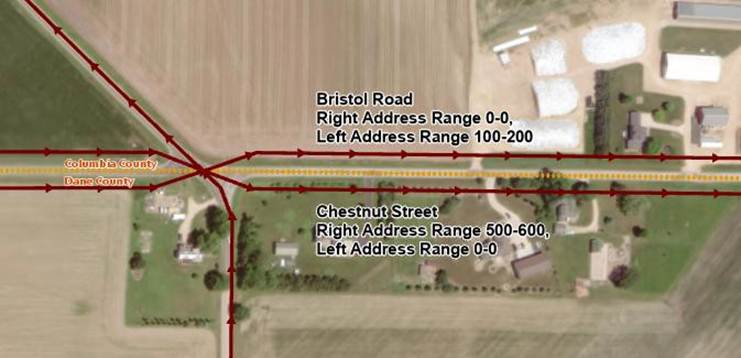
13.4.3 Road Centerline in a Different Jurisdiction than the Addressed Properties
On occasion, jurisdictional boundaries may parallel and fall along one side of a Road Centerline rather than being coincident with the Road Centerline. For NG9-1-1 Location Validation and Emergency Call Routing purposes, the Road Centerline attributes must reflect the addressed properties on each side of the Road Centerline, regardless of where the physical roadway is located.
13.4.4 Interstates/Highways
Interstates and limited-access highways are named with their jurisdiction and route number. Travel direction (e.g., northbound, southbound, eastbound, westbound) is often not part of the official street name but is important for responders and other service providers that need to know which side of the highway a location is associated with. It is recommended that the travel direction be included in the Post Modifier in lowercase as “northbound”, “southbound”, “eastbound”, or “westbound”.
Example: I90 EB and I39 NB
Street Name Pre Type: Interstate
Street Name: 90
Street Name Post Modifier: eastbound
Street Name Pre Type: Interstate
Street Name: 39
Street Name Post Modifier: northbound
13.4.5 Ramps and Interchanges
Ramp and interchange naming can be a particularly challenging. It is strongly recommended that as much information as possible be put into the Street Name field for ramps, including the FROM road, TO road, travel direction, designation as an on ramp or off ramp, and exit number as appropriate. Ramps should be single segments unless a physical barrier exists that splits the ramp for separate travel directions.
The following ramp naming convention is recommended, with everything placed in the Street Name field:
<Ramp/Exit #> <FROM Street> <travel direction> to <TO Street> <travel direction>
Where:
- Ramp/Exit #: The text “On Ramp” or “Off Ramp” and, if applicable, “Exit <#>”
Note: If there is no exit number for ramps connecting an undivided road and a limited-access road, then “On Ramp” and “Off Ramp” are preferred to a generic “Ramp” designation.
- FROM Street: Route/Street Name that the ramp is exiting from
- TO Street: Route/Street Name that the ramp is going to
- Travel direction: NB, SB, EB, WB
Due to the current 60 character field width limitation of the Street Name field, some abbreviations are necessary for the ramp names. For consistency, abbreviations are allowed ONLY for the travel direction (i.e., NB, SB, EB, WB) and the road jurisdiction for numbered routes in a ramp name. Everything else must be fully spelled out. The allowable abbreviations for the road jurisdiction in a ramp name are:
- I – Interstate
- USH – United States Highway, United States Route
- STH – State Highway, State Trunk Highway, State Route, State Road
- CTH – County Highway, County Trunk Highway, County Route, County Road, County
Example ramp names using the recommended ramp naming convention:
- Street Name: Off Ramp Exit 87 I39 NB to STH 33
- Street Name: Off Ramp Exit 240 I94 WB to STH30 WB
- Street Name: Off Ramp STH 54 WB to Bay Settlement Road
- Street Name: On Ramp West Silver Spring Drive EB to I43 SB
13.5 Overlapping Routes and Multiple Street Names
Street names are an important part of an NG9-1-1 system. However, in many cases, roads can be known by several different street names. Local jurisdictions may assign a local name for a road, while the Wisconsin DOT may assign a state highway number to that same road. As a further complication, the road may also carry a US route number, a second state route number, a county route number, or a memorial or honorarium name for that same road.
These multiple street names are all important, however, the official 9-1-1 name assigned by the Street Naming Authority is the Street Name that must be populated in the Road Centerlines layer for NG9-1-1 Location Validation and Emergency Call Routing purposes. To easily keep track of street name alias you can build a Street Name Alias Table. Documentation required to create a Street Name Alias Table is located in Appendix B | Street Name Aliases.
Organizations with local CAD systems that can currently use related tables should consider developing an Street Name Alias Table now in a format that can be used by their CAD system, if time and resources permit. More advanced CAD systems may allow alias street names to be parsed into the Street Name elements while others may initially only be able to handle a simple concatenated full street name. Any work done now would not be lost but be an important first step for development the future NG9-1-1 Street Name Alias Table.
13.5.1 Street Naming Hierarchy
The most important thing to remember is that for NG9-1-1 purposes, the official 9-1-1 name assigned by the Street Naming Authority is the Street Name that must be populated in the Road Centerlines layer.
All other names are considered alias street names and would be populated in the Alias Street Name Table.
Where named and numbered roads overlap, it is usually clear which street name is the official 9-1-1 street name to populate in Road Centerline layer. However, there are some situations where the street name overlap is in a small, limited area (e.g., traffic circles, roundabouts, exit ramps that lead to multiple roads) and determining which official 9-1-1 street name to populate in the Road Centerlines layer may not be straightforward. For these situations where two official 9-1-1 Street Names overlap, follow this hierarchy for populating the Street Name in the Road Centerlines:
- Interstate Name (highest priority)
- Interstate Business Route name
- US Route name
- US Business, Alternate, or Truck Route name
- State Route name
- State Business, Alternate, or Truck Route name
- County Route Name
- Other local or memorial street name (lowest priority)
Using this hierarchy, the highest jurisdiction route name would be put into the Road Centerline Street Name, and the lower jurisdiction route would go into the Street Name Alias Table. When multiple routes with the same jurisdiction overlap, the lowest route number would go into the Road Centerline Street Name and the higher route number(s) would go into the Street Name Alias Table.
For example, sometimes an exit ramp leads to more than one connected road but only one of the connected street names can be used for the “TO Street” in the ramp name. For the road centerline leaving the “FROM Street,” the “TO Street” in the ramp name should follow the naming hierarchy above and be populated with the highest jurisdiction route name. The lower jurisdiction route would go into the Street Name Alias Table. At some point, the ramp will split and the centerline for each ramp after the split should be named with the “TO Street” for the connected road it leads to.
13.6 Roundabouts and Traffic Circles
Naming of roundabouts and traffic circles can be complicated, particularly when routes overlap the official 9-1-1 street name or when street names end or change at the circle. Many of the Street Naming Hierarchy concepts discussed above in Section 13.5, Overlapping Routes and Multiple Street Names, can be applied to roundabouts and traffic circles.
13.6.1 If two roads intersect at a roundabout or traffic circle
Populate the Street Name elements with the official 9-1-1 street name on those segments in the circle that one would traverse to get to the other side of the circle. In situations where a segment in the circle would be traversed by both intersecting roads, populate the Street Name elements with the street name of the road with the higher jurisdiction, following the same Street Naming Hierarchy as established above in Section 13.5, Overlapping Routes and Multiple Street Names. If both roads only have a local street name, populate the Street Name elements with the name of the street that typically has a higher traffic flow. All other overlapping street names and route numbers would go into the Street Name Alias Table.
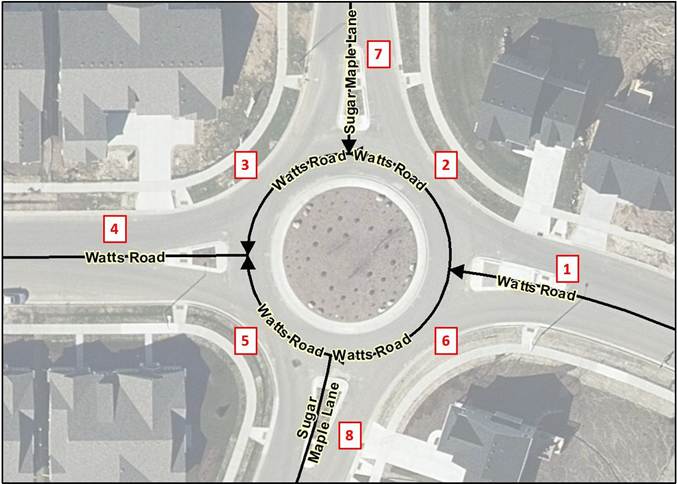
For example, in Figure 13-8 above, Watts Road runs east-west through the roundabout and Sugar Maple Lane runs north-south through the roundabout. Both are the official 9-1-1 name as assigned by the Street Naming Authority and both are local roads at the same hierarchy. Since Watts Road has a higher traffic flow than Sugar Maple Lane, the Street Name elements for segments 2, 3, 5, and 6 in the circle are populated with Watts Road and Sugar Maple Lane would be populated as an Alias Street Name in the Street Name Alias Table for these segments. Table 13-1 below provides the recommended population of the Street Name elements and the Street Name Alias Table for all segments in Figure 13-8.
Table 13-1 Population of Street Names in Figure 13-5
Segment #: 1
Street Name Pre Modifier:
Street Name Pre Directional:
Street Name Pre Type:
Street Name Pre Type Separator:
Street Name: Watts
Street Name Post Type: Road
Street Name Post Directional:
Street Name Post Modifier:
Alias Street Name Table:
Segment #: 2
Street Name Pre Modifier:
Street Name Pre Directional:
Street Name Pre Type:
Street Name Pre Type Separator:
Street Name: Watts
Street Name Post Type: Road
Street Name Post Directional:
Street Name Post Modifier:
Alias Street Name Table: Sugar Maple Lane
Segment #: 3
Street Name Pre Modifier:
Street Name Pre Directional:
Street Name Pre Type:
Street Name Pre Type Separator:
Street Name: Watts
Street Name Post Type: Road
Street Name Post Directional:
Street Name Post Modifier:
Alias Street Name Table: Sugar Maple Lane
Segment #: 4
Street Name Pre Modifier:
Street Name Pre Directional:
Street Name Pre Type:
Street Name Pre Type Separator:
Street Name: Watts
Street Name Post Type: Road
Street Name Post Directional:
Street Name Post Modifier:
Alias Street Name Table:
Segment #: 5
Street Name Pre Modifier:
Street Name Pre Directional:
Street Name Pre Type:
Street Name Pre Type Separator:
Street Name: Watts
Street Name Post Type: Road
Street Name Post Directional:
Street Name Post Modifier:
Alias Street Name Table: Sugar Maple Lane
Segment #: 6
Street Name Pre Modifier:
Street Name Pre Directional:
Street Name Pre Type:
Street Name Pre Type Separator:
Street Name: Watts
Street Name Post Type: Road
Street Name Post Directional:
Street Name Post Modifier:
Alias Street Name Table: Sugar Maple Lane
Segment #: 7
Street Name Pre Modifier:
Street Name Pre Directional:
Street Name Pre Type:
Street Name Pre Type Separator:
Street Name: Sugar Maple
Street Name Post Type: Lane
Street Name Post Directional:
Street Name Post Modifier:
Alias Street Name Table:
Segment #: 8
Street Name Pre Modifier:
Street Name Pre Directional:
Street Name Pre Type:
Street Name Pre Type Separator:
Street Name: Sugar Maple
Street Name Post Type: Lane
Street Name Post Directional:
Street Name Post Modifier:
Alias Street Name Table:
13.6.2 If a single street name ends at a roundabout or traffic circle
Populate the Street Name elements with the official 9-1-1 street name of the primary road that traverses through the circle on those segments in the circle that one would traverse to get to the other side of the circle. Continue the ending street name into the circle, populating the ending street name on those segments in the circle that one would traverse to get to the other side of the circle and populating the ending street name on those segments in the circle one would have to traverse to get from the primary road to the ending street. For routing purposes, the street name of the primary road that traverses through the circle would be populated as an Alias Street Name in the Street Name Alias Table for those segments in the circle populated with the ending street name.
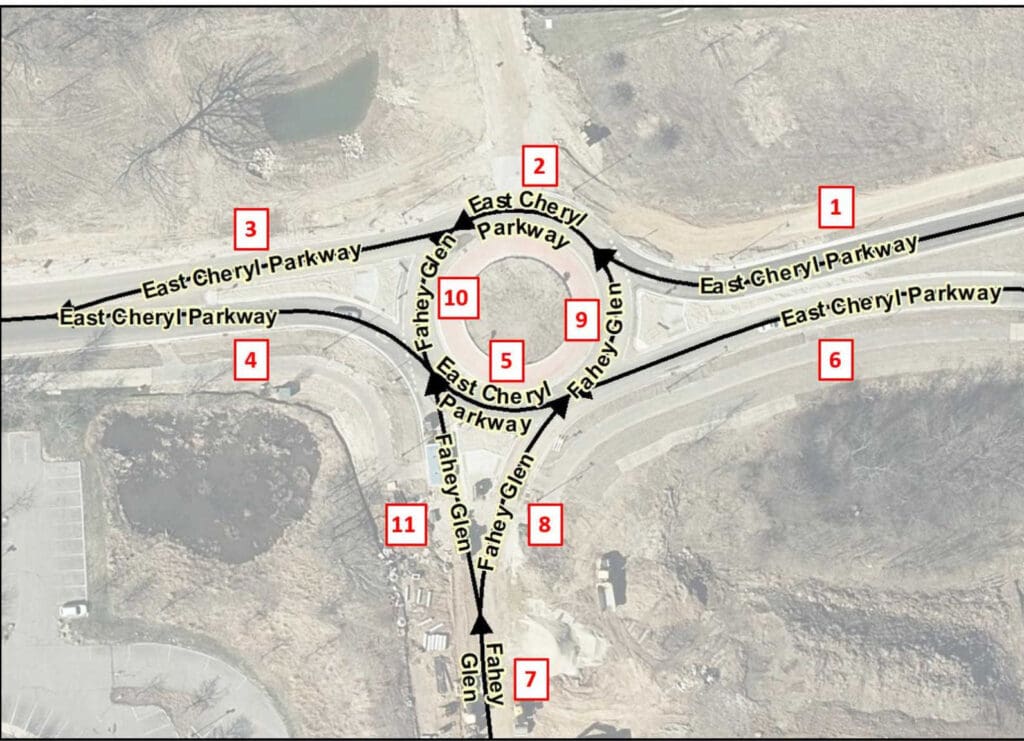
For example, in Figure 13-9 above, Fahey Glen ends at the roundabout where it intersects with East Cheryl Parkway. The Street Name elements for segments 2 and 5 in the circle would be populated with East Cheryl Parkway since it runs east-west through the circle and these are the primary segments one would traverse through the circle. The Street Name elements for segment 9 in the circle would be populated with Fahey Glen in order to travel from Fahey Glen to westbound East Cheryl Parkway. The Street Name elements for segment 10 in the circle would also be populated with Fahey Glen in order to travel from westbound East Cheryl Parkway to Fahey Glen. For routing purposes, segments 9 and 10 in the circle would be populated with East Cheryl Parkway as an Alias Street Name in the Street Name Alias Table. Table 13-2 below provides the recommended population of the Street Name elements and the Street Name Alias Table for all segments in Figure 13-9.
Table 13-2 Population of Street Names in Figure 13-9
Segment #: 1
Street Name Pre Modifier:
Street Name Pre Directional: East
Street Name Pre Type:
Street Name Pre Type Separator:
Street Name: Cheryl
Street Name Post Type: Parkway
Street Name Post Directional:
Street Name Post Modifier:
Alias Street Name Table:
Segment #: 2
Street Name Pre Modifier:
Street Name Pre Directional: East
Street Name Pre Type:
Street Name Pre Type Separator:
Street Name: Cheryl
Street Name Post Type: Parkway
Street Name Post Directional:
Street Name Post Modifier:
Alias Street Name Table:
Segment #: 3
Street Name Pre Modifier:
Street Name Pre Directional: East
Street Name Pre Type:
Street Name Pre Type Separator:
Street Name: Cheryl
Street Name Post Type: Parkway
Street Name Post Directional:
Street Name Post Modifier:
Alias Street Name Table:
Segment #: 4
Street Name Pre Modifier:
Street Name Pre Directional: East
Street Name Pre Type:
Street Name Pre Type Separator:
Street Name: Cheryl
Street Name Post Type: Parkway
Street Name Post Directional:
Street Name Post Modifier:
Alias Street Name Table:
Segment #: 5
Street Name Pre Modifier:
Street Name Pre Directional: East
Street Name Pre Type:
Street Name Pre Type Separator:
Street Name: Cheryl
Street Name Post Type: Parkway
Street Name Post Directional:
Street Name Post Modifier:
Alias Street Name Table:
Segment #: 6
Street Name Pre Modifier:
Street Name Pre Directional: East
Street Name Pre Type:
Street Name Pre Type Separator:
Street Name: Cheryl
Street Name Post Type: Parkway
Street Name Post Directional:
Street Name Post Modifier:
Alias Street Name Table:
Segment #: 7
Street Name Pre Modifier:
Street Name Pre Directional:
Street Name Pre Type:
Street Name Pre Type Separator:
Street Name: Fahey
Street Name Post Type: Glen
Street Name Post Directional:
Street Name Post Modifier:
Alias Street Name Table:
Segment #: 8
Street Name Pre Modifier:
Street Name Pre Directional:
Street Name Pre Type:
Street Name Pre Type Separator:
Street Name: Fahey
Street Name Post Type: Glen
Street Name Post Directional:
Street Name Post Modifier:
Alias Street Name Table:
Segment #: 9
Street Name Pre Modifier:
Street Name Pre Directional:
Street Name Pre Type:
Street Name Pre Type Separator:
Street Name: Fahey
Street Name Post Type: Glen
Street Name Post Directional:
Street Name Post Modifier:
Alias Street Name Table:
Segment #: 10
Street Name Pre Modifier:
Street Name Pre Directional:
Street Name Pre Type:
Street Name Pre Type Separator:
Street Name: Fahey
Street Name Post Type: Glen
Street Name Post Directional:
Street Name Post Modifier:
Alias Street Name Table:
Segment #:11
Street Name Pre Modifier:
Street Name Pre Directional:
Street Name Pre Type:
Street Name Pre Type Separator:
Street Name: Fahey
Street Name Post Type: Glen
Street Name Post Directional:
Street Name Post Modifier:
Alias Street Name Table:
13.6.3 If multiple street names end at a roundabout or traffic circle
Populate the Street Name elements on those segments in the circle exactly as described above in Section 13.6.2, If a single street name ends at a roundabout or traffic circle, with one exception. Both ending street names would only be populated on those segments in the circle one would have to traverse to get to the road on the other side of the circle. For routing purposes, the ending street names would be populated as an Alias Street Name in the Street Name Alias Table for those segments in the circle one would traverse to get from the primary road to the ending street.
For example, in Figure 13-9 above, if a new road was built on the north side of East Cheryl Parkway and ended at the roundabout, all segments would be populated as noted above except:
- segment 10 would be populated with the new road’s Street Name and Fahey Glen would be another Alias Street Name for that segment, and
- segment 9 would have the new road’s Street Name as another Alias Street Name for that segment.
However, if multiple street names end at a roundabout or traffic circle and the primary road that traverses through the circle enters and exists the circle as undivided roads, all segments in the circle would be populated with the official 9-1-1 street name of the primary road. For routing purposes, the ending street names would be populated as an Alias Street Name on those segments in the circle that one would traverse to get to the road on the other side of the circle.
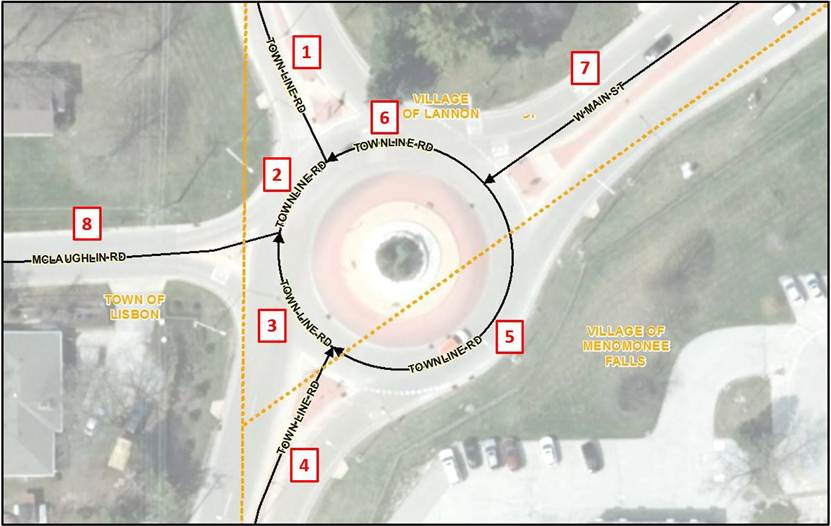
For example, in Figure 13-10 above, West Main Street and McLaughlin Road both end at the roundabout where they intersect with Town Line Road. Since Town Line Road enters and exists the roundabout as undivided roads, the Street Name elements for segments 2, 3, 5, and 6 in the circle are populated with Town Line Road. For routing purposes, segments 2 and 6 in the circle would be populated with West Main Street as an Alias Street Name in the Street Name Alias Table and segments 3 and 5 in the circle would be populated with McLaughlin Road as an Alias Street Name in the Street Name Alias Table.
To further complicate matters, Town Line Road is also known as County Trunk Highway V. In addition, County Trunk Highway F runs from West Main Street through the circle to the southern portion of Town Line Road. However, these are not the official 9-1-1 Street Names so they are populated as Alias Street Names in the Street Name Alias Table. Table 13-3 below provides the recommended population of the Street Name elements and the Street Name Alias Table for all segments in Figure 13-10.
Jurisdictional boundaries that cross through a traffic circle or roundabout such as in Figure 13-10 above, directly impact the Street Name assigned to the Road Centerline segments. It is important for the Street Naming Authorities to agree on the official 9-1-1 name for each of the segments within the circle so that NG9-1-1 Location Validation and Emergency Call Routing Functions operate as expected. Local CAD software requirements must also be considered as they may impact the assigned Street Name, particularly if the local CAD software cannot handle Street Name Alias Tables. Sometimes, assigning the traffic circle or roundabout its own unique 9-1-1 Street Name may resolve the conflicting needs of the different jurisdictions as well as the CAD software.
Table 13-3 Population of Street Names in Figure 13-10
Segment #: 1
Street Name Pre Modifier:
Street Name Pre Directional:
Street Name Pre Type:
Street Name Pre Type Separator:
Street Name: Town Line
Street Name Post Type: Road
Street Name Post Directional:
Street Name Post Modifier:
Alias Street Name Table: County Trunk Highway V
Segment #: 2
Street Name Pre Modifier:
Street Name Pre Directional:
Street Name Pre Type:
Street Name Pre Type Separator:
Street Name: Town Line
Street Name Post Type: Road
Street Name Post Directional:
Street Name Post Modifier:
Alias Street Name Table: West Main Street
County Trunk Highway V
County Trunk Highway F
Segment #: 3
Street Name Pre Modifier:
Street Name Pre Directional:
Street Name Pre Type:
Street Name Pre Type Separator:
Street Name: Town Line
Street Name Post Type: Road
Street Name Post Directional:
Street Name Post Modifier:
Alias Street Name Table: McLaughlin Road
County Trunk Highway V
County Trunk Highway F
Segment #: 4
Street Name Pre Modifier:
Street Name Pre Directional:
Street Name Pre Type:
Street Name Pre Type Separator:
Street Name: Town Line
Street Name Post Type: Road
Street Name Post Directional:
Street Name Post Modifier:
Alias Street Name Table: County Trunk Highway V
County Trunk Highway F
Segment #: 5
Street Name Pre Modifier:
Street Name Pre Directional:
Street Name Pre Type:
Street Name Pre Type Separator:
Street Name: Town Line
Street Name Post Type: Road
Street Name Post Directional:
Street Name Post Modifier:
Alias Street Name Table: McLaughlin Road
County Trunk Highway V
County Trunk Highway F
Segment #: 6
Street Name Pre Modifier:
Street Name Pre Directional:
Street Name Pre Type:
Street Name Pre Type Separator:
Street Name: Town Line
Street Name Post Type: Road
Street Name Post Directional:
Street Name Post Modifier:
Alias Street Name Table: West Main Street
County Trunk Highway V
County Trunk Highway F
Segment #: 7
Street Name Pre Modifier:
Street Name Pre Directional: West
Street Name Pre Type:
Street Name Pre Type Separator:
Street Name: Main
Street Name Post Type: Road
Street Name Post Directional:
Street Name Post Modifier:
Alias Street Name Table: County Trunk Highway F
Segment #: 8
Street Name Pre Modifier:
Street Name Pre Directional:
Street Name Pre Type:
Street Name Pre Type Separator:
Street Name: McLaughlin
Street Name Post Type: Road
Street Name Post Directional:
Street Name Post Modifier:
Alias Street Name Table:
13.7 Military Bases
Military bases may or may not have their own PSAP and responsibility for emergency services. In most cases, the military facility will share street name information but will not provide address specific information. It is recommended that the local 9-1-1 jurisdiction reach out to the military facility and work directly with them to obtain the most current information the facility is willing to provide.
14 Site/Structure Address Point Recommendations and Best Practices for GIS Data Development and Maintenance
14.1 General Best Practices
The Quality Control checks described in Section 11, Quality Control of Next Generation 9-1-1 GIS Data, provide valuable information into how the validation software looks at the Site/Structure Address Point layer to identify integrity issues and ensure consistent, valid data throughout the dataset. Ensuring that the data meets the requirements of the Address Point QC checks, Address Point to Road Centerline QC checks, and the synchronization of the ALI to the Site/Structure Address Point layer will eliminate unnecessary rework and ensure that the data meets the required specifications for the NG9-1-1 Location Validation and the Emergency Call Routing Functions. Quality control is a continuous process. The data maintenance plan for the Site/Structure Address Point layer must include these QC checks and at a minimum, resolution of all critical errors.
Address point placement should be based on an authoritative list of addresses, current orthoimagery or a high-quality data collection device, and source data with reliable attribution. The accuracy of the Site/Structure Address Point layer is only as good as the least accurate data source or data collection device that was used to create it.
Given today’s navigation technologies used by consumers and emergency responders, it is strongly recommended that Addressing Authorities assign an address based on the named road used to access the structure. This is especially important when there is no direct access from the road that the front entrance to the addressed structure faces. Emergency responders may waste valuable time backtracking to an address if the assigned address does not provide the most direct route to the structure.
14.2 Address Point Placement
The NENA Information Document for Development of Site/Structure Address Point Data for 9-1-1 NENA-INF-014.1-2025 [18] provides detailed guidelines on address point placement and subaddress data development. Review of the document is strongly recommended as it provides an in-depth discussion of five address point placement methodologies that meet NG9-1-1 Location Validation and Emergency Call Routing requirements. These include:
- Geocoding: Placement of an Address Point Based on Geocoding off of Road Centerlines
- Parcel: Placement of an Address Point Based on a Parcel
- Site: Placement of an Address Point Based on a Site
- Structure: Placement of an Address Point Based on a Structure(s)
- Property Access: Placement of an Address Point Based on Property Access
The document also includes a section on Address Point Placement for Subaddresses (specific locations within structures, sites, or within a group of structures and/or sites). As such, the NENA Information Document for Development of Site/Structure Address Point Data for 9-1-1 NENA-INF-014.1-2015 [18] should be considered a companion document to Section 14, Site/Structure Address Point Recommendations and Best Practices for GIS Data Development and Maintenance, in this document.
Address point placement is especially critical for NG9-1-1 Emergency Call Routing and dispatch. During NG9-1-1 Emergency Call Routing, the location of an identified address point is spatially compared to the PSAP Boundary to determine which PSAP to send the call. The location of the same identified address point is also spatially compared to the Emergency Services Boundaries to provide the call taker with the recommended Law, Fire and EMS providers that should respond to the call. The address point must fall within the correct PSAP Boundary or valuable time will be lost for call transfer to the correct PSAP.
14.2.1 Address Point versus Access Point
Address points are typically placed on the addressed feature (e.g., a structure or a site). However, there are some situations where an access point may be preferred. An access point is the point of access to the addressed feature and may represent a driveway, gate, an entrance to a building containing multiple addresses, or other entrance. Access points can also be used for a building with multiple entrances where each entrance serves many specific addresses (e.g., a high-rise building where certain entrances only allow access to units on specific floors.)
The access point can be useful for directing emergency responders to a structure that may be located far from the road it is addressed off of or may share a long driveway with several other addressed structures as shown below in Figure 14-1. In such cases, it may be useful to include an address point and an access point. Access points should be placed as a Property Access address point, offset from the road centerlines and in alignment with the direction of the increasing address ranges. Attributes on a Property Access address point should be populated with the same values as on the Structure address point it represents, with only the Placement Method attribute being populated differently. This is regardless as to whether the access point is physically located in a different jurisdiction or responder area since its location only represents from where off of a named road one would turn to access the addressed structure.
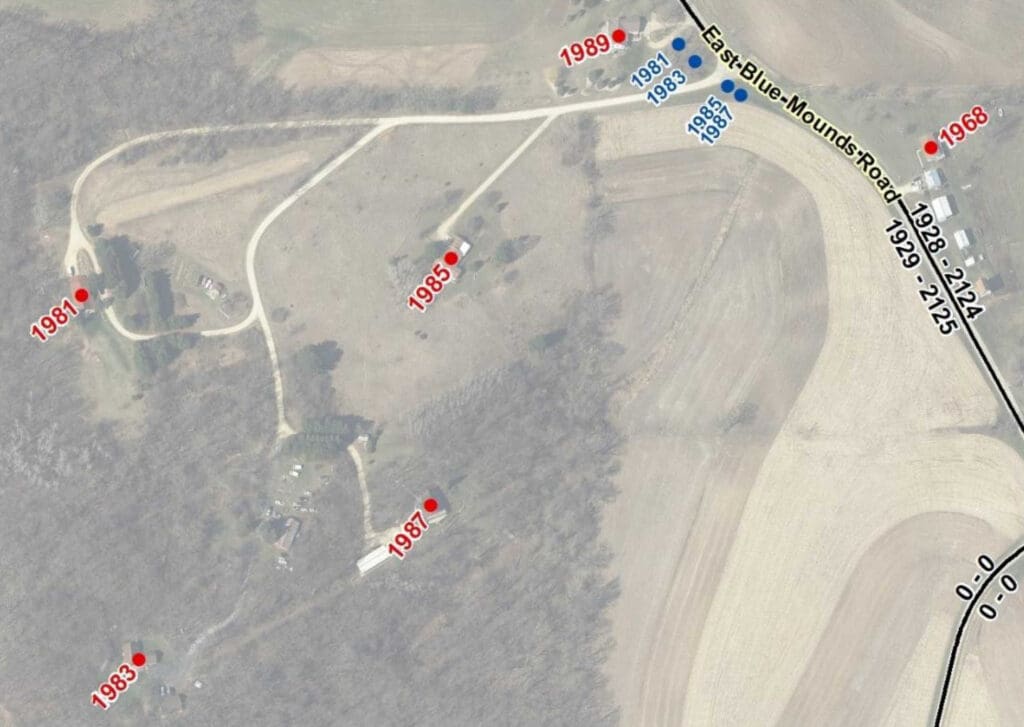
An access point can also be useful for directing emergency responders to the correct structure in a more expeditious manner when an addressed location has multiple entrances to the property as shown below in Figure 14-2, where there are three primary entrances into a campus that has two addressed structures.
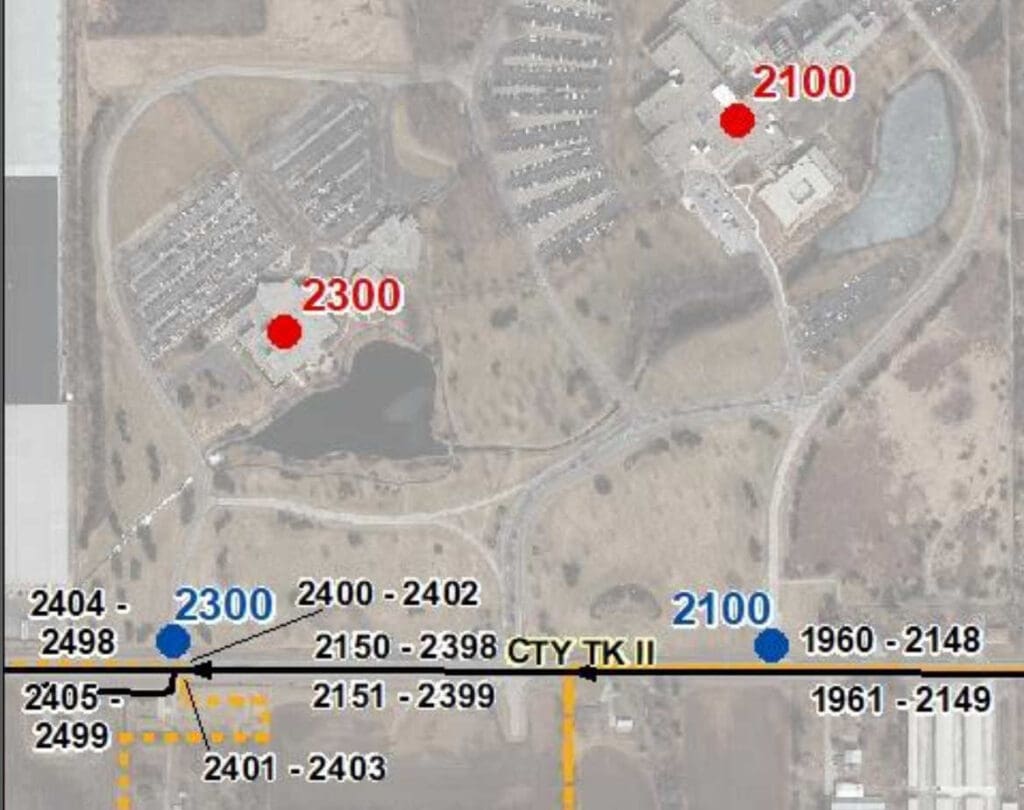
Road reconstruction projects for more safe and efficient traffic flow may result in the access to addressed properties being relocated so that access is from a different road than what the property is addressed off of, as shown below in Figure 4-3. If the properties are unable to be readdressed to the new access road (which is strongly recommended), then including both a Structure address point and a Property Access address point may benefit emergency responders by directing them to the relocated entrance.
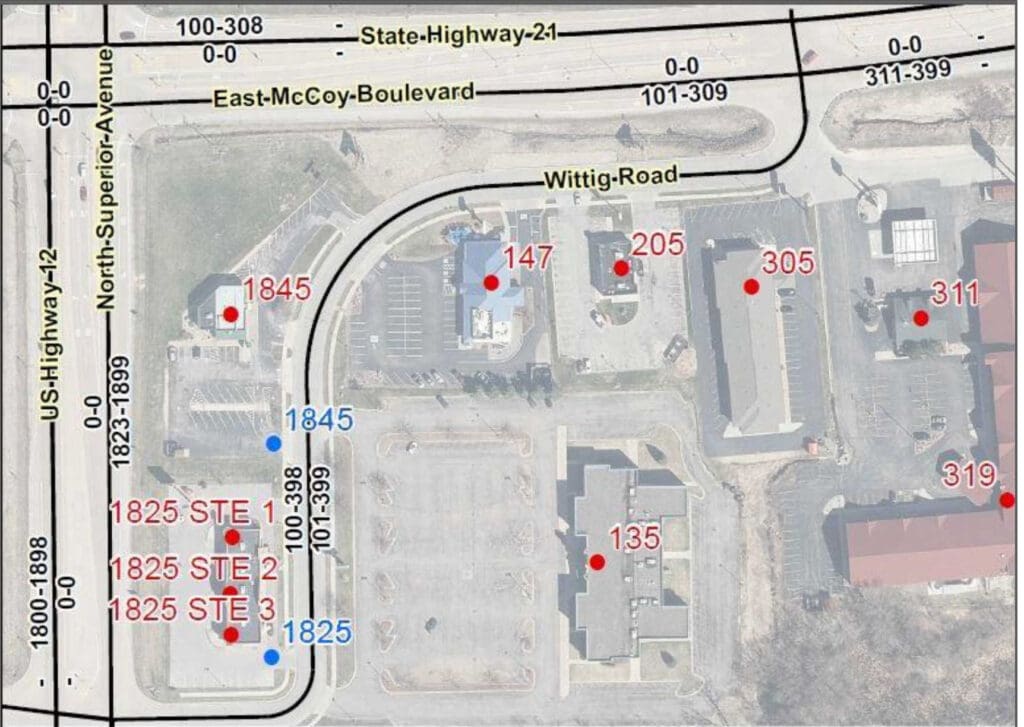
If both an access point and address point are shown, population of the Placement Method attribute (see 4.5.1) is strongly recommended to clearly differentiate the two points. It also provides a means to easily remove one or the other if a 9-1-1 application is unable to differentiate between them. A list of acceptable values can be found here: http://technet.nena.org/nrs/registry/SiteStructureAddressPointPlacementMethod.xml. See NENA Information Document for Development of Site/Structure Address Point Data for 9-1-1 NENA-INF-014.1-2015 [18], Section 3.4.5, Placement of an Address Point Based on Property Access, for more information.
14.3 Address Point Placement for Special Cases
In most cases, address point placement is straightforward with points placed on the center of a structure or site. Large structures or sites, particularly those with multiple entry points, may benefit by having the address point placed at the primary entrance to the structure or site. However, there are some situations that may require a little more research or even field visits to determine the correct placement location.
14.3.1 Multiple Addresses or Units within a Single Structure
Shopping centers, commercial buildings, condominiums, and duplexes contain multiple businesses or residences that are located within the same structure. In some cases, the individual units have been addressed with their own individual address number but in many situations, they share the same address number and are only differentiated by subaddress information (e.g., apartment, unit, suite, etc.). In both situations, address point placement is usually based on whether the units share an entrance to the building or have their own separate entrance.
Generally, Structure address points should be placed at or near each addressed unit’s building entrance, just within the building footprint and near the building base. This will keep the address points very close to their true location, even if future imagery shifts slightly, and will help avoid the urge to move the address points each time new imagery is acquired. This point placement method is shown in Figure 14-4 below, where each unit in a shopping center has its own separate entrance.
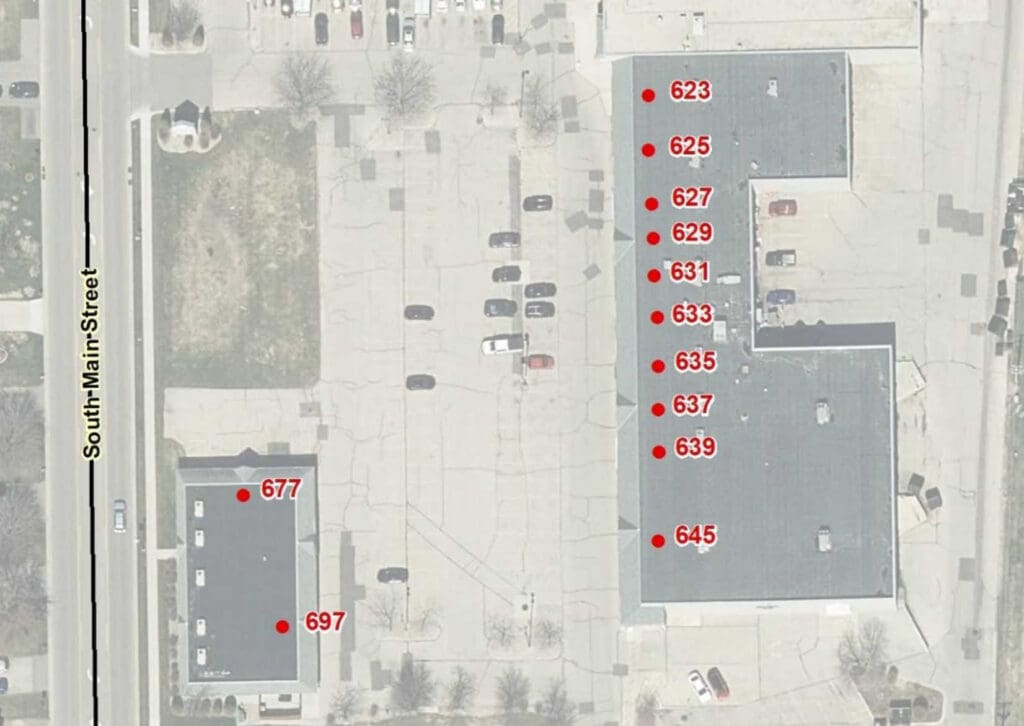
When addressed units share a common entrance, typical practice is to stack the address points at the shared building entrance as exactly where within the structure an individual unit is located is usually unknown. Structure address points should be placed just within the building footprint, near the shared entrance for the addressed unit. Consultation with the Core Services Provider and understanding the requirements of the local CAD software is necessary to determine whether stacked points can be used.
In Figure 14-5 below, two buildings share the same address with each building having two primary entrances. Each entrance provide access to four separate apartments. Four Structure address points are stacked at each building entrance, representing the four apartments that can be accessed through that entrance. Providing this level of detail for complicated addressing situations will help direct responders to the correct entrance, saving valuable time during an emergency.
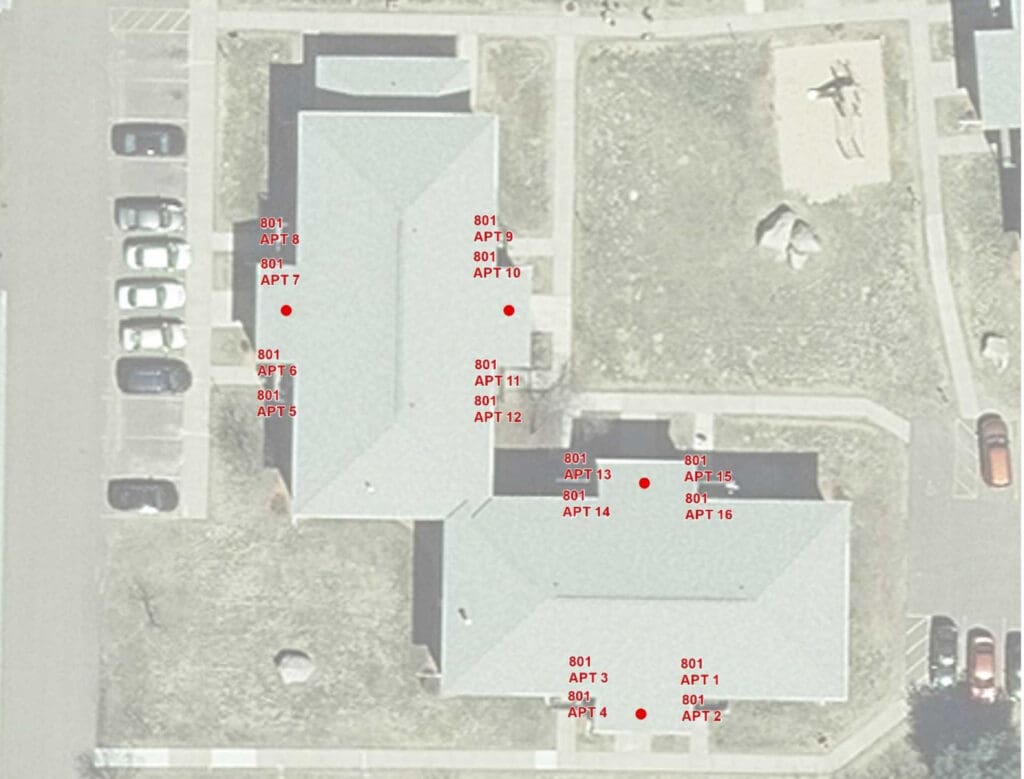
Some 9-1-1 applications and CAD software have difficulty with subaddresses. To alleviate this issue, an address point that has only the structure address and no subaddress information can be created and placed at the structure’s primary entrance. The address points with subaddress information can then be stacked on it. If subaddresses are not usable in an application, address points with populated subaddress fields can then be easily extracted from the file while still allowing other applications full use of the address points with subaddress information.
Trying to place address points exactly where individual units are located can be resource intensive to research, create, and maintain. Placement at this level of detail should be reserved for locations where knowing that level of detail will be valuable to the responders.
Large buildings may sometimes have multiple entrances with elevators located nearby that only serve specific floors. In these situations, it is important to make sure that address points are stacked at the building entrance associated with the elevator that serves their floor so that responders are directed to the correct entrance.
In rare situations, a structure may be split by a PSAP Boundary or Emergency Service Boundary. In these situations, it is critical that the address points are placed within the corresponding PSAP and Emergency Services Boundaries that services the address. This may not be at the structure entrance.
Some properties contain multiple structures and/or sites that share the same address and are only differentiated by a number, name, or other unique identifier (e.g., medical campus, mobile home park, correctional facility, campground).
At a minimum, each structure and/or site should have its own Structure address point with subaddress fields populated so that responders can be sent to the correct location. This is especially critical when the property is spilt by a PSAP Boundary or Emergency Service Boundary. Address points must be placed so that calls can be routed to the correct PSAP and the appropriate emergency service providers can be identified.
To assist responders, it is often helpful to create a Property Access address point that contains only the property address (no subaddress information) and place the address point at the primary access to the property, particularly if the property is very large or the CAD software does not recognize subaddresses as unique addresses. If subaddress information is known but one is not able to identify the specific structure and/or site it is associated with, Property Access address points with subaddress information can be stacked on this access point.
In the mobile home park in Figure 14-6 below, there are three separate unnamed driveways where the structures on each driveway share the same address but have different unit numbers. For example, Units 1-10 are all addressed as 1325 Wedgewood Drive, Units 11-31 are all addressed as 1350 Wedgewood Drive, and Units 32-43 are all addressed as 1375 Wedgewood Drive. Structure address points with subaddress information are placed on each structure. A separate Property Access address point with no subaddress information is placed at each driveway entrance for the three driveways that provide access to their specific units.
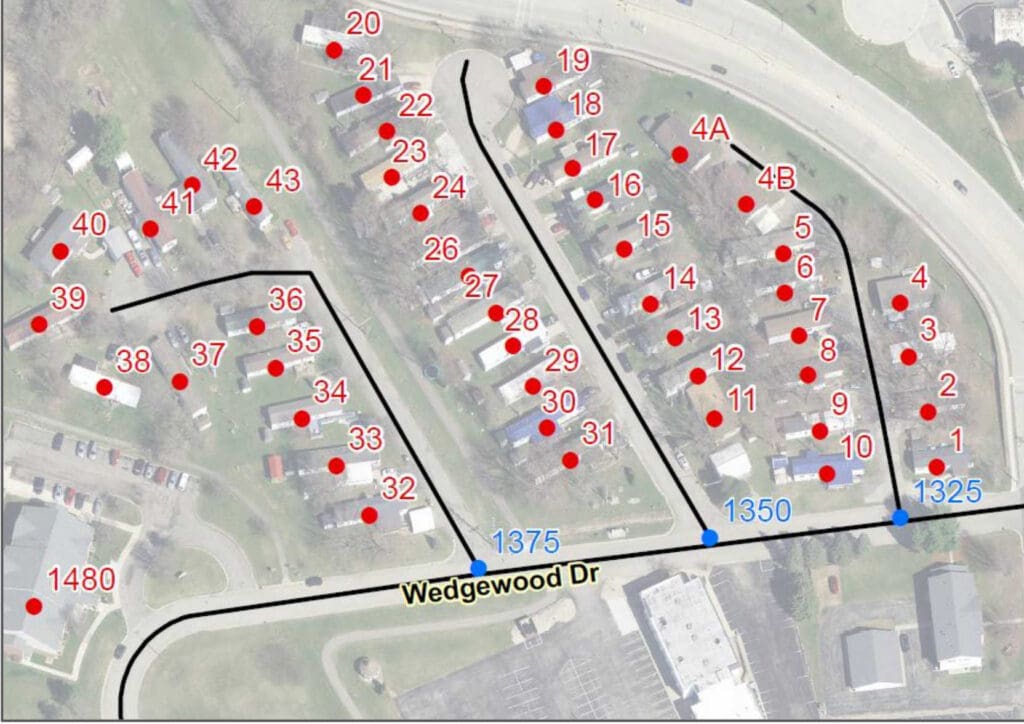
On occasion, properties containing multiple structures and/or sites that share the same address and are only differentiated by their subaddress information, may have an administrative building that carries the same address as the other units, but the administrative building does not have subaddress information.
Figure 14-7 below shows an example of this situation where all structures are addressed as 7539 US Highway 12 but are differentiated by their Trailer number, with the exception of the administrative building. It is addressed without any subaddress information.
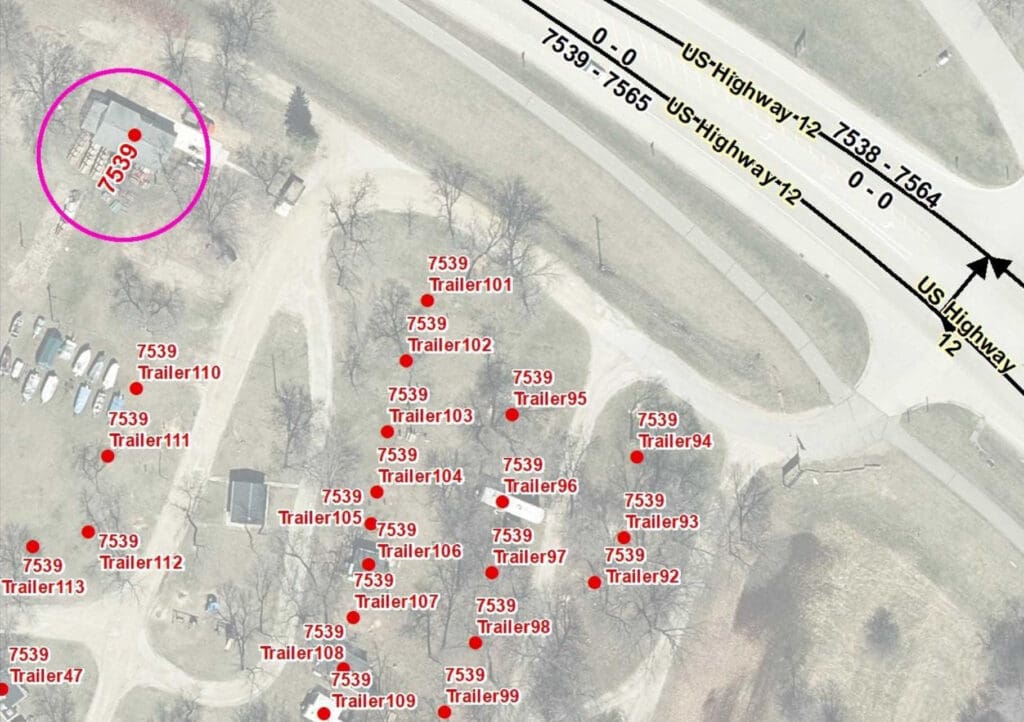
If the CAD system does not recognize subaddresses as unique addresses, only the Structure address point placed on the administration building will be recognized. For such a situation, consideration should be given to create an additional Property Access address point that contains only the property address (no subaddress information) to represent the access for all units at that location and place the Property Access address point at the primary access to the property.
14.3.3 Multiple Properties Sharing One Address
Large properties assigned a single address may consist of multiple parcels and even span across a road. A Structure address point for the property should be placed on the addressed structure regardless if the address conflicts with the address range odd/even parity on that side of the road. In such a case, the Structure address point would need to be flagged as an exception for Parity Checks during the QC process. If no structure exists on the addressed property, a Parcel address point should be placed on the side of the road that does not conflict with the address range odd/even parity. If there is a driveway or other main access to the property that goes to a specific feature on the property such as a swimming hole or fishing pond, a Property Access address point could be used instead of a Parcel address point.
14.3.4 Transient Structures
Mobile home parks, seasonal camps, and other addressed locations often have temporary structures that can be moved to a different location on the addressed property or be removed entirely from the property. For large properties where the temporary structure is moved frequently, a Property Access
address point should be placed at the access to the property or, if there is no primary access to the property, a Parcel address point should be used.
For small areas or areas where the temporary structure is usually located when it is on the property (e.g. mobile home park, campsite), the address point can be placed where the transient structure would normally be located. To minimize maintenance of the Placement Method attribute for such situations, populate Placement Method as “Site” if the address contains subaddress information (e.g., Lot #, Unit #, etc.) and “Parcel” if there is only one address for the property. This avoids having to constantly update the record when the temporary structure is removed from the property.
14.4 Location Markers
Mile posts, trail head marker, trail intersection markers, and other location markers provide a valuable reference for 9-1-1 callers when a civic address location is unavailable. If these locations will used for call routing purposes, they can be represented as an address point in the Site/Structure Address Points dataset by populating the Milepost field instead of, or in addition to, the Address Number fields. Alternatively, they can be placed in a Mile Marker layer that can be referenced by the telecommunicator. This is a recommended layer in the NENA Standard for NG9-1-1 GIS Data Model [5], but it is not used for the Emergency Call Routing or Location Validation Functions. Development and maintenance of these features and their associated layers is an important consideration when deciding how to represent them in the NG9-1-1 GIS data.
14.5 Military Bases and Tribal Nations
Military bases and tribal nations may or may not have their own PSAP and responsibility for emergency services. In most cases, they will share street name information with the local 9-1-1 jurisdiction but may not provide address specific information. It is recommended that the local 9-1-1 jurisdiction reach out to the military facility and tribal nations and work directly with them to obtain the most current information they are willing to provide. Some may share their address information but restrict usage for 9-1-1 operations only, not allowing the data to be publicly shared.
Local 9-1-1 jurisdictions having difficulties obtaining address information from military bases or tribal nations should reach out to the Office of Emergency Communications under the Wisconsin Department of Military Affairs for assistance.
15 Items Pending Future Work
The following items require additional research and/or development work:
- Development and maintenance of domains used within Wisconsin
- Develop consistent naming/addressing convention for:
- Crossover/connector roads on controlled-access highways
- Rest areas, service plazas and their buildings on controlled-access highways
- On and off ramps to rest areas and service plazas
- Minimum metadata elements required with local data submission and whether metadata should be on the data or in a separate file
- Monitor changes to the NENA Site/Structure Address Point Placement Method Registry
- Monitor changes to NENA Civic Location Data Exchange Format (CLDXF) Standard
- Monitor changes to NENA Standard for NG9-1-1 GIS Data Model
16 Terminology
Unless otherwise noted, the following terms are a subset of terms defined in the NENA Master Glossary of 9-1-1 Terminology [19] or the NENA Standard for NG9-1-1 GIS Data Model [5].
Addressing Authority
In Wisconsin, an Addressing Authority is a local, tribal, military, or county department responsible for issuing addresses and reconciling addressing discrepancies, through administrative procedures, to locations within its jurisdiction. The local and county authority is provided by state statute for the specific purpose of aiding in fire protection, emergency services, and civil defense.
ALI (Automatic Location Identification)
The automatic display at the PSAP of the caller’s telephone number, the address/location of the telephone, and supplementary emergency services information of the location from which a call originates.
CAD (Computer Aided Dispatch)
A computer-based system that aids PSAP Telecommunicators by automating selected dispatching and record‑keeping activities.
CLDXF (Civic Location Data Exchange Format)
A United States emergency services profile of PIDF‑LO that defines a set of data elements describing detailed street address information.
Domain (Data Domain)
An enumerated listing or range of valid values that may be used as an attribute. If no Data Domain is provided, any value that meets the format criteria may be used.
DNS (Domain Name System)
A globally distributed database for resolving host names to numeric IP addresses.
ECRF (Emergency Call Routing Function)
A functional element in NGCS (Next Generation 9‑1‑1 Core Services). It is a LoST protocol server where location information (civic or geocoordinates) and a Service URN are used to return a URI that routes an emergency call to the appropriate PSAP or responder agency.
ESInet (Emergency Services IP Network)
A managed IP network used for emergency services communications and shared by public safety agencies. It provides the transport infrastructure for NG9‑1‑1 services and can be built from dedicated or shared facilities. ESInets may interconnect at multiple levels to form an IP‑based “network of networks.” The term refers to the network, not the services running on it.
GCS (Geocode Service)
A web‑based service providing geocoding and reverse‑geocoding. Geocoding: Converts a civic‑address PIDF‑LO into a geodetic PIDF‑LO. Reverse‑geocoding: Converts a geodetic PIDF‑LO into a civic‑address PIDF‑LO.
i3
A shorthand term for a version of the NENA technical architecture introducing the concept of an ESInet. It represents the evolution toward an IP‑based emergency services network. The interim version is referred to as “i2.”
LoST (Location‑to‑Service Translation) Protocol
A protocol that takes location information and a Service URN and returns a URI. Used for location‑based call routing and as the protocol for the ECRF and LVF in NG9‑1‑1.
LVF (Location Validation Function)
A functional element in NGCS that validates civic location information against authoritative GIS data. A civic address is valid if it can be uniquely located, supports accurate call routing, and is specific enough for responders.
MCS (MSAG Conversion Service)
A web service converting between PIDF‑LO and MSAG data.
MDS (Mapping Data Service)
A service that returns GIS‑based images or features used to create map displays or support spatial analysis. Often used for out‑of‑area calls or to provide consistent map displays within a PSAP.
MSAG (Master Street Address Guide)
A database of street names and house‑number ranges within associated communities, defining Emergency Service Zones (ESZs) and Emergency Service Numbers (ESNs) to support proper 9‑1‑1 call routing.
NENA (National Emergency Number Association)
NENA is dedicated to improving and modernizing the 9‑1‑1 system through research, standards development, training, education, certification, outreach, and advocacy. As an ANSI‑accredited Standards Developer, NENA collaborates with public safety professionals and industry partners. Current efforts focus on NG9‑1‑1 implementation. See www.nena.org..
NGCS (Next Generation 9‑1‑1 Core Services)
The base set of services needed to process a 9‑1‑1 call on an ESInet. Includes ESRP, ECRF, LVF, BCF, Bridge, Policy Store, Logging Services, and typical IP services such as DNS and DHCP. Refers to the services, not the network.
PIDF‑LO (Presence Information Data Format – Location Object)
A flexible XML‑based format used to represent location information in SIP headers.
Registry
A single place for keeping valid data values associated with a specific data element.
SI (Spatial Interface)
A standardized NG9‑1‑1 interface between GIS data and functional elements that consume GIS data, such as ECRF/LVF and Mapping Data Services.
Street Naming Authority
In Wisconsin, a Street Naming Authority is the local, tribal, military, or county department responsible for approving or issuing street names and reconciling discrepancies through resolution or ordinance. Authority is provided by state statute to support fire protection, emergency services, and civil defense.
URI (Uniform Resource Identifier)
A character sequence that identifies a resource according to the syntax in RFC 3986. A URI may be a URL, a URN, or both. Example of a URI that is neither URL nor URN: sip:psap@example.com
URN (Uniform Resource Name)
A type of URI intended to serve as a persistent, location‑independent identifier. Example: urn:service.sos
WGS 84 (World Geodetic System 1984)
The reference coordinate system used by GPS and in cartography and navigation.
17 References
- Wisconsin Interoperability Council, 9-1-1 Subcommittee. Wisconsin Statewide NextGen9-1-1 Plan. Madison, WI: 9-1-1 Subcommittee, June 2020. https://dma.wi.gov/DMA/divisions/oec/library/2020/2020_WI_Statewide_NextGen9-1-1_Plan_FINAL.pdf.
- Wisconsin Interoperability Council. Wisconsin Emergency Communication Strategy. Madison, WI: IC, April 2019. https://dma.wi.gov/DMA/divisions/oec/library/2019/WI_Emergency_Communications_Strategy2019.pdf
- Wisconsin Land Information Association. Street Centerline Data Standard. Wild Rose, WI: WLIA, approved August 12, 2020. https://www.wlia.org/wlia-standards.
- Wisconsin Land Information Association. Address Point Data Standard. Wild Rose, WI: WLIA, approved August 12, 2020. https://www.wlia.org/wlia-standards.
- National Emergency Number Association. NENA Standard for NG9-1-1 GIS Data Model. NENA-STA-006.2a-2022. Arlington, VA: NENA, approved September 23, 2022.
- Internet Engineering Task Force. Domain Names – Concepts And Facilities. P. Mockapetris. RFC 1034, November 1987.
- Internet Engineering Task Force. Uniform Resource Identifier (URI): Generic Syntax. T. Berners-Lee, R. Fielding and L. Masinter. RFC 3986, January 2005.
- World Wide Web Consortium (W3C). XML Schema Part 2: Datatypes Second Edition. P. Biron and A. Malhotra. http://www.w3.org/TR/xmlschema-2, October 28, 2004.
- United States Postal Service. “Postal Addressing Standards.” Publication 28, June 20210. Accessed September 25, 2020.
- United States Postal Service. “City State Product,” Available at https://postalpro.usps.com/address-quality/city-state-product. Accessed September 25, 2020.
- InterNational Committee for Information Technology Standards (INCITS). Codes for the Identification of Counties and Equivalent Areas of the United States, Puerto Rico, and the Insular Areas. INCITS 31:2009 (R2019), approved November 2019. Maintained by the U.S. Census Bureau.
- Internet Engineering Task Force. Location Types Registry. H. Schulzrinne and H. Tschofenig. RFC 4589, July 2006.
- Internet Engineering Task Force. Domain Names – Implementation and Specification. P. Mockapetris. RFC 1035, November 1987.
- Internet Engineering Task Force. jCard: The JSON Format for vCard. P. Kewisch. RFC 7095, January 2014.
- Internet Engineering Task Force. Domain Names – Concepts and Facilities. P. Mockapetris. RFC 1034, November 1987.
- National Emergency Number Association. NENA i3 Standard for Next Generation 9-1-1. NENA-STA-010.3e-2021. Arlington, VA: NENA, approved October 7, 2021.
- National Emergency Number Association. NENA Next Generation 9-1-1 (NG9-1-1) United States Civic Location Data Exchange Format (CLDXF) Standard. NENA-STA-004.2-2024. Arlington, VA: NENA, approved March 23, 2014.
- National Emergency Number Association. NENA Information Document for Development of Site/Structure Address Point GIS Data for 9-1-1. NENA-INF-014.1-2015. Arlington, VA: NENA, approved September 18, 2015.
- National Emergency Number Association. NENA Knowledge Base Glossary. Updated June 16, 2022. https://kb.nena.org/wiki/Category:Glossary.
- National Emergency Number Association. NENA Information Document for GIS Data Stewardship for Next Generation 9-1-1 (NG9-1-1). NENA-INF-028.2-2023. Arlington, VA: NENA, approved September 20, 2023.
- National Emergency Number Association. NENA Master Glossary of 9-1-1 Terminology. NENA-ADM-000.23-2020. Arlington, VA: DSC, approved January 20, 2020.
- Wisconsin Regional Orthoimagery Consortium (WROC). https://www.ncwrpc.org/wisconsin-regional-orthoimagery-consortium-wroc/
- State of Wisconsin Cartographer’s Office. https://www.sco.wisc.edu/data/aerial-imagery/
- Wisconsin Department of Transportation Regional Office. https://wisconsindot.gov/Pages/about-wisdot/who-we-are/dtsd/dtsd-region-offices.aspx
Appendix A | Change Log
Approval Date: 4/16/2024
Section: 1 Introduction
Reason for Update: Addition of Appendix A | Change Log text
Approval Date: 4/16/2024
Section: 2.1 Spatial Reference
Reason for Update: Addition of the WI NG911 GIS Data Management Process
Approval Date: 4/16/2024
Section: 2.3 Abbreviations
Reason for Update: Addition of information on non‑USPS abbreviations related to legacy databases
Approval Date: 4/16/2024
Section: 2.4 NENA Globally Unique IDs (NGUID)
Reason for Update: Update to the NENA standard (v2a)
Approval Date: 4/16/2024
Section: 2.4.1 Layer Indicators
Reason for Update: Addition of section
Approval Date: 4/16/2024
Section: 2.5 Field Types
Reason for Update: Update to the NENA standard (v2a)
Approval Date: 4/16/2024
Section: 2.6 Field Width
Reason for Update: Update to the NENA standard (v2a)
Approval Date: 4/16/2024
Section: 2.7 Inclusion
Reason for Update: Update to the NENA standard (v2a)
Approval Date: 4/16/2024
Section: 2.8 Domains
Reason for Update: Update to the email address
Approval Date: 4/16/2024
Section: 3 RoadCenterline (Road Centerline) – Summary Table
Reason for Update: Update to the NENA standard (v2a)
Approval Date: 4/16/2024
Section: 3.1.1 NENA Globally Unique ID
Reason for Update: Update to the NENA standard (v2a)
Approval Date: 4/16/2024
Section: 3.3.19 Legacy Street Name Type
Reason for Update: Update to Domain
Approval Date: 4/16/2024
Section: 3.4.3 State – 3.4.12 Neighborhood Community
Reason for Update: Addition of A1–A5 per update to the NENA standard (v2a)
Approval Date: 4/16/2024
Section: 3.5.3
Reason for Update: Addition of Walkway/Pedestrian Trail and Bike Path or Trail
Approval Date: 4/16/2024
Section: 3.7.1 Discrepancy Agency ID
Reason for Update: Update to the NENA standard (v2a)
Approval Date: 4/16/2024
Section: 3.7.10 Exception
Reason for Update: Addition of field
Approval Date: 4/16/2024
Section: 4 SiteStructureAddressPoint (Site/Structure Address Point) – Summary Table
Reason for Update: Update to the NENA standard (v2a)
Approval Date: 4/16/2024
Section: 4.1.1 NENA Globally Unique ID
Reason for Update: Update to the NENA standard (v2a)
Approval Date: 4/16/2024
Section: 4.2.1 Road Centerline NENA Globally Unique ID (Foreign Key)
Reason for Update: Update from Required‑Yes to Conditional
Approval Date: 4/16/2024
Section: 4.3.8 Unit Pre Type
Reason for Update: Addition
Approval Date: 4/16/2024
Section: 4.3.9 Unit Value
Reason for Update: Update from previous Unit field to Unit Value
Approval Date: 4/16/2024
Section: 4.3.25 Legacy Street Name Type
Reason for Update: Update to Domain
Approval Date: 4/16/2024
Section: 4.4.3 State – 4.4.6 Neighborhood Community
Reason for Update: Addition of A1–A5 per update to the NENA standard (v2a)
Approval Date: 4/16/2024
Section: 4.7.1 Discrepancy Agency ID
Reason for Update: Update to the NENA standard (v2a)
Approval Date: 4/16/2024
Section: 4.7.7 Exception
Reason for Update: Addition of field
Approval Date: 4/16/2024
Section: 5 PsapPolygon (PSAP Boundary) – Summary Table
Reason for Update: Update to the NENA standard (v2a)
Approval Date: 4/16/2024
Section: 5.1.1 NENA Globally Unique ID
Reason for Update: Update to the NENA standard (v2a)
Approval Date: 4/16/2024
Section: 5.4.1 Country
Reason for Update: Addition per update to the NENA standard (v2a)
Approval Date: 4/16/2024
Section: 5.4.2 State (A1)
Reason for Update: Addition per update to the NENA standard (v2a)
Approval Date: 4/16/2024
Section: 5.5.3 Service URN
Reason for Update: Update to the NENA standard (v2a) and addition of note
Approval Date: 4/16/2024
Section: 5.5.5 Agency vCard URI
Reason for Update: Update to the NENA standard (v2a) and addition of note
Approval Date: 4/16/2024
Section: 5.7.1 Discrepancy Agency ID
Reason for Update: Update to the NENA standard (v2a)
Approval Date: 4/16/2024
Section: 5.7.2 Exception
Reason for Update: Addition of field
Approval Date: 4/16/2024
Section: 6 FirePolygon, PolicePolygon, EmsPolygon (Emergency Service Boundary) – Table Summary
Reason for Update: Update to the NENA standard (v2a)
Approval Date: 4/16/2024
Section: 6.1.1 NENA Globally Unique ID
Reason for Update: Update to the NENA standard (v2a)
Approval Date: 4/16/2024
Section: 6.4.1 Country
Reason for Update: Addition per update to the NENA standard (v2a)
Approval Date: 4/16/2024
Section: 6.4.2 State (A1)
Reason for Update: Addition per update to the NENA standard (v2a)
Approval Date: 4/16/2024
Section: 6.5.3 Service URN
Reason for Update: Update to the NENA standard (v2a) and addition of note
Approval Date: 4/16/2024
Section: 6.5.5 Agency vCard URI
Reason for Update: Update to the NENA standard (v2a) and addition of note
Approval Date: 4/16/2024
Section: 6.7.1 Discrepancy Agency ID
Reason for Update: Update to the NENA standard (v2a)
Approval Date: 4/16/2024
Section: 6.7.2 Exception
Reason for Update: Addition of field
Approval Date: 4/16/2024
Section: 7 ProvisioningPolygon (Provisioning Boundary) – Table Summary
Reason for Update: Update to the NENA standard (v2a)
Approval Date: 4/16/2024
Section: 7.1.1 NENA Globally Unique ID
Reason for Update: Update to the NENA standard (v2a)
Approval Date: 4/16/2024
Section: 7.7.1 Discrepancy Agency ID
Reason for Update: Update to the NENA standard (v2a)
Approval Date: 4/16/2024
Section: 8.1 RoadCenterline (RoadCenterline)
Reason for Update: Removal of Crosswalk Notes for 3.1 and addition of A1–A5 to Section 3.4
Approval Date: 4/16/2024
Section: 8.2 SiteStructureAddressPoint (Site/Structure Address Point)
Reason for Update: Removal of Crosswalk Notes for 4.1, addition of Unit Type, update to Unit Number, and addition of A1–A5 to Section 4.4
Approval Date: 4/16/2024
Section: 9 Potential Future Changes in NENA Standards Impacting this Standard
Reason for Update: Addition of note on Unit PreType
Approval Date: 4/16/2024
Section: 10.1.2 Use of Orthoimagery versus GPS Data Collection Devices
Reason for Update: Removal of hyperlinks and addition of references to Section 17
Approval Date: 4/16/2024
Section: 11.1 Definitions of Commonly Used Quality Control Terms
Reason for Update: Addition of A1–A3
Approval Date: 4/16/2024
Section: 11.2 General Quality Control
Reason for Update: Addition of the WI GIS Data Management tool and update of quality control checks
Approval Date: 4/16/2024
Section: 11.3 Boundary Quality Control
Reason for Update: Addition of the WI GIS Data Management tool and update of quality control checks
Approval Date: 4/16/2024
Section: 11.4 Site/Structure Address Point Quality Control
Reason for Update: Addition of the WI GIS Data Management tool and update of quality control checks
Approval Date: 4/16/2024
Section: 11.5 Road Centerline Quality Control
Reason for Update: Addition of the WI GIS Data Management tool, update of quality control checks, and division into Sections 11.5.1 (NG9‑1‑1 Quality Control) and 11.5.2 (Local 9‑1‑1 Mapping Quality Control)
Approval Date: 4/16/2024
Section: 11.6 Site/Structure Address Point to Road Centerline Quality Control
Reason for Update: Addition of text
Approval Date: 4/16/2024
Section: 11.7 Synchronization of ALI and MSAG to GIS Data
Reason for Update: Addition of text
Approval Date: 4/16/2024
Section: 11.7.4 MSAG and ALI Examples
Reason for Update: Addition of section to provide clarification
Approval Date: 4/16/2024
Section: 11.8 Quality Control Exceptions
Reason for Update: Addition of text
Approval Date: 4/16/2024
Section: 13 Road Centerline Recommendations and Best Practices for GIS Data Development and Maintenance
Reason for Update: Updated figure numbers throughout subsections
Approval Date: 4/16/2024
Section: 13.1 General Best Practices
Reason for Update: Addition of the NENA Informational Document for GIS Stewardship for NG9‑1‑1
Approval Date: 4/16/2024
Section: 13.2 Road Centerline Digitizing Direction
Reason for Update: Division of information into subsections 13.2.1–13.2.4
Approval Date: 4/16/2024
Section: 13.2.2 Cul‑de‑sacs
Reason for Update: Section update
Approval Date: 4/16/2024
Section: 13.3 Road Centerline Segmentation
Reason for Update: Division of information into subsections 13.3.1–13.3.4
Approval Date: 4/16/2024
Section: 13.3.1 Overpasses and Underpasses
Reason for Update: Section update
Approval Date: 4/16/2024
Section: 13.3.4 Segmentation and Alignment at Boundaries
Reason for Update: Addition of text
Approval Date: 4/16/2024
Section: 13.4.2 Different Street Names on Each Side of the Road Centerline
Reason for Update: Addition of figure
Approval Date: 4/16/2024
Section: 13.5 Overlapping Routes and Multiple Street Names
Reason for Update: Update to text and addition of Appendix B | Street Name Aliases
Approval Date: 4/16/2024
Section: 14.2.1 Address Point versus Access Point
Reason for Update: Addition of reference to Placement Method
Approval Date: 4/16/2024
Section: 14.2 Address Point Placement
Reason for Update: Update of figure references
Approval Date: 4/16/2024
Section: 15 Items Pending Future Work
Reason for Update: Removal of topics covered
Appendix B | Street Name Aliases
Street Name Alias Methodology
The street name as assigned by the local addressing authority MUST be the name in the RoadCenterLine layer. The street name assigned by the local addressing authority is the street name used for location validation, and call routing. However, many roads are known by more than one street name, and these are known as alias street names. There are many ways to represent an alias. This document describes one model. Regardless of the alias naming methodology selected, one MUST ensure it is compatible with the latest version of Appendix B of NENA-STA-010.3e-2021 [16]. Note that the representation shown in this section is compatible with the latest version of Appendix B of NENA-STA-010.3e-2021 [16].
Alias street names are common and must be considered. Examples include when a state route or state highway crosses into a city jurisdiction, when several streets “merge” to traverse the same road segment, or when honorary names are given to previously named and addressed roads. Many 9-1-1 Authorities will need to accommodate for alias street names during call taking and data sharing.
The method of maintaining alias street names is illustrated below in the StreetNameAliasTable, Figure B-3. The attribute data in Figure B-1 and Figure B-3 below is only to illustrate the concept of managing alias street names. In the RoadCenterLine layer in Figure B-1, the street names “Avenue of the Pines” and “Main Street” have been assigned by the local addressing authority. Each street name has two different segments associated with it. All the segments are in Any County, with the two segments associated with Main Street also being in Some City. Each road centerline segment has a NENA Globally Unique ID (NGUID) assigned to it as a primary key. In this example, the NGUID for each road centerline segment is in the first column.
Figure B-1 RoadCenterline Tabular Data
NGUID (Primary Key): urn:emergency:uid:gis:RCL:1:waukeshacounty.gov
St_Pre Mod:
St_Pre Dir:
St_PreTyp:
St_Pre Sep:
St_Name: North Shore
St_Pos Typ: Drive
St_Pos Dir:
St_Pos Mod:
IncMuni_L: City of Pewaukee
IncMuni_R: City of Pewaukee
NGUID (Primary Key): urn:emergency:uid:gis:RCL:2:waukeshacounty.gov
St_Pre Mod:
St_Pre Dir:
St_PreTyp:
St_Pre Sep:
St_Name: North Shore
St_Pos Typ: Drive
St_Pos Dir:
St_Pos Mod:
IncMuni_L: City of Pewaukee
IncMuni_R: City of Pewaukee
NGUID (Primary Key): urn:emergency:uid:gis:RCL:3:waukeshacounty.gov
St_Pre Mod:
St_Pre Dir:
St_PreTyp: Avenue
St_Pre Sep: of the
St_Name: Pines
St_Pos Typ: Drive
St_Pos Dir:
St_Pos Mod:
IncMuni_L: Village of Pewaukee
IncMuni_R: Village of Pewaukee
NGUID (Primary Key): urn:emergency:uid:gis:RCL:4:waukeshacounty.gov
St_Pre Mod:
St_Pre Dir:
St_PreTyp: Avenue
St_Pre Sep: of the
St_Name: Pines
St_Pos Typ: Drive
St_Pos Dir:
St_Pos Mod:
IncMuni_L: Village of Pewaukee
IncMuni_R: Village of Pewaukee
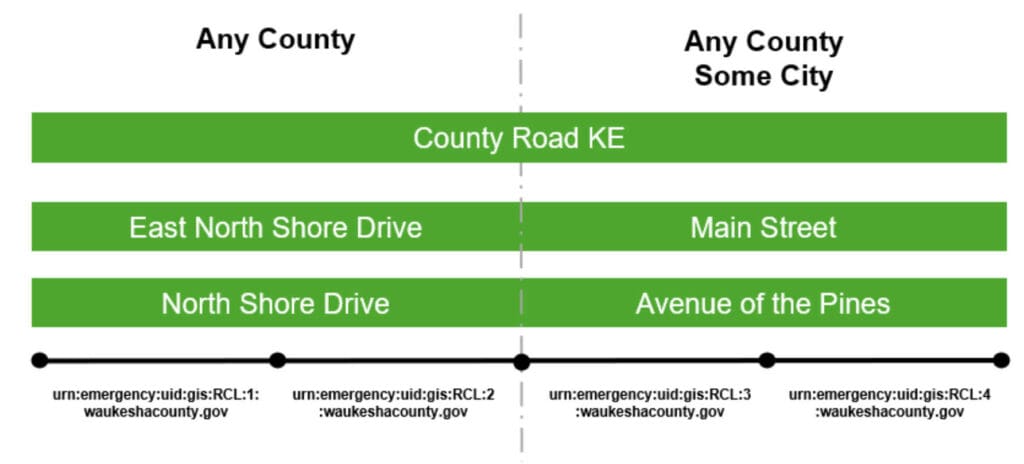
In Figure B-1, North Shore Drive and Avenue of the Pines that have been assigned by the local addressing authority each has several alias street names:
- County Road KE, the street name assigned by the county highway department, is used as an alias for North Shore Drive and Avenue of the Pines. These four segments have an individual RoadCenterLine layer NGUID of:
- urn:emergency:uid:gis:RCL:1:waukeshacounty.gov
- urn:emergency:uid:gis:RCL:2: waukeshacounty.gov
- urn:emergency:uid:gis:RCL:3: waukeshacounty.gov
- urn:emergency:uid:gis:RCL:4: waukeshacounty.gov
- East North Shore Drive is an alias for the two segments of North Shore Drive that are in Waukesha County but not in Village of Pewaukee. These two segments have an individual RoadCenterLine layer NGUID of:
- urn:emergency:uid:gis:RCL:1: waukeshacounty.gov
- urn:emergency:uid:gis:RCL:2: waukeshacounty.gov
- Main Street is an alias for the two segments of Avenue of the Pines that are in Village of Pewaukee. These two segments have an individual RoadCenterLine layer NGUID of:
- urn:emergency:uid:gis:RCL:3: waukeshacounty.gov
- urn:emergency:uid:gis:RCL:4: waukeshacounty.gov
The RoadCenterLine layer NGUID is used to relate the alias street names in the StreetNameAliasTable to the road centerline segments in the RoadCenterLine layer in Section 3. Using this methodology, one can add as many alias street names as needed.
To ensure data integrity, the user MUST assign an NGUID (Primary Key) to each record in the StreetNameAliasTable. The NGUID (Primary Key), as with the other respective Unique IDs for each layer, MUST be globally unique and therefore has only one occurrence.
Figure B-3 StreetNameAliasTable Methodology
NGUID (Primary Key): urn:emergency:uid:gis:StrNA:1:waukeshacounty.gov
RCL_NGUID (Foreign Key): urn:emergency:uid:gis:RCL:1:waukeshacounty.gov
ASt_Pre Mod:
ASt_Pre Dir:
ASt_PreTyp: County Road
ASt_Pre Sep:
ASt_Name: KE
ASt_Pos Typ:
ASt_Pos Dir:
ASt_Pos Mod:
NGUID (Primary Key): urn:emergency:uid:gis:StrNA:2:waukeshacounty.gov
RCL_NGUID (Foreign Key): urn:emergency:uid:gis:RCL:2:waukeshacounty.gov
ASt_Pre Mod:
ASt_Pre Dir:
ASt_PreTyp: County Road
ASt_Pre Sep:
ASt_Name: KE
ASt_Pos Typ:
ASt_Pos Dir:
ASt_Pos Mod:
NGUID (Primary Key): urn:emergency:uid:gis:StrNA:3:waukeshacounty.gov
RCL_NGUID (Foreign Key): urn:emergency:uid:gis:RCL:3:waukeshacounty.gov
ASt_Pre Mod:
ASt_Pre Dir:
ASt_PreTyp: County Road
ASt_Pre Sep:
ASt_Name: KE
ASt_Pos Typ:
ASt_Pos Dir:
ASt_Pos Mod:
NGUID (Primary Key): urn:emergency:uid:gis:StrNA:4:waukeshacounty.gov
RCL_NGUID (Foreign Key): urn:emergency:uid:gis:RCL:4:waukeshacounty.gov
ASt_Pre Mod:
ASt_Pre Dir:
ASt_PreTyp: County Road
ASt_Pre Sep:
ASt_Name: KE
ASt_Pos Typ:
ASt_Pos Dir:
ASt_Pos Mod:
NGUID (Primary Key): urn:emergency:uid:gis:StrNA:5:waukeshacounty.gov
RCL_NGUID (Foreign Key): urn:emergency:uid:gis:RCL:5:waukeshacounty.gov
ASt_Pre Mod:
ASt_Pre Dir: East
ASt_PreTyp:
ASt_Pre Sep:
ASt_Name: North Shore
ASt_Pos Typ: Drive
ASt_Pos Dir:
ASt_Pos Mod:
NGUID (Primary Key): urn:emergency:uid:gis:StrNA:6:waukeshacounty.gov
RCL_NGUID (Foreign Key): urn:emergency:uid:gis:RCL:6:waukeshacounty.gov
ASt_Pre Mod:
ASt_Pre Dir: East
ASt_PreTyp:
ASt_Pre Sep:
ASt_Name: North Shore
ASt_Pos Typ: Drive
ASt_Pos Dir:
ASt_Pos Mod:
NGUID (Primary Key): urn:emergency:uid:gis:StrNA:7:waukeshacounty.gov
RCL_NGUID (Foreign Key): urn:emergency:uid:gis:RCL:7:waukeshacounty.gov
ASt_Pre Mod:
ASt_Pre Dir:
ASt_PreTyp:
ASt_Pre Sep:
ASt_Name: Main
ASt_Pos Typ: Street
ASt_Pos Dir:
ASt_Pos Mod:
NGUID (Primary Key): urn:emergency:uid:gis:StrNA:8:waukeshacounty.gov
RCL_NGUID (Foreign Key): urn:emergency:uid:gis:RCL:8:waukeshacounty.gov
ASt_Pre Mod:
ASt_Pre Dir:
ASt_PreTyp:
ASt_Pre Sep:
ASt_Name: Main
ASt_Pos Typ: Street
ASt_Pos Dir:
ASt_Pos Mod:
From the StreetNameAliasTable in Figure B-3 above, we can tell that:
- RCL_NGUID (Foreign Key) = urn:emergency:uid:gis:RCL:1:waukeshacounty.gov has an alias of County Road KE and another alias of East North Shore Drive
- RCL_NGUID (Foreign Key) = urn:emergency:uid:gis:RCL:2:waukeshacounty.gov has an alias of County Road KE and another alias of East North Shore Drive
- RCL_NGUID (Foreign Key) = urn:emergency:uid:gis:RCL:3:waukeshacounty.gov has an alias of County Road KE and another alias of Main Street
- RCL_NGUID (Foreign Key) = urn:emergency:uid:gis:RCL:4:waukeshacounty.gov has an alias of County Road KE and another alias of Main Street
StreetNameAliasTable (Street Name Aliases) – Strongly Recommended
Street Name Aliases data is maintained as a table containing alternate street names related to the legal street name contained in the RoadCenterLine layer. This dataset is referred to as the StreetNameAliasTable in the GIS Data Layers Registry in NENA-STA-010.3e-2021 [16] and in NENA documents going forward.
B.1 Identification Elements
Element Number: B.1.1
Element Name: NENA Globally Unique ID (Primary Key)
Database Field Name: NGUID
Field Type: TEXT
Field Width: 254
Inclusion: Yes
Domain:
Reference Standard: NENA
B.2 Relate Elements
Element Number: B.2.1
Element Name: Road Centerline NENA Unique ID (Foreign Key)
Database Field Name: RCL_NGUID
Field Type: TEXT
Field Width: 254
Inclusion: Yes
Domain:
Reference Standard: NENA
B.3 Address Elements
Element Number: B.3.1
Element Name: Street Name Pre Modifier
Database Field Name: St_PreMod
Field Type: TEXT
Field Width: 15
Inclusion: Conditional
Domain:
Reference Standard:NENA, WLIA
Element Number: B.3.2
Element Name: Street Name Pre Directional
Database Field Name: St_PreDir
Field Type: TEXT
Field Width: 10
Inclusion: Conditional
Domain: WLIA DirectionDomain
Reference Standard: NENA, WLIA
Element Number: B.3.3
Element Name: Street Name Pre Type
Database Field Name: St_PreType
Field Type: TEXT
Field Width: 50
Inclusion: Conditional
Domain: NENA Street Name Pre Types and Street Name Post Types Registry
Reference Standard: NENA, WLIA
Element Number: B.3.4
Element Name: Street Name Pre Type Separator
Database Field Name: St_PreSep
Field Type: TEXT
Field Width: 20
Inclusion: Conditional
Domain: NENA Street Name Pre Type Separators Registry
Reference Standard: NENA, WLIA
Element Number: B.3.5
Element Name: Street Name
Database Field Name: St_Name
Field Type: TEXT
Field Width: 254
Inclusion: Yes
Domain:
Reference Standard:NENA, WLIA
Element Number: B.3.6
Element Name: Street Name Post Type
Database Field Name: St_PosTyp
Field Type: TEXT
Field Width: 50
Inclusion: Conditional
Domain: NENA Street Name Pre Types and Street Name Post Types Registry
Reference Standard: NENA, WLIA
Element Number: B.3.7
Element Name: Street Name Post Directional
Database Field Name: St_PosDir
Field Type: TEXT
Field Width: 10
Inclusion: Conditional
Domain: WLIA DirectionDomain
Reference Standard: NENA, WLIA
Element Number: B.3.8
Element Name: Street Name Post Modifier
Database Field Name: St_PosMod
Field Type: TEXT
Field Width: 25
Inclusion: Conditional
Domain:
Reference Standard:NENA, WLIA
Element Number: B.3.9
Element Name: Full Street Name
Database Field Name: FullStNm
Field Type: TEXT
Field Width: 245
Inclusion: Yes
Domain:
Reference Standard:WLIA
Element Number: B.3.10
Element Name: Abbreviated Full Street Name
Database Field Name: abFullStNm
Field Type: TEXT
Field Width: 175
Inclusion: No
Domain:
Reference Standard:WLIA
B.4 Area Elements
Not applicable
B.5 Functional Elements
Not applicable
B.6 Management Elements
Element Number: B.6.1
Element Name: Date Updated
Database Field Name: DateUpdate
Field Type: DATE
Field Width:
Inclusion: Yes
Domain:
Reference Standard: NENA
Element Number: B.6.2
Element Name: Effective Date
Database Field Name: Effective
Field Type: DATE
Field Width:
Inclusion: No
Domain:
Reference Standard: NENA
Element Number: B.6.3
Element Name: Expiration Date
Database Field Name: Expire
Field Type: DATE
Field Width:
Inclusion: No
Domain:
Reference Standard: NENA
B.7 9-1-1 Elements
Element Number: B.7.1
Element Name: Discrepancy Agency ID
Database Field Name: DiscrpAgID
Field Type: TEXT
Field Width: 100
Inclusion: Yes
Domain:
Reference Standard: NENA
StreetNameAliasTable (Street Name Alias Table) – Data Element Details
B.1 Identification Elements
B.1.1 NENA Globally Unique ID
Database Field Name: NGUID
Data Type: TEXT
Inclusion: Yes
Width: 254
Domain:
Examples:
urn:emergency:uid:gis:RCL:47824393:co.polk.wi.us, urn:emergency:uid:gis:RCL:587392034:waukeshacounty.gov, urn:emergency:uid:gis:RCL:90a942e1bc7f4g1h94c5acaadv24r89h:countyofdane.com
Description:
The NENA Globally Unique ID (Primary Key) for each record in a GIS data layer. Each record in the GIS data layer MUST have a globally unique ID. When coalescing data from other local 9-1-1 Authorities into the ECRF and LVF, this unique ID MUST continue to have only one occurrence. Additional detail on how to construct the NGUID can be found in section 2.4 NENA Globally Unique IDs (NGUID).
B.2 Relate Elements
B.2.1 Road Centerline NENA Globally Unique ID (Foreign Key)
Database Field Name: RCL_NGUID
Data Type: TEXT
Inclusion: Yes
Width: 254
Domain:
Examples:
urn:emergency:uid:gis:RCL:47824393:co.polk.wi.us, urn:emergency:uid:gis:RCL:587392034:waukeshacounty.gov, urn:emergency:uid:gis:RCL:90a942e1bc7f4g1h94c5acaadv24r89h:countyofdane.com
Description:
The Road Centerline NENA Globally Unique ID (RCL_NGUID) is used in the StreetNameAliasTable as a foreign key relationship between the StreetNameAliasTable and the RoadCenterLine layer. A foreign key acts as a cross-reference between RCL_NGUID field in the StreetNameAliasTable because it references the NGUID field primary key in the RoadCenterLine layer, thereby establishing a link between them. A RoadCenterLine record may have zero to many (0:M) StreetNameAliasTable records. Without this relationship, it would not be possible to identify any street name aliases of a road centerline. The values in the RCL_NGUID field MUST exist in the values of the NGUID field in the RoadCenterLine layer.
B.3 Address Elements
B.3.1 Street Name Pre Modifier
Database Field Name: St_PreMod
Data Type: TEXT
Inclusion: Conditional
Width: 15
Domain:
Examples:
Old North County Highway 12
Description:
A word or phrase that precedes all other Street Name elements and is separated from the Street Name element by a Street Name Pre Directional and/or a Street Name Pre Type element. Not commonly used and use should be minimized.
B.3.2 Street Name Pre Directional
Database Field Name: St_PreDir
Data Type: TEXT
Inclusion: Conditional
Width: 10
Domain: WLIA DirectionDomain
Examples:
East Main Street, Old North County Highway 12
Description:
A word or phrase preceding the Street Name element that indicates the direction taken by the road from an arbitrary starting point or the sector where it is located.
B.3.3 Street Name Pre Type
Database Field Name: St_PreType
Data Type: TEXT
Inclusion: Conditional
Width: 50
Domain: NENA Street Name Pre Types and Street Name Post Types Registry
Examples:
Avenue A, Old North County Highway 12, United States Highway 151, State Highway 46, Interstate 90
Description:
A word or phrase that precedes the Street Name element and identifies the type of thoroughfare in the Full Street Name.
B.3.4 Street Name Pre Type Separator
Database Field Name: St_PreSep
Data Type: TEXT
Inclusion: Conditional
Width: 20
Domain: NENA Street Name Pre Type Separators Registry
Examples:
Avenue of the Arts, Avenue of Champions
Description:
A preposition or prepositional phrase between the Street Name Pre Type and the Street Name element.
B.3.5 Street Name
Database Field Name: St_Name
Data Type: TEXT
Inclusion: Yes
Width: 254
Domain:
Examples:
Jones Road, County Highway KP, Avenue of the Arts, Avenue C, Azure Court South
Description:
The official name of the road as defined by the official Street Naming Authority for the given jurisdiction. The Street Name element does not include a street type, directional, or modifier unless assigned as such by the official Street Naming Authority.
B.3.6 Street Name Post Type
Database Field Name: St_PosTyp
Data Type: TEXT
Inclusion: Conditional
Width: 50
Domain: NENA Street Name Pre Types and Street Name Post Types Registry
Examples:
Jones Road, Azure Court South
Description:
A word or phrase that follows the Street Name element and identifies the type of thoroughfare in the Full Street Name.
B.3.7 Street Name Post Directional
Database Field Name: St_PosDir
Data Type: TEXT
Inclusion: Conditional
Width: 10
Domain: WLIA DirectionDomain
Examples:
Azure Court South, 10th Avenue West
Description:
A word or phrase following the Street Name element that indicates the direction taken by the road from an arbitrary starting point or the sector where it is located.
B.3.8 Street Name Post Modifier
Database Field Name: St_PosMod
Data Type: TEXT
Inclusion: Conditional
Width: 25
Domain:
Examples:
Bermuda Boulevard Lower, Lake Road Fire Road 8, Stoughton Road Frontage Road, Interstate 90 westbound
Description:
A word or phrase that follows all other Street Name elements and is separated from the Street Name element by a Street Name Post Directional and/or Street Name Post Type element. Not commonly used and use should be minimized.
B.3.9 Full Street Name
Database Field Name: FullStNm
Data Type: TEXT
Inclusion: Yes
Width: 245
Domain:
Examples:
Old North County Highway 12, Azure Court South, Lake Road Fire Road 8
Description:
The Street Name with all Pre/Post Modifiers, Pre/Post Directionals, Pre Type Separator, and Pre/Post Types concatenated: St_PreMod + St_PreDir + St_PreTyp + St_PreSep + St_Name + St_PosTyp + St_PosDir + St_PosMod
B.3.10 Abbreviated Full Street Name
Database Field Name: abFullStNm
Data Type: TEXT
Inclusion: No
Width: 175
Domain:
Examples:
Old N CTH 12, Azure Ct S, Lake Rd Fire Rd 8
Description:
The Full Street Name with abbreviations (where appropriate) used for the Pre/Post Modifiers, Pre/Post Types, and Pre/Post Directionals. This field is equivalent to the abFullStNm field in the WLIA Standard.
B.4 Area Elements
B.5 Functional Elements
B.6 Management Elements
B.6.1 Date Updated
Database Field Name: DateUpdate
Data Type: DATE
Inclusion: Yes
Width:
Domain:
Examples:
2020-01-28T15:47.09.3-06:00 (representing a record updated on January 28, 2020 at 3:47 and 9.3 seconds PM US Central Standard Time, with a precision of .1 second); 2020-07-16T08:31:15.2-05:00 (representing a record updated on July 16, 2020 at 8:31 and 15.2 seconds AM US Central Daylight Time, with a precision of .1 second)
Description:
The date and time that the record was created or last modified.
B.6.2 Effective Date
Database Field Name: Effective
Data Type: DATE
Inclusion: No
Width:
Domain:
Examples:
2021-02-11T01:30:00.1-06:00 (representing a record that will become active on February 11, 2021 at 1:30 and 0.1 seconds AM US Central Standard Time, with a precision of .1 second); 2021-10-15T20:15:30.5-05:00 (representing a record that will become active on October 15, 2021 at 8:15 and 30.5 seconds PM US Central Daylight Time, with a precision of .1 second)
Description:
The date and time that the record is scheduled to take effect (e.g., the date and time an annexation takes effect and a copy of the road centerlines within the annexed area that have had their Incorporated Municipality, ESN, and MSAG Community Name fields populated with the new values are recognized for use in the NG9-1-1 system).
B.6.3 Expiration Date
Database Field Name: Expire
Data Type: DATE
Inclusion: No
Width:
Domain:
Examples:
2021-02-11T01:30:00.1-06:00 (representing a record that will expire and no longer be valid on February 11, 2021 at 1:30 and 0.1 seconds AM US Central Standard Time, with a precision of .1 second); 2021-10-15T20:15:30.5-05:00 (representing a record that will expire and no longer be valid on October 15, 2021 at 8:15 and 30.5 seconds PM US Central Daylight Time, with a precision of .1 second)
Description:
The date and time when the information in the record is no longer considered valid (e.g., the date and time an annexation takes effect and the road centerlines within the annexed area that have their Incorporated Municipality, ESN, and MSAG Community Name fields populated with the former values are no longer recognized for use in the NG9-1-1 system).
B.7 9-1-1 Elements
B.7.1 Discrepancy Agency ID
Database Field Name: DiscrpAgID
Data Type: TEXT
Inclusion: Yes
Width: 100
Domain:
Examples:
co.polk.wi.us, waukeshacounty.gov, countyofdane.com
Description:
Agency that receives a Discrepancy Report (DR), should a discrepancy be discovered in the GIS data, and will take responsibility for ensuring discrepancy resolution. This may or may not be the same as the 9-1-1 Authority. This MUST be represented by a domain name that is an Agency Identifier as defined in the NENA Master Glossary of 9-1-1 Terminology, NENA-ADM-000.23.2020 [19].